
The Amazon Echo Hub is the best smart home controller with touchscreen for most buyers because it is the only product here designed first as a.
This guide is a spoke under our broader best smart home automation hubs guide. That distinction matters. A hub is the backend brain that speaks protocols and runs automations. A touchscreen controller is the front-end surface you actually tap when you want to see camera feeds, launch scenes, shut down the downstairs lights, or confirm whether the garage door closed. Some products here blur that line. The Amazon Echo Hub is both a dashboard and a hub. The Brilliant Smart Home Control (2-Switch Panel) is primarily an in-wall control layer. The Amazon Echo Show 15 (newest model) is a display-first device that still works as a serious household dashboard.
I verified all five products against Amazon on April 1, 2026. The shortlist is intentionally strict. I excluded thermostats, tablet mounts, and decorative switch panels that do not really function as central smart-home dashboards. The goal here is not "touchscreen device with some smart-home features." It is "screen you would actually use to run the house." If you are still deciding whether you need a hub at all, read smart home without hub: Wi-Fi-only vs hub setup next. If you are comparing ecosystems before choosing a screen, pair this with Matter vs Zigbee vs Z-Wave vs Wi-Fi, Alexa vs Google Home vs Apple HomeKit, and the main best smart home automation hubs guide.
Smart Home Controller
Chart
 Smarthomeexplorer.com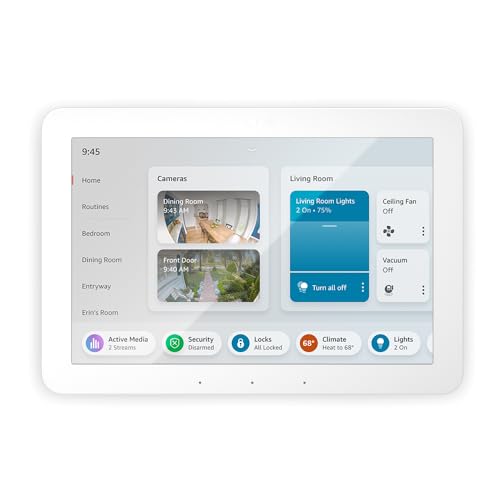
Amazon Echo Hub — Best Overall
Amazon Echo Hub
(Current Price, subject to change)
The Amazon Echo Hub is the cleanest answer for this guide because it is the only pick here that feels designed around fast household control rather than entertainment, kitchen use, or being a fancy switch replacement. You put it on a wall, glance at device tiles, tap a room, see cameras, launch a routine, and move on. That sounds obvious, but it is exactly the part a lot of smart displays get wrong. They make smart-home control one feature among many. The Echo Hub makes it the entire point.
That focused design matters more than raw specs. A touchscreen controller only earns wall space if it reduces friction. The Amazon Echo Hub does that better than anything else in the list. It also sits naturally inside the ecosystem logic from the broader best smart home automation hubs guide: Alexa households that already use Echo speakers, routines, and compatible lighting get the shortest path from automation brain to visible control surface. If your home leans heavily on smart lighting systems, smart speakers and displays, or smart garage controllers, that integration story is the whole reason to buy it.
What We Love
- Purpose-built dashboard instead of a general-use display pretending to be a controller
- Strong Alexa-centric device view for lights, cameras, locks, thermostats, and routines
- Built-in hub radios make it more useful than a mere wall tablet
Tradeoffs
- Best experience assumes you are comfortable living in the Alexa ecosystem
- Smaller screen than the Amazon Echo Show 15 (newest model)
- Less elegant than the Brilliant Smart Home Control (2-Switch Panel) if you care about built-in designer-wall aesthetics
The Verdict
The Amazon Echo Hub is the best smart home touchscreen controller for most people because it is the most honest product in the category. It is a dashboard first, which is exactly what this guide is supposed to reward.
Amazon Echo Show 15 (newest model) — Best Big Display
Amazon Echo Show 15 (newest model)
(Current Price, subject to change)
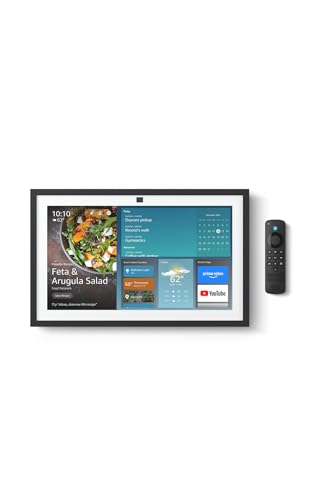
The Amazon Echo Show 15 (newest model) is the best answer if your definition of touchscreen controller starts with "I want a large, shared family dashboard." It is not as control-purist as the Echo Hub, but the screen size changes what the device can do. Big camera tiles, big family widgets, bigger room controls, and a more legible glance experience from across the kitchen or hallway all make it more usable in a busy house. If multiple people in the home are going to interact with the panel every day, size matters.
The reason it does not win outright is also the reason it belongs here: it is broader than a controller. That can be a strength or a distraction depending on what you want. If your priority is a single central household screen that handles home organization and smart-home visibility in one place, the Amazon Echo Show 15 (newest model) is a better fit than the smaller Echo Hub. If you want a cleaner control-only device, the Amazon Echo Hub remains the sharper choice. Buyers comparing these should also look at our best smart speakers and displays guide.
What We Love
- Biggest screen in the guide, which makes dashboard use genuinely easier at a distance
- Better shared-family-screen fit than the more narrowly focused Echo Hub
- Strong camera, widget, and routine visibility for common-area use
Tradeoffs
- Less dedicated as a controller than the Amazon Echo Hub
- Costs noticeably more than the smaller Alexa-first options
- Still an Alexa ecosystem bet, not a neutral controller layer
The Verdict
The Amazon Echo Show 15 (newest model) is the best touchscreen smart-home controller if you want one large wall display to organize the household and control devices from the same screen. It is less pure than the Echo Hub and more useful for some families because of that.
Brilliant Smart Home Control (2-Switch Panel) — Best Premium In-Wall Panel
Brilliant Smart Home Control (2-Switch Panel)
(Current Price, subject to change)
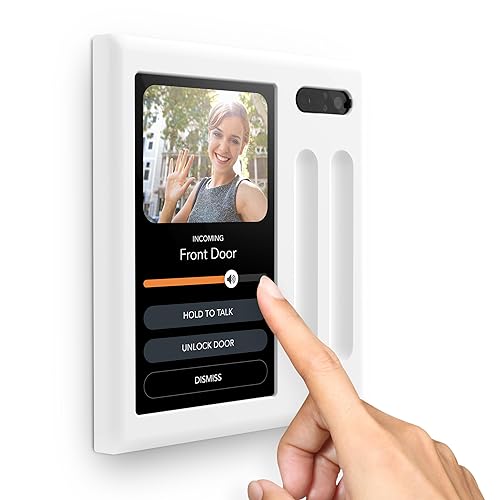
The Brilliant Smart Home Control (2-Switch Panel) is the premium option for buyers who do not want a display sitting on a counter or a consumer-looking screen floating on the wall. This is the most architectural controller in the list. It is the one that feels like it belongs in a remodel, a custom smart-lighting plan, or a house where you want smart-home control to look built in. That is a meaningful difference from the Alexa screens even before you get to ecosystem support.
The price is brutal, which is why it cannot win this guide. But price is not the only part of the decision. If you care about replacing switch locations with a touchscreen that can also orchestrate wider smart-home behavior, the Brilliant Smart Home Control (2-Switch Panel) makes more sense than bolting a large consumer display near the foyer. It also pairs well with homes already investing in smart lighting dimmer systems, best smart lighting systems, or best smart lock keypads and touchscreen locks.
What We Love
- Best true in-wall premium look and feel in the guide
- Integrates direct switch control with touchscreen scene and device access
- Multi-ecosystem story is stronger than most controller-specific hardware
Tradeoffs
- Massively more expensive than every other pick here
- Best value only appears if the home already has a larger smart-device stack
- Installation expectations are higher than with Alexa displays
The Verdict
The Brilliant Smart Home Control (2-Switch Panel) is the right choice when you want the touchscreen controller to feel like part of the wall, not an accessory added later. It is expensive enough that you should only buy it if that design and install logic matters.
MOES Smart Home Touchscreen Control (1-Switch Panel) — Best Budget Wall Panel
MOES Smart Home Touchscreen Control (1-Switch Panel)
(Current Price, subject to change)
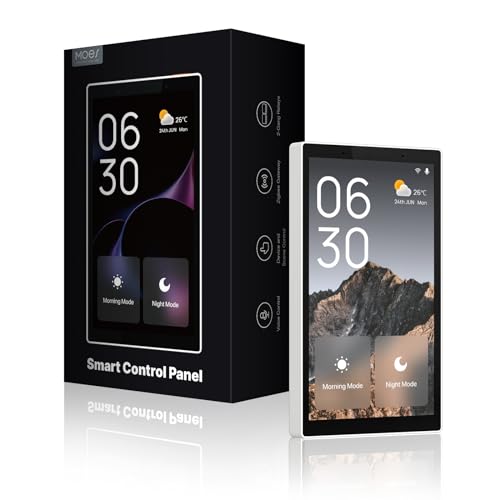
The MOES Smart Home Touchscreen Control (1-Switch Panel) is the cheapest way in this guide to get a dedicated in-wall smart-home touchscreen that still feels like a real controller. It is clearly a different kind of product from the Echo screens. You buy it when you want an in-wall surface for scenes and devices, but do not want to pay Brilliant money to get there. That makes it one of the most context-sensitive picks in the guide. In the right Smart Life or Tuya-heavy home, it is a good value. Outside that lane, it can feel like a compromise.
This is also where ecosystem honesty matters. The MOES Smart Home Touchscreen Control (1-Switch Panel) is attractive partly because the price is low for a dedicated panel, but the practical value depends on whether you are already operating in the Smart Life world. If not, the Amazon Echo Hub is the safer mainstream buy and the SONOFF NSPanel Pro 120 Smart Home Control Panel is the more interesting tinkerer's panel. If you are building a lower-cost automation stack, also compare with the main best smart home automation hubs guide and best smart home starter kit bundles for beginners.
What We Love
- Cheapest purpose-built in-wall touchscreen in the guide
- Better wall-panel value story than the premium Brilliant option
- Integrated gateway positioning is useful for buyers already in Smart Life
Tradeoffs
- Ecosystem fit is narrower than the mainstream Alexa picks
- More niche recommendation than the Amazon Echo Hub
- Lower confidence choice for buyers who are not already in Tuya or Smart Life
The Verdict
The MOES Smart Home Touchscreen Control (1-Switch Panel) is the best budget wall-panel option if your house already leans toward Smart Life devices and you want touchscreen control without spending premium-panel money.
SONOFF NSPanel Pro 120 Smart Home Control Panel — Best for DIY Tinkerers
SONOFF NSPanel Pro 120 Smart Home Control Panel
(Current Price, subject to change)
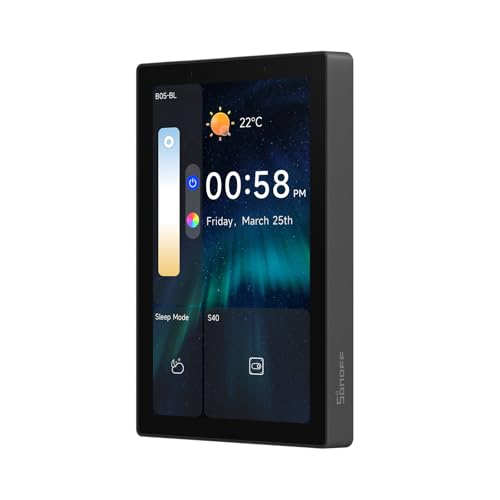
The SONOFF NSPanel Pro 120 Smart Home Control Panel is the most interesting pick in the guide for buyers who like dedicated control hardware but do not want to stay entirely in the mainstream Alexa lane. SONOFF has long attracted tinkerers because the products tend to be more appealing to hands-on smart-home users than to people who just want the simplest possible setup. That logic carries through here. You get a dedicated panel, Zigbee gateway framing, energy-viewing angle, and an overall feel that is more "project-worthy control surface" than "household display."
That also means the SONOFF NSPanel Pro 120 Smart Home Control Panel is not the easiest recommendation for a normal buyer. The Amazon Echo Hub is still simpler and the Amazon Echo Show 15 (newest model) is still the better large-family display. But if your smart home already includes custom routines, Zigbee-heavy devices, or a stronger appetite for tuning the stack, SONOFF becomes much more compelling. It also belongs in the same conversation as our best smart home automation hubs guide and best Matter-compatible devices guide.
What We Love
- Better fit for tinkerers than more locked-down mainstream dashboards
- Dedicated panel format keeps the controller mission clear
- Zigbee gateway and monitoring angle make it more useful than a simple wall screen
Tradeoffs
- Smaller display than the Echo and Brilliant options
- Less plug-and-play confidence for casual buyers
- Broader ecosystem story is not as clear-cut as the top picks
The Verdict
The SONOFF NSPanel Pro 120 Smart Home Control Panel is the best touchscreen controller here for DIY-minded buyers who want a dedicated panel and are comfortable living closer to the configuration layer.
When NOT to Buy a Touchscreen Controller
- Skip this whole category if your smart home has fewer than 10 active devices and you already use voice assistants happily. A phone and a speaker are often enough.
- Do not buy a touchscreen controller before you decide on the underlying ecosystem. Start with the best smart home automation hubs guide and Alexa vs Google Home vs Apple HomeKit.
- If what you really want is a family calendar, recipe screen, or media device with some smart-home controls, a smart display may fit better than a pure controller. Read our best smart speakers and displays guide.
- If you are mostly trying to control lighting scenes from the wall, a dimmer or lighting keypad may solve the problem better than a dashboard. Compare with best smart lighting dimmer systems.
SHE Controller Score
Full methodology for this score
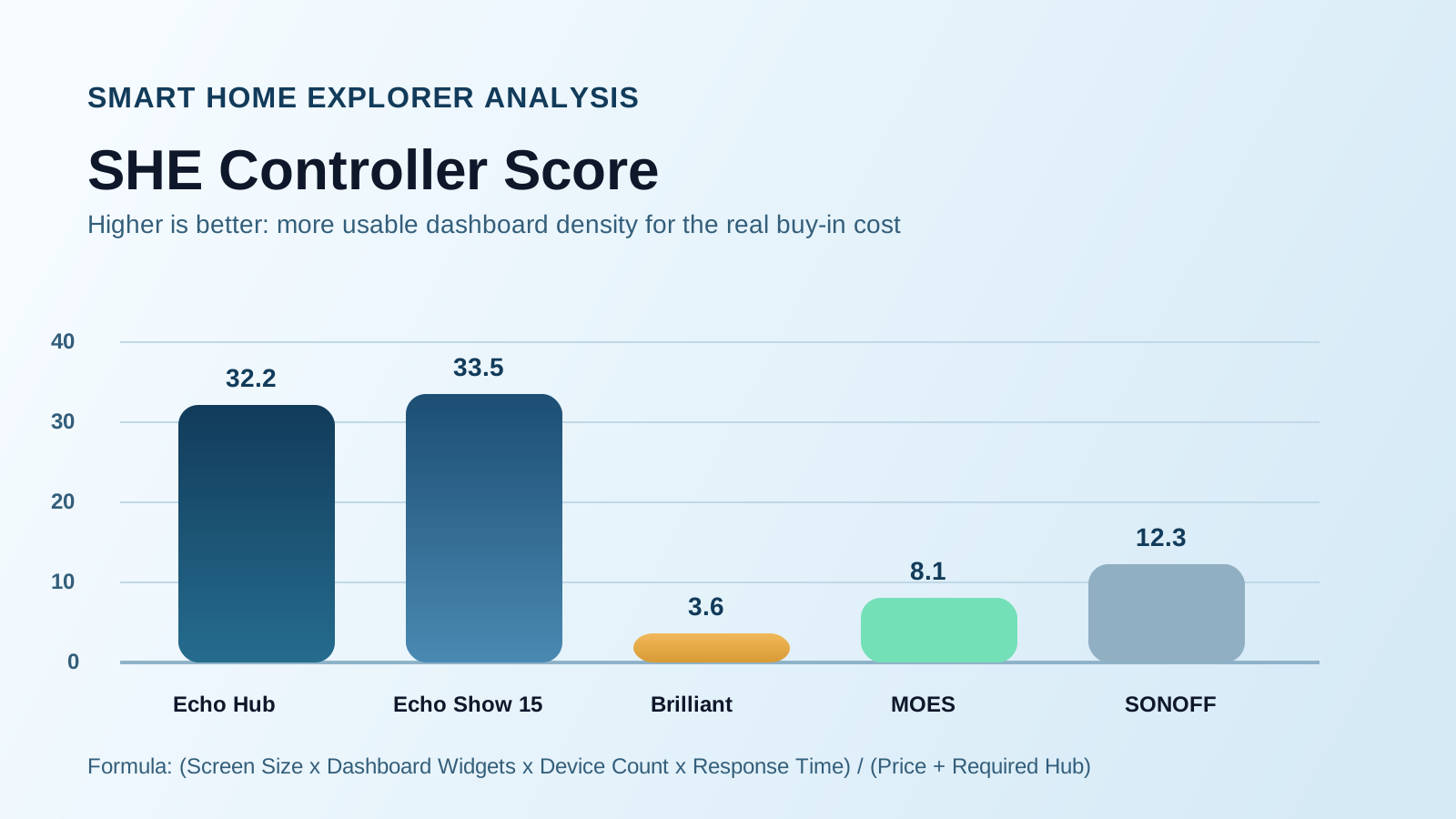
What it measures: This score rewards touchscreen controllers that let you see more of the home at once, expose more useful widgets and device controls, handle larger smart-home stacks, and feel fast enough to replace phone-first control. It penalizes both price and dependence on extra hub hardware.
Formula: SHE Controller Score = (Screen Size x Dashboard Widgets x Device Count x Response Time) / (Price + Required Hub)
Data sources: Amazon pricing and verified current listings on April 1, 2026, Amazon feature disclosures for panel size, dashboard and camera-view capabilities, and SmartHomeExplorer editorial weighting for control density, ecosystem fit, and whether a separate hub penalty materially affects the real buy-in cost. Response Time is normalized as a speed factor rather than raw lag so higher numbers still represent a better experience.
(SmartHomeExplorer editorial analysis — methodology)
The raw score shows why this category is messy. The Amazon Echo Show 15 (newest model) wins on sheer dashboard surface area, while the Amazon Echo Hub wins the guide because its interface is more purpose-built around control. That is exactly why this spoke exists instead of folding every panel into the main best smart home automation hubs guide. A controller is not just a protocol device. It is a friction device. The best one is the screen you will actually touch every day.
Frequently Asked Questions
What is the difference between a smart home hub and a touchscreen controller?
A hub is the backend system that connects devices and runs automations. A touchscreen controller is the surface you tap to see and control those devices quickly. Some products, like the Amazon Echo Hub, do both. The broader architecture question is covered in our best smart home automation hubs guide.
Do I need a hub before buying a touchscreen smart-home controller?
Not always. The Amazon Echo Hub and Amazon Echo Show 15 (newest model) can act as serious control layers on their own in Alexa homes. Products like the MOES Smart Home Touchscreen Control (1-Switch Panel) make more sense when the rest of the ecosystem is already chosen.
Are smart displays and touchscreen smart-home controllers the same thing?
Not quite. A smart display is broader and may include media, widgets, video calls, recipes, or entertainment. A touchscreen controller is more focused on rooms, routines, cameras, and device dashboards. The Amazon Echo Show 15 (newest model) straddles both categories, which is why it belongs here but does not beat the Amazon Echo Hub.
Can I just use a tablet instead of buying a dedicated smart-home controller?
Yes, but a tablet is usually a workaround, not a purpose-built answer. Dedicated panels like the Amazon Echo Hub or SONOFF NSPanel Pro 120 Smart Home Control Panel tend to feel more permanent and less fiddly. If you still have not decided on your platform, start with smart home without hub: Wi-Fi-only vs hub setup.
Which touchscreen controller is best for wall mounting?
The Amazon Echo Hub is the best wall-mounted controller for most people because it was designed for that role. The Brilliant Smart Home Control (2-Switch Panel) is the premium built-in-wall answer if you want something that looks more architectural.
Which controller works best with Home Assistant or mixed ecosystems?
The Brilliant Smart Home Control (2-Switch Panel) has the strongest mixed-ecosystem story in the listing, while the SONOFF NSPanel Pro 120 Smart Home Control Panel is more interesting for tinkerers. If the bigger question is ecosystem compatibility, read Matter vs Zigbee vs Z-Wave vs Wi-Fi and best Matter-compatible devices.
Is a touchscreen controller worth it if I only have a handful of devices?
Usually no. If you have under 10 active devices, a voice assistant and phone app are often enough. Touchscreen controllers become more valuable when you are juggling rooms, cameras, locks, lighting scenes, and household routines every day.
The Bottom Line
Buy the Amazon Echo Hub if you want the best pure smart-home touchscreen controller in 2026. Buy the Amazon Echo Show 15 (newest model) if your real goal is a larger shared-family dashboard that also runs the house. Buy the Brilliant Smart Home Control (2-Switch Panel) only if you want a premium in-wall control surface and can justify the price.
The bigger strategic point is simpler: do not buy the screen first and figure out the ecosystem later. Choose the automation stack, then choose the control surface that makes that stack faster to live with. That is why this guide belongs next to the best smart home automation hubs guide, not instead of it.
Sources & Methodology
- Amazon product listings and current April 1, 2026 availability checks for all five controllers
- SmartHomeExplorer editorial analysis of controller-first usability, ecosystem fit, dashboard density, and required-hub penalty
- Comparative positioning against related SmartHomeExplorer guides including best smart home automation hubs, best smart speakers and displays, best smart home starter kits for beginners, and smart home without hub: Wi-Fi-only vs hub setup
Author: Nicholas Miles is the founder of SmartHomeExplorer and a longtime smart home enthusiast focused on helping everyday homeowners make better technology decisions. He researches, compares, and writes about lighting, security, climate, sensors, energy, and automation with a focus on ecosystem fit, reliability, privacy, and long-term value. His editorial framework is designed to explain not just what wins, but what stays practical once real installation and expansion costs show up.
Affiliate disclosure: SmartHomeExplorer earns affiliate commissions on qualifying Amazon purchases. Our scoring methodology is independent of affiliate relationships.