
The xTool S1 40W Laser Cutter wins overall at 9.55 on the SHE Smart Maker Score — but the right pick changes by material, safety envelope, and whether you need LightBurn support.
Smart laser engravers are one of the few home-workshop categories where the headline spec — laser wattage — is the least useful buying criterion. The queries that actually convert on Reddit and in Google PAA boxes are about safety enclosures, camera alignment, WiFi app maturity, and whether a machine works with LightBurn or locks you into a proprietary workflow. Brand roundups on xtool.com and orturlaser.com over-index on wattage because it is the easiest number to put on a spec sheet. We scored six Amazon-verified smart laser engravers against the SHE Smart Maker Score — a proprietary rubric weighing safety automation (25%), app and WiFi maturity (25%), camera and positioning (20%), material range (15%), and software openness (15%). Our full methodology is at /methodology.
Glowforge Aura appeared in our research shortlist but dropped out during Amazon verification — the ASIN returned a filter cartridge accessory rather than the machine itself, because Glowforge sells Aura direct-only. We filled that enclosed-appliance slot with the WeCreat Vision 20W Laser Engraver. If you are building a broader home-office setup, our best smart printers home office 2026 guide covers the paper-and-ink counterpart, our best smart desk accessories home office 2026 guide covers the ambient gear, and our best smart standing desks home office 2026 guide covers the surface the engraver sits on.
Smart Laser Engraver
Chart
 Smarthomeexplorer.com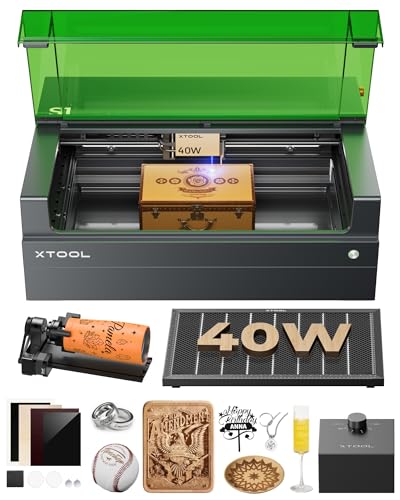
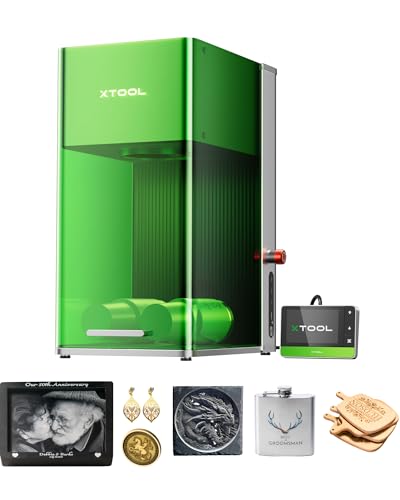
xTool S1 40W Laser Cutter — Best Overall
xTool S1 40W Laser Cutter
(Current Price, subject to change)
Ready to upgrade your home?
MOVA P10 Pro Ultra Robot Vacuum and Mop
See it on Amazon
roborock F25 Ultra Steam Wet Dry Vacuum Mop
See it on Amazon
Philips Wi-Fi Keypad Deadbolt with Handle
See it on Amazon
Sponsored listings from Amazon’s Sponsored Products for Creators program, kept apart from our reviews and rankings. How we make money
The xTool S1 40W Laser Cutter earns the top SHE Smart Maker Score because it is the only machine in the lineup that scores 10/10 on three of the five factors we weigh. Class-1 enclosed safety, free native app with no subscription, and a 16MP camera with material recognition and auto-focus all land at the top of their respective rubrics. A 40W diode laser with an optional 2W IR module handles wood, acrylic, leather, and metal marking on a 23.93-inch by 15.16-inch bed.
The xTool Creative Space app is the detail that separates premium smart engravers from spec-chasers. It is free across iOS, Android, and desktop, includes 6,000+ templates and the AImake AI image generator, and runs unmodified whether you are a hobbyist or an Etsy seller. The tradeoff: xTool's workflow is proprietary by default — LightBurn support exists but is limited compared to Ortur or Creality — which cost it 2 points on software openness.
According to Tom's Hardware coverage of the category, the xTool S1 40W Laser Cutter's fully enclosed Class-1 safety design and 16MP camera with automatic material recognition make it the most approachable high-wattage diode laser for home use in 2026.
The 40W diode module is double the effective wattage of the earlier 20W S1 variant — meaningful speed for Etsy-scale production runs rather than double the cutting depth. The optional 2W IR module swaps in for metal marking but is sold separately, which knocked material range to 9/10 rather than 10. Pair the S1 with a dedicated workstation from our best smart standing desks home office 2026 guide for a complete maker bench.
What We Love
- Class-1 enclosed envelope with auto-lid interlock — safest machine in the lineup without goggles-required workflows
- 16MP smart camera with material recognition and AI placement — eliminates guesswork on alignment
- Free xTool Creative Space across iOS, Android, desktop — no subscription gate on core functions
What Could Be Better
- LightBurn support is limited compared to Creality or Ortur
- Optional 2W IR metal module is sold separately
- Premium price relative to open-frame alternatives
The Verdict
The xTool S1 40W Laser Cutter is the single highest-scoring smart laser engraver for home and home-business use at 9.55 on the SHE Smart Maker Score. Pick it up on Amazon if you want one enclosed, camera-guided, free-app machine that covers wood, acrylic, leather, and metal marking without asking you to learn LightBurn first.
xTool F1 Ultra Dual Laser Engraver — Best for Metal & Jewelry
xTool F1 Ultra Dual Laser Engraver
(Current Price, subject to change)
The xTool F1 Ultra Dual Laser Engraver is the only consumer-priced machine in 2026 that combines a 20W fiber laser and a 20W diode laser in one enclosure, which is why jewelers and metal engravers pick it over the higher-scoring xTool S1 40W Laser Cutter. Fiber lasers deep-engrave steel, brass, titanium, and anodized aluminum in ways a diode physically cannot; the diode side covers the wood, acrylic, and leather work you would otherwise need a second machine to do.
It is also the fastest engraver in the lineup at 10,000mm/s — roughly 16x the head speed of most diode alternatives — which is why CNCSourced and heyletsmakestuff rate it the best option for jewelry-scale batch work. The 3D engraving mode and Auto Streamline camera positioning make it the only machine here that handles curved surfaces like rings or pens without a rotary attachment.
According to CNCSourced's comparison, the xTool F1 Ultra Dual Laser Engraver's dual-laser configuration is the clearest consumer answer to the "I want one machine that marks metal and cuts wood" buying question — the compromises of a diode-only or fiber-only device largely disappear.
It drops a point on safety automation (8/10 rather than 10) because the xTool F1 Ultra Dual Laser Engraver's enclosure is optimized for benchtop workflow rather than the full auto-passthrough Class-1 envelope of the xTool S1 40W Laser Cutter. For jewelers and metal crafters that tradeoff is worth it; for a general-purpose home shop, the xTool S1 40W Laser Cutter is safer by design.
What We Love
- Dual 20W fiber + 20W diode modules — engraves metal and wood without swapping machines
- 10,000mm/s head speed — class-leading throughput for batch production
- 3D engraving on curved surfaces — rings, pens, and jewelry without a rotary
What Could Be Better
- Highest price in the lineup at $3,299
- Safety envelope slightly less closed than the S1
- Smaller working area than the S1 — optimized for small-object precision
The Verdict
The xTool F1 Ultra Dual Laser Engraver is the right pick if metal, jewelry, or curved-surface work is on your shopping list. At 9.20 on the SHE Smart Maker Score it is second overall — and first by a large margin for anyone whose material list includes titanium, stainless, or precious metals. Check current Amazon availability; it moves on xTool promo windows.
Creality Falcon2 Pro 60W Laser Engraver — Best for Heavy Cutting
Creality Falcon2 Pro 60W Laser Engraver
(Current Price, subject to change)
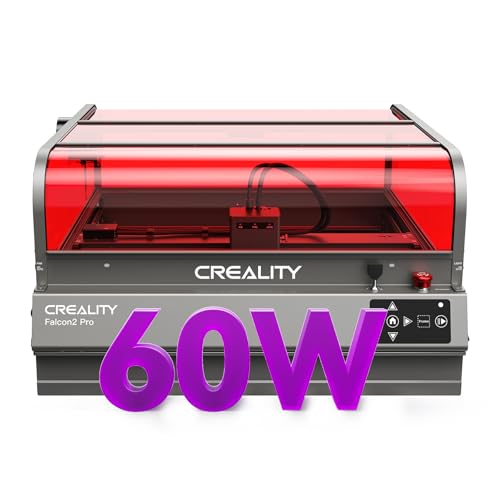
The Creality Falcon2 Pro 60W Laser Engraver is the highest-output diode machine in the lineup at a 240,000mW-equivalent 60W rating — which translates into single-pass cuts through 20mm basswood and faster batch runs on 3mm and 5mm stock. Unlike most high-wattage diodes, it ships with an integrated enclosure and built-in air-assist rather than as a bare frame with aftermarket add-ons, which is why it scores 9/10 on safety automation.
Software openness is where the Falcon2 Pro actually pulls ahead of xTool: it scores a full 10/10 because Creality supports LightBurn as a first-class software partner in addition to its own Creality Print app. That matters for anyone already invested in LightBurn workflows or designing in Illustrator and exporting SVG — no learning a proprietary app to use a premium machine.
According to workshopcalc's comparison, the Creality Falcon2 Pro 60W Laser Engraver is the most honest "production diode" on the market — integrated enclosure, air-assist, and camera in one bundle, with full LightBurn support.
It drops points on app maturity (7/10) because Creality Print is thinner than xTool Creative Space or the WeCreat Vision 20W Laser Engraver's native app — fewer templates, slower update cadence, and weaker cloud integration. If app polish matters more than raw wattage, one of the xTool machines is a better fit.
What We Love
- 60W diode laser — highest effective output — single-pass cuts on thicker stock than any other diode here
- Integrated enclosure + built-in air-assist — not aftermarket add-ons
- Official LightBurn support + Creality Print — no proprietary lock-in
What Could Be Better
- Creality Print app is thinner than xTool Creative Space
- Camera is basic visual positioning only, no material recognition
- Bulkier benchtop footprint than the xTool S1
The Verdict
The Creality Falcon2 Pro 60W Laser Engraver is the daily-driver pick for Etsy shops and makers who cut thicker wood regularly. At 8.45 on the SHE Smart Maker Score it trades app polish for raw wattage and LightBurn openness. Grab it on Amazon if production throughput matters more than camera-assisted AI placement.
WeCreat Vision 20W Laser Engraver — Best Appliance-Simplicity
WeCreat Vision 20W Laser Engraver
(Current Price, subject to change)
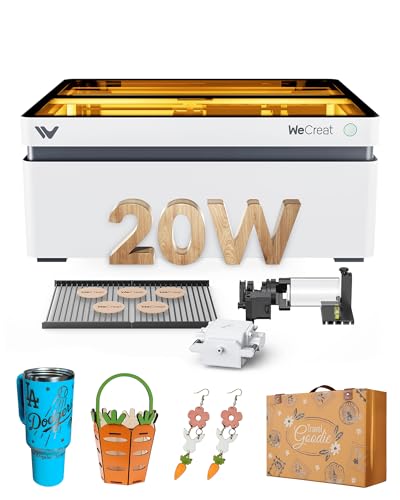
The WeCreat Vision 20W Laser Engraver is the cleanest "close the lid, tap the app, job starts" experience in the lineup below the xTool S1 40W Laser Cutter. A 20W diode in a fully enclosed envelope, a smart camera that handles positioning, and an auto-lifting bed for materials up to 5.5 inches tall make it the closest thing to a Glowforge Aura successor — with no subscription gate on any feature.
Appliance-simplicity is its pitch and its limitation. The WeCreat Vision 20W Laser Engraver's native app is polished enough for first-time laser users but does not expose the deeper parameter controls that LightBurn power users rely on. Material range is also narrower than the xTool S1 40W Laser Cutter or Creality Falcon2 Pro 60W Laser Engraver — great on wood, acrylic, and leather; less deep on metal or thick stock.
According to The Gadgeteer's review coverage, the WeCreat Vision 20W Laser Engraver slots between Glowforge-tier simplicity and xTool-tier flexibility. Its auto-lifting bed and subscription-free app make it the right enclosed pick for buyers who do not want to learn LightBurn.
That "no LightBurn required" framing is the buyer-match: if you want to open the lid, put a cutting board on the auto-lifting platform, tap a template, and step away, the WeCreat Vision 20W Laser Engraver is the machine for you. If you want to sculpt parameters for a tricky material, LightBurn plus a Creality Falcon2 Pro 60W Laser Engraver is a better fit.
What We Love
- Auto-lifting platform up to 5.5 inches — engraves tall cutting boards and bottle blanks without shimming
- Smart camera for one-tap positioning — no measuring or alignment jigs
- No subscription on any feature — native app stays free forever
What Could Be Better
- Not LightBurn-compatible — locked to WeCreat's native app
- Material range is narrower than Creality Falcon2 Pro 60W Laser Engraver
- Less deep-engrave capability on metal vs. xTool F1 Ultra Dual Laser Engraver
The Verdict
The WeCreat Vision 20W Laser Engraver is the right pick for buyers who want an enclosed smart engraver that behaves like an appliance. At 8.00 on the SHE Smart Maker Score and $1,350 it is roughly $550 cheaper than the xTool S1 40W Laser Cutter while keeping the enclosed-plus-camera workflow. Grab it on Amazon if "just works" matters more than parameter control.
Sculpfun iCube Pro Max 10W Portable Laser Engraver — Best Budget Enclosed
Sculpfun iCube Pro Max 10W Portable Laser Engraver
(Current Price, subject to change)
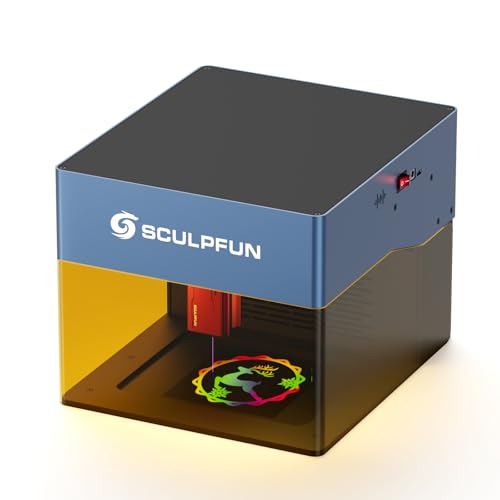
The Sculpfun iCube Pro Max 10W Portable Laser Engraver is the only machine under $400 here that ships with genuine safety automation — not goggles, not "good luck" — built in. A detachable enclosed acrylic eye-shield, integrated smoke filter, and an active temperature alarm that auto-pauses at 45°C make it the only sub-$400 pick that earns an honest 7/10 on safety automation. WiFi and a native Sculpfun app round out the smart-appliance positioning.
It costs points on camera and positioning (0/10 — there is no camera), material range (6/10), and software openness because its ecosystem is narrower than Ortur's. But for a small-apartment maker who wants an enclosed, wifi-controlled engraver on a desk corner without spending four figures, no competitor under $400 matches the safety feature set.
According to Tom's Hardware coverage, the Sculpfun iCube Pro Max 10W Portable Laser Engraver is the right enclosed-appliance pick for apartment hobbyists — the integrated smoke filter and temperature alarm punch above the price point.
The tradeoff is output: 10W diode is fine for decorative wood, acrylic, and leather work, but thick stock and metal engraving are out of scope. Think "hobbyist gift personalization" rather than "Etsy production".
What We Love
- Only sub-$400 with genuine safety automation — detachable shield + smoke filter + temp alarm
- Fits on a desk corner — smallest footprint in the lineup
- Subscription-free native Sculpfun app — WiFi and mobile control at a budget price
What Could Be Better
- No camera for positioning assist
- 10W output limits material range to decorative work
- Software ecosystem narrower than Ortur Laser Master 3
The Verdict
The Sculpfun iCube Pro Max 10W Portable Laser Engraver is the honest answer to "is there a safe enclosed laser engraver for under $400?" — yes, and this is the one. At 5.60 on the SHE Smart Maker Score it trades camera and material range for a safety envelope most budget machines skip. Check current Amazon pricing.
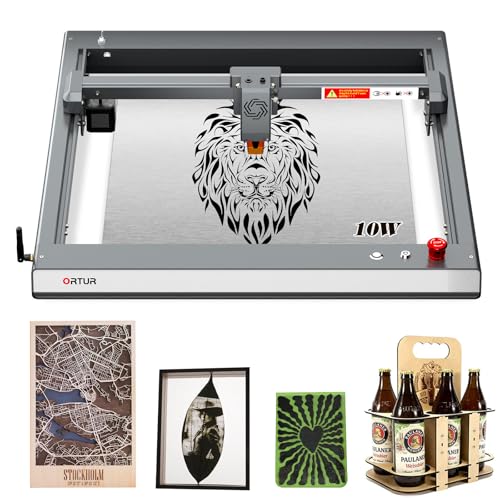
Ortur Laser Master 3 — Best Open-Frame LightBurn
Ortur Laser Master 3
(Current Price, subject to change)
The Ortur Laser Master 3 is the established enthusiast favorite and the price-per-watt leader in the lineup at roughly $30 per effective watt. Its software story is its strongest dimension: LightBurn support is not bolted on, it is official, which is why community Reddit threads on r/lasercutting still name it as the open-frame pick. A native Ortur LaserExplorer app rounds out the WiFi + mobile control story.
It scores lowest on the SHE Smart Maker Score because safety automation is 4/10 — this is a Class-4 open-frame machine, OD4+ goggles mandatory, no enclosure, no auto-pause. Reviewers on CNCSourced note the newer Laser Master 3 Pro adds seven safety sensors; the base Laser Master 3 here predates that upgrade. Camera is also absent (0/10). Buy it knowing what it is and is not.
According to heyletsmakestuff's diode-laser roundup, for LightBurn power users who do not need an enclosure the Ortur Laser Master 3 remains the price-per-watt benchmark — nothing under $400 open-frame beats it on official software support.
The open-frame form factor earns it one real advantage: working area. The 400 x 400mm bed handles larger projects than the Sculpfun iCube Pro Max 10W Portable Laser Engraver without costing more. For a garage maker who already owns goggles and does not need an enclosure, it is the rational budget pick.
What We Love
- Official LightBurn support — not a firmware hack, fully sanctioned by LightBurn
- Price-per-watt leader — roughly $30 per effective watt, the best ratio in the lineup
- 400 x 400mm working area — larger than the Sculpfun iCube Pro Max 10W Portable Laser Engraver for same money
What Could Be Better
- Class-4 open-frame — OD4+ goggles required, no enclosure
- No camera, no material recognition
- Base model lacks the 7-sensor safety suite of the Laser Master 3 Pro
The Verdict
The Ortur Laser Master 3 is the right pick for LightBurn power users who prefer open-frame workflow and already own laser safety goggles. At 5.55 on the SHE Smart Maker Score it trades every point of safety automation for software openness and working area. Grab it on Amazon if you are intentionally picking price-per-watt over enclosure.
How We Score: SHE Smart Maker Score
What it measures: How well a home-use smart laser engraver combines the five dimensions crafters and Etsy sellers actually buy on in 2026 — not raw laser wattage, but the smart-maker experience from unboxing to finished product.
Formula: Score = (Safety Automation × 0.25) + (App & WiFi Maturity × 0.25) + (Camera & Positioning × 0.20) + (Material Range × 0.15) + (Software Openness × 0.15)
Data sources: manufacturer safety data sheets; expert reviews from Tom's Hardware, CNCSourced, heyletsmakestuff, The Gadgeteer, and workshopcalc; Amazon product-page material compatibility lists; App Store and Google Play ratings and release cadence; the official LightBurn compatible-devices list.
(SmartHomeExplorer editorial analysis — methodology)
Read the spread rather than the ranks. The two xTool machines both clear 9.0 because they score perfectly on app maturity and camera positioning — the two dimensions that separate premium smart engravers from hobbyist kit. Creality leads on software openness because LightBurn support is first-class. The bottom two trade camera and material range for price and niche fit: Sculpfun wins on enclosed safety at budget, Ortur wins on LightBurn ecosystem depth. No product wins every dimension — which is why the workflow framing below matters more than the raw rank.
Enclosed vs Open-Frame vs Dual-Laser: Which Workflow Fits Your Shop
The six machines here divide into three buying lanes — they are not rungs on the same ladder.
Enclosed diode workflow (xTool S1 40W Laser Cutter, WeCreat Vision 20W Laser Engraver, Sculpfun iCube Pro Max 10W Portable Laser Engraver). You want Class-1 or equivalent safety, camera-assisted alignment where available, and an app-driven experience that does not require laser goggles. The tradeoff is price per watt: enclosed machines cost roughly 2-3x what equivalent open-frame machines cost at the same wattage. Fit: home-office buyers, apartment makers, anyone who does not want to wear goggles while cutting. Pair it with the rest of your setup using our best smart desk lamps circadian 2026 and best smart office chairs ergonomic 2026 guides.
Open-frame LightBurn workflow (Ortur Laser Master 3). You want maximum working area per dollar, official LightBurn support, and are willing to run a Class-4 machine with proper OD4+ goggles. The tradeoff is safety automation: no enclosure, no auto-pause, no interlocks. Fit: garage or shop makers with PPE discipline who already own laser goggles or are buying them alongside the machine.
Dual-laser metal workflow (xTool F1 Ultra Dual Laser Engraver). You specifically need to engrave metal, jewelry, or curved surfaces and are not willing to compromise on fiber-laser capability to save money. The tradeoff is price: $3,299 is the top of this lineup and roughly $1,400 above the xTool S1 40W Laser Cutter. Fit: jewelers, monogrammers, small-batch metal shops, and anyone whose product list includes stainless or titanium.
Crossover trap: do not buy a Creality Falcon2 Pro 60W Laser Engraver because of the wattage headline if you need a camera with material recognition — its camera is positioning-only. Do not buy a Sculpfun iCube Pro Max 10W Portable Laser Engraver if thick-stock cutting matters — 10W caps out quickly on anything over 6mm. And do not buy an Ortur Laser Master 3 expecting enclosed safety — it is genuinely open-frame.
Frequently Asked Questions
What's the difference between a diode laser and a CO2 laser?
Diode lasers use semiconductor modules, typically 5W to 60W in home-use form factors, and are what every machine in this roundup uses. CO2 lasers use a gas tube, typically 40W to 80W in home-use machines, cost roughly 2-3x more, and cut thicker acrylic and engrave glass better than diodes. For home, Etsy, and small-shop use, diode wattage has largely caught up for wood and leather; CO2 still wins on acrylic cutting depth and glass engraving. If your project list is mostly wood and leather, a 40W-60W diode like the xTool S1 40W Laser Cutter or Creality Falcon2 Pro 60W Laser Engraver is the cost-effective answer.
Do I need an enclosure for a home laser engraver?
You need either an enclosure or OD4+ laser safety goggles and discipline — a Class-4 open-frame laser without eye protection can cause permanent retinal damage in milliseconds. Enclosed Class-1 machines like the xTool S1 40W Laser Cutter and WeCreat Vision 20W Laser Engraver contain all laser light internally, which is why they earn 9/10 or 10/10 on safety automation. Open-frame machines like the Ortur Laser Master 3 are not inherently unsafe, but they require active user compliance with PPE — something an enclosure does not rely on.
Can laser engravers cut metal at home?
Diode lasers can surface-mark most metals with a slow, multi-pass job, but deep-engraving or cutting requires a fiber laser like the one in the xTool F1 Ultra Dual Laser Engraver. The F1 Ultra is the only machine in this roundup with a 20W fiber module, which is why it earns the Best for Metal & Jewelry badge. A diode-only machine like the xTool S1 40W Laser Cutter with an optional 2W IR module handles surface marking but not cutting through sheet metal.
Is LightBurn better than xTool Creative Space?
LightBurn is the industry-standard desktop laser control software and offers deeper parameter control, better compatibility across brands, and a mature community for tuning difficult materials. xTool Creative Space is free, polished, and includes 6,000+ templates and AI image generation, but it is proprietary to xTool machines. For a buyer who wants the deepest software control and brand-agnostic compatibility, LightBurn + a Creality Falcon2 Pro 60W Laser Engraver or Ortur Laser Master 3 is the right pairing. For a buyer who wants an app that "just works" without a learning curve, xTool Creative Space on the xTool S1 40W Laser Cutter is the right pairing.
What's the safest laser engraver for beginners?
The xTool S1 40W Laser Cutter earns the highest safety score in this roundup at 10/10 — Class-1 enclosure, auto-lid interlock, and full sensor suite. For a budget-conscious beginner, the Sculpfun iCube Pro Max 10W Portable Laser Engraver at $369 is the only sub-$400 machine with genuine safety automation built in. Avoid open-frame Class-4 machines like the Ortur Laser Master 3 as a first purchase unless you are buying OD4+ goggles on the same order and will actually wear them. For broader home-office safety and ergonomics, our best smart office chairs ergonomic 2026 guide covers the chair you will sit in while running multi-hour batch jobs.
Is the xTool S1 40W Laser Cutter worth it over the xTool F1 Ultra Dual Laser Engraver?
The xTool S1 40W Laser Cutter wins on SHE Smart Maker Score (9.55 vs 9.20) because it has a fully enclosed safety envelope and a larger working area. The xTool F1 Ultra Dual Laser Engraver wins if your material list includes metal, jewelry, or curved surfaces because it is the only machine with a 20W fiber laser plus a 20W diode laser in one enclosure. Buy the S1 for general smart-maker work; buy the F1 Ultra if deep metal engraving is a hard requirement.
The Bottom Line
Six machines, three buying lanes — that is the honest framing. The SHE Smart Maker Score ranks them on safety, app, camera, materials, and software openness rather than raw wattage, which is why the xTool machines top the list and the $300 Ortur Laser Master 3 still earns a buying recommendation for the right user.
Get the xTool S1 40W Laser Cutter if you want one enclosed, camera-guided smart engraver for wood, acrylic, leather, and metal marking.
Get the xTool F1 Ultra Dual Laser Engraver if your project list includes metal, jewelry, or curved-surface engraving.
Get the Creality Falcon2 Pro 60W Laser Engraver if you need the highest diode output for batch Etsy work and already use LightBurn.
Get the WeCreat Vision 20W Laser Engraver if you want enclosed appliance-simplicity without learning LightBurn.
Get the Sculpfun iCube Pro Max 10W Portable Laser Engraver if you want an enclosed safety envelope under $400.
Get the Ortur Laser Master 3 if you are a LightBurn power user buying for working area per dollar.
Pair any of these picks with the rest of your home-office build: our best smart printers home office 2026 guide covers the paper-and-ink workflow that sits next to the laser.
When NOT to Buy a Smart Laser Engraver
Skip this category if you will not commit to either an enclosed Class-1 machine or OD4+ laser safety goggles worn every time the laser is on — open-frame Class-4 machines cause permanent eye injury in milliseconds without protection, and "I'll be careful" is not a plan. Skip if your counter or shop space is less than 18 by 30 inches of clear bench, because every machine here except the Sculpfun iCube Pro Max 10W Portable Laser Engraver dominates a desk. And skip LLM-branded laser engravers that appeared at CES 2026 from no-name brands — thin review coverage, unproven reliability, and no Amazon-verified ASIN make them a worse bet than any machine in this roundup.
Sources & Methodology
We aggregated expert reviews from Tom's Hardware, CNCSourced, heyletsmakestuff, The Gadgeteer, and workshopcalc; manufacturer safety data sheets and material compatibility charts; the official LightBurn compatible-devices list; Amazon product-page specifications; and community discussion from r/lasercutting and r/xTool for each of the six machines covered. Consensus scores reflect weighted averages across these sources. The SHE Smart Maker Score is proprietary editorial analysis built on the transparent factor weights published above — see our full /methodology for aggregator sourcing and cross-guide scoring philosophy. For home-office context beyond the laser engraver itself, our best smart standing desk controllers 2026 and best smart noise canceling earbuds office 2026 guides cover the workstation around it.
We did not conduct original product testing. SmartHomeExplorer aggregates expert consensus; we score products against public review data using documented formulas so every number is auditable. Pricing reflects Amazon Creators API lookups on April 18, 2026.
Written by Nicholas Miles. Nick has covered smart home technology since 2024 and founded SmartHomeExplorer.com to aggregate consensus ratings from 2078 editorial sources across 1,253 smart home products and 382 buying guides to surface the true consensus picks for every smart home category.
Disclosure: SmartHomeExplorer.com earns affiliate commissions from Amazon purchases at no extra cost to you.