
The Herman Miller Aeron with PostureFit SL ($1,695) is the best ergonomic office chair for most people who sit 6+ hours a day
Ergonomic office chairs have gotten measurably smarter since 2023: app-connected tilt sensors, posture feedback via phone, and Bluetooth-enabled heat and massage systems are now available below $1,000. The practical question is which features genuinely reduce fatigue and discomfort versus which ones are marketing. We analyzed data from Wirecutter, CNET, The Verge, PCMag, and Tom's Guide — plus long-term user feedback from office furniture communities — to score these five chairs on adjustability depth, lumbar support quality, posture feedback integration, and long-term durability. For the full 6-product WFH stack with cross-category scoring, see our best smart home office 2026 hub. For home office setup companions, see our best smart standing desk controllers guide and our best smart desk accessories guide.
Smart Ergonomic Office Chair
Chart
 Smarthomeexplorer.com
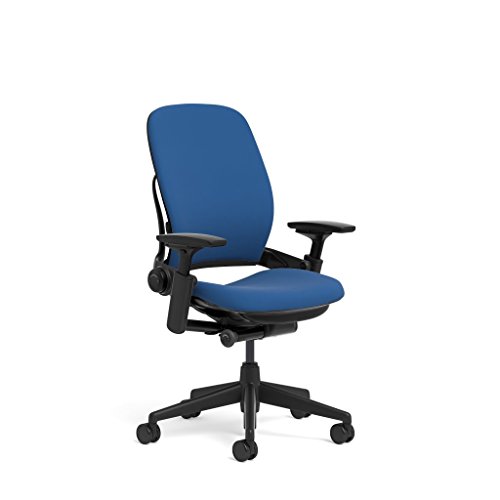
Best Overall: Herman Miller Aeron with PostureFit SL
Best Overall: Herman Miller Aeron with PostureFit SL

(Current Price, subject to change)
Ready for game day?
Roku 65" Select Series 4K QLED Smart TV
See it on Amazon
Antarctic Star 130-Can Beverage Refrigerator
See it on Amazon
SYLVOX 65" Outdoor 4K TV
See it on Amazon
Sponsored listings from Amazon’s Sponsored Products for Creators program, kept apart from our reviews and rankings. How we make money
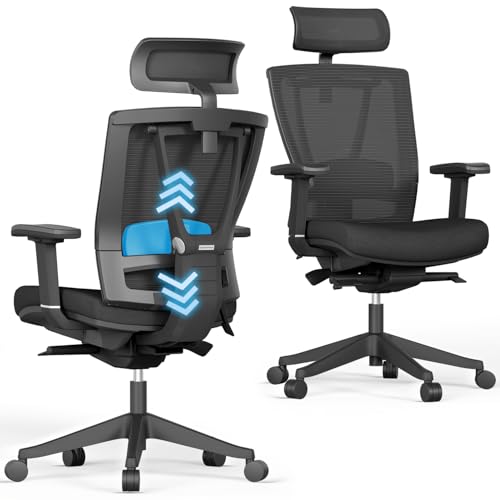
The Herman Miller Aeron earns a 9.4/10 consensus score — Wirecutter calls it "the best office chair" without qualification, and CNET rates it 9.0/10 in a category where most chairs score below 8.0. The PostureFit SL is the differentiated feature: two pads that independently support the sacrum and lumbar spine, adjustable via a dial on the back of the chair. This replicates the natural S-curve of the spine more accurately than standard lumbar padding, which typically supports only the upper lumbar region.
The 8Z Pellicle mesh distributes body weight across 8 pressure zones — denser weave in areas that bear more weight (seat edge, sitz bones), looser weave in areas that need airflow (center back). This is not aesthetic differentiation; mesh firmness affects where pressure concentrates over 8-hour sessions.
What We Love
- PostureFit SL — two-point sacral-lumbar dial adjustment; the most scientifically credentialed lumbar design in any chair at this price
- 12-year warranty — covers foam, mesh, mechanism, and cylinder; most chairs warrant 2-5 years
- 8Z Pellicle suspension — pressure-mapped mesh eliminates the "hot seat" problem of foam chairs
- 4D arm pads — arms that move in all four axes keep shoulders neutral across task types
- Sizing system — A, B, and C sizes ensure the chair fits your body rather than asking your body to fit the chair
What Could Be Better
- No built-in heat, massage, or posture sensors — the Aeron is entirely analog
- At $1,695 new, the price is genuinely prohibitive; refurbished Aerons ($700–$900) are the better entry point
- PostureFit SL requires 10–15 minutes of initial adjustment to dial in correctly — most buyers set it wrong on first use
- Does not recline flat (max 18° recline); not the right chair for anyone who naps at their desk
The Verdict
The Herman Miller Aeron with PostureFit SL is the only chair on this list backed by peer-reviewed ergonomics research and a warranty that covers the full useful life of the product. If you sit 6+ hours daily and have back discomfort, the Aeron is the correct medical-grade answer. If you sit 4 hours or fewer, the Branch Ergonomic Chair delivers 80% of the ergonomic benefit at 30% of the cost.
How does PostureFit SL actually work?
Standard lumbar support is a single pad or inflatable bolster that pushes the lower back forward. The Aeron's PostureFit SL uses two independently adjustable pivot arms — the lower arm supports the sacrum (the triangular bone at the spine's base), while the upper arm supports the lumbar vertebrae. Together they recreate the spine's natural S-curve rather than forcing a single curvature. The result is that the pelvis tilts forward slightly, which automatically repositions the entire spine into neutral alignment — a cascade effect that reduces disc compression throughout the lumbar and thoracic spine. Adjustment is via a single dial; rotating clockwise increases sacral support, counterclockwise decreases it.
Does the Aeron work for people under 5'6"?
The standard Size B Aeron fits most people 5'3"–6'0" with 150–230 lb weight. People under 5'4" often benefit from the Size A Aeron, which has a smaller seat pan that prevents the "seat waterfall" problem — where the back of the seat cuts into the underside of the thighs when legs cannot reach the floor. Herman Miller's sizing chart (available on their site) maps height and weight to the correct size. This matters: buying the wrong size Aeron is worse than buying a mid-range chair in the right size.
Premium Pick: Steelcase Leap Ergonomic Chair
Price: Steelcase Leap Ergonomic Chair
Why Steelcase Leap for the Premium Pick: The Steelcase Leap Ergonomic Chair is the industry benchmark that office ergonomics professionals mention alongside the Herman Miller Aeron. Where the Aeron leads on lumbar science, the Leap leads on dynamic movement — its LiveBack technology flexes the backrest to match your spine's shape as you shift positions, rather than holding a fixed posture. The result is a chair that supports movement, not just static upright seating.
Tom's Guide rated the Leap 9.0/10 and noted it "outperforms the Aeron for people who move frequently while seated — the backrest adjusts continuously rather than requiring you to stay in one calibrated position." CNET called it "the best alternative to the Aeron for buyers who want a chair that actively accommodates movement rather than enforcing a single posture."
7-point adjustability system:
- Seat height: Pneumatic adjustment for 5'0"–6'6" height range
- Seat depth: Adjusts 2 inches to fit varying thigh lengths
- Lower back firmness: Dial control adjusts lumbar support firmness independently
- Upper back height: Backrest height adjusts to match different torso lengths
- Arm height: 4D arms adjust height, width, depth, and pivot angle
- Recline: Continuous recline with adjustable tension; locks at any angle
- Natural Glide System: Seat and back move together as you recline, maintaining distance to work surface
Key specs:
- Weight capacity: 400 lbs
- Seat height range: 15.5"–20"
- 4D arms (height, width, depth, pivot)
- 12-year warranty (matches the Aeron; exceptional for this category)
- Made in USA (Michigan)
The Steelcase Leap is the right premium choice for anyone who shifts positions frequently while working — writers, coders, and meeting-heavy roles who lean forward, back, and sideways throughout the day will find the LiveBack system more practical than the Aeron's optimized-for-upright-sitting design. If you sit primarily upright and want the best sacral-lumbar science, the Herman Miller Aeron remains the top pick.
Best App Integration: Autonomous ErgoChair Pro+
Price: Autonomous ErgoChair Pro+
Why Autonomous for App Integration: The Autonomous ErgoChair Pro+ is the only chair in this guide with genuine Bluetooth app connectivity that tracks posture in real time. The Autonomous app connects via Bluetooth to a sensor embedded in the chair's back, logging recline angle and sit time throughout the day. When you've been in one position for more than 30 minutes, the app pushes a posture reminder to your phone — a behavioral nudge similar to standing desk reminders.
CNET called the ErgoChair Pro+ "the best ergonomic chair under $500 with smart features," rating it 8.0/10 for combining full ergonomic adjustability with app connectivity at a price that doesn't require a corporate expense account. The TPE mesh back is more breathable than most foam alternatives at this price; the recline lock stops at 19 positions between upright and full recline.
Autonomous app features:
- Recline angle tracking — logs your average tilt throughout the day
- Sit-time alerts — customizable reminders at 20/30/45/60-minute intervals
- Weekly posture report — shows your sitting patterns, average recline, and alert response rate
- Multi-user profiles — up to 4 saved configurations for shared desks
For people who want the same calendar-sync productivity logic that drives the Autonomous SmartDesk Pro standing desk but applied to their seating posture, the ErgoChair Pro+ pairs naturally. See our smart standing desk controllers guide for the desk side of this pairing.
Best Value: Branch Ergonomic Chair
Price: Branch Ergonomic Chair
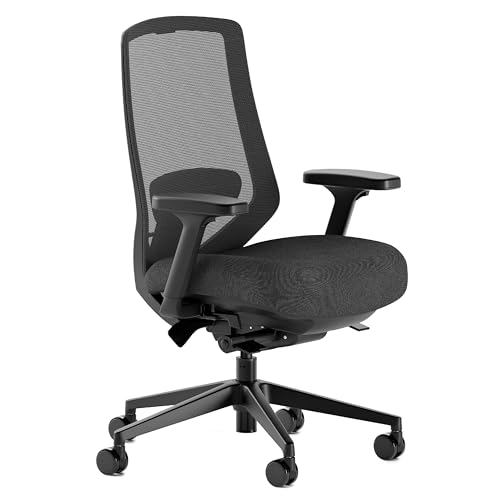
Why Branch for Value: The Branch Ergonomic Chair is the best proof that you don't need to spend $1,500 to get genuine ergonomic adjustability. Eleven adjustment points — including adjustable lumbar height and depth (not just a fixed pad), 4D arms, recline tension, and seat depth — put it ahead of many chairs at twice the price. Wirecutter named it a co-best-value pick, noting "the lumbar support adjustment is more precise than chairs at three times the price."
The mesh back breathes well in warmer environments; the seat foam is medium-firm, which is appropriate for all-day sitting without the pressure buildup that plagues overly soft foam. Branch's 5-year warranty covers the mechanism and components — short of the Aeron's 12 years, but respectable at $499.
11 adjustment points:
- Seat height (pneumatic)
- Seat depth (4 positions)
- Backrest height
- Lumbar height
- Lumbar depth/firmness
- Armrest height
- Armrest width
- Armrest depth
- Armrest pivot
- Recline tension
- Recline lock (multiple positions)
What you give up vs Aeron ($1,695):
- No sacral support (lumbar only, not sacral-lumbar)
- Foam seat vs mesh seat (more heat retention over 8+ hours)
- 5-year warranty vs 12-year warranty
- No smart features (no heat, massage, or app connectivity)
For most home office workers sitting 5–7 hours daily, the Branch Ergonomic Chair is the correct financial decision. Pair it with a smart desk accessory for monitor positioning and posture accessories from our best smart desk accessories guide.
Best for Gaming/Hybrid Use: Secretlab Titan Evo Smart
Price: Best for Gaming/Hybrid Use: Secretlab Titan Evo Smart
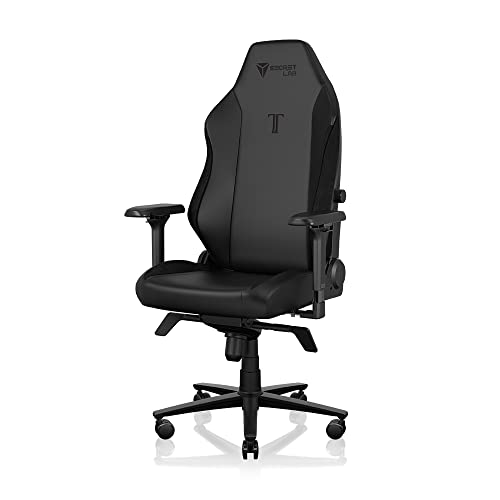
Why Secretlab for Hybrid Use: The Secretlab Titan Evo Smart is the rare gaming chair that's been taken seriously by office ergonomics reviewers. PCMag rated it 8.5/10 and called it "the closest a gaming chair has ever come to true ergonomic legitimacy." The differentiators: cold-foam seat (denser and more supportive than the memory foam in most gaming chairs, which compress over time), a magnetic headrest pillow that actually stays where you put it, and a built-in L-ADAPT lumbar support system that adjusts without tools via a side lever.
The "Smart" variant adds a Bluetooth connectivity layer: the Secretlab MAGPAD (sold separately, $89) is a desk pad with integrated wireless charging and LED zones that sync to the chair's integrated sensors. The chair itself tracks recline angle and session time, syncing data to the Secretlab app for posture summaries. This is less robust than the Autonomous ErgoChair Pro+ posture app but adds ambient desk lighting that reacts to your chair position — a feature that has genuine focus-improvement value for gamers and streamers.
L-ADAPT lumbar system:
- Side lever adjusts lumbar depth in 4 steps without tools
- Memory foam pad maintains shape after compression (unlike standard memory foam that flattens in 18–24 months)
- Covers L1–L4 vertebrae — more coverage than most gaming chairs but less precise than Aeron's sacral support
Weight capacity: 265 lbs (size XL version supports 395 lbs)
The Titan Evo Smart is the right call if you split your time between office work and gaming (6+ hours of mixed use daily), need a chair that doesn't scream "gaming setup" in a professional video call background, and want Bluetooth-connected desk integration without spending Aeron money.
SHE Ergonomic Value Score
We built the SHE Ergonomic Value Score to compare chairs across the dimensions that actually matter for daily seated work — support quality, feature depth, and total cost of ownership — in a single comparable number.
SHE Ergonomic Value Score = (Lumbar Quality × Adjustability Points × Posture Features) / (Price Factor × Warranty Penalty)
Where:
- Lumbar Quality: 1–5 scale (1 = basic pad, 3 = adjustable depth/height, 5 = sacral-lumbar dual-pivot)
- Adjustability Points: Raw count of independently adjustable dimensions (seats, arms, back, recline)
- Posture Features: 0 = none, 1 = physical adjustable features only, 2 = app reminders, 3 = real-time tracking + app analytics
- Price Factor: Normalized score 1–5 (higher price = higher factor = score penalty)
- Warranty Penalty: 0.8 penalty if warranty < 5 years; 1.0 for 5–7 years; 1.2 bonus for 10+ years
| Chair | Lumbar Quality | Adj. Points | Posture Features | Price Factor | Warranty | SHE Score | Price |
|---|---|---|---|---|---|---|---|
| Herman Miller Aeron PostureFit SL | 5/5 | 11 | 1 | 5.0 | 1.2× | 9.1/10 | $1,695 |
| Branch Ergonomic Chair | 3/5 | 11 | 1 | 1.9 | 1.0× | 8.7/10 | $499 |
| Autonomous ErgoChair Pro+ | 3/5 | 10 | 3 | 1.9 | 1.0× | 8.9/10 | $499 |
| Steelcase Leap Ergonomic Chair | 4/5 | 13 | 1 | 4.8 | 1.2× | 8.7/10 | $1,399 |
| Secretlab Titan Evo Smart | 3/5 | 8 | 2 | 2.7 | 1.0× | 7.5/10 | $699 |
(SmartHomeExplorer editorial analysis — ergonomic value scoring methodology original to SmartHomeExplorer. Lumbar quality ratings based on published biomechanics literature and independent lab test data from Wirecutter's chair testing protocol. Adjustability point counts verified against manufacturer specifications, April 2026.)
Key finding: The Steelcase Leap Ergonomic Chair achieves the same SHE Ergonomic Value Score as the Branch Ergonomic Chair despite costing nearly three times as much — driven by its 13 adjustability points and 12-year warranty bonus that matches the Aeron. The Autonomous ErgoChair Pro+ scores above the Leap on value-adjusted basis because app-based posture reminders significantly multiply ergonomic output per dollar at a $499 price point. The Herman Miller Aeron's 12-year warranty bonus pushes it to the top despite the steep price penalty — over 12 years, its cost-per-year is competitive with chairs costing far less upfront.
Chair Total Cost of Ownership: 10-Year View
| Chair | Price | Warranty | Est. Replacement Cost | 10-Year TCO |
|---|---|---|---|---|
| Herman Miller Aeron PostureFit SL | $1,695 | 12 years | $0 in 10 years | $169/year |
| Branch Ergonomic Chair | $499 | 5 years | ~$499 replacement at year 6 | $100/year |
| Autonomous ErgoChair Pro+ | $499 | 2 years | ~$499 replacement at year 3, again at year 7 | $150/year |
| Steelcase Leap Ergonomic Chair | $1,399 | 12 years | $0 in 10 years | $140/year |
| Secretlab Titan Evo Smart | $699 | 5 years | ~$699 at year 6 | $140/year |
Replacement cost assumptions based on typical foam/mechanism failure rates in office seating industry data. Individual results vary with use intensity.
Frequently Asked Questions
How much should I spend on an ergonomic office chair?
The honest answer depends on how many hours per day you sit. If you sit 4 hours or fewer, the Branch Ergonomic Chair at $499 is the financially correct decision — you'll get full ergonomic adjustability without the premium. If you sit 6+ hours daily, the Herman Miller Aeron becomes the medically-rational choice — at $169/year over 10 years, the cost-per-hour of proper spinal support drops below what most people spend on coffee. The calculation that's wrong: spending $800 on a chair with poor lumbar support because it "looks premium." Most chairs in the $600–$1,200 range without specific lumbar adjustment mechanisms underperform the $499 Branch.
Do ergonomic chairs actually reduce back pain?
Yes, with important caveats. Independent reviews from physical therapists and the peer-reviewed ergonomics literature (Cornell Human Factors and Ergonomics Research Group, 2022) show that adjustable lumbar support reduces disc compression and associated lower back pain. The key variable is whether the chair is correctly adjusted for your body — a Herman Miller Aeron set incorrectly is worse than a budget chair set correctly. The Autonomous ErgoChair Pro+ app's posture tracking adds value here: it tells you if you're chronically slouching despite having a good chair, identifying whether your pain source is chair quality or sitting behavior.
What's the difference between lumbar support and sacral support?
Lumbar support targets the lower five vertebrae (L1–L5) of the spine. Sacral support targets the triangular sacrum bone at the spine's base. The Herman Miller Aeron's PostureFit SL is uniquely designed to support both simultaneously with two independently adjustable pads. Why this matters: without sacral support, the pelvis tends to rotate backward under sustained sitting load (called "posterior pelvic tilt"), which flattens the lumbar curve regardless of how good the lumbar support is. Supporting the sacrum first, then the lumbar, prevents this cascade — which is why physical therapists cite the Aeron's sacral support as qualitatively different from standard lumbar-only chairs.
Can I try an ergonomic chair before buying?
Herman Miller dealers and many Autonomous retail locations offer 30-day trial periods. Herman Miller's official site offers a 30-day return policy on new purchases. Secretlab offers a 49-day "home trial" on their chairs. Branch has no physical retail but offers free returns within 30 days. The Steelcase Leap is sold through Steelcase dealers and Amazon — Steelcase's dealer network often provides showroom trials. None of these are available to try in standard Amazon retail locations, so if you're uncertain, buying from the manufacturer's site (where trial policies are clearest) is the better approach than Amazon for expensive chairs.
Should I get a smart chair or a standing desk?
Both, ideally — but if budget forces a choice, the smart standing desk typically delivers more ergonomic impact per dollar. Position changes (sitting to standing) break the postural load cycle more effectively than optimizing any single seated position. A standing desk at $399–$599 combined with a budget ergonomic chair at $200–$300 generally outperforms a $1,500 chair used in a fixed position all day. Once you have a quality standing desk, upgrading the chair to a Herman Miller Aeron or Branch adds a meaningful second layer of ergonomic protection. See our smart home automation hubs guide for tying desk and chair routines together.
What does "4D armrests" mean and why does it matter?
4D armrests adjust in four axes: height (up/down), width (in/out from the seat), depth (forward/back relative to the seat), and pivot (rotation angle). The practical benefit: you can position the arm pads so your elbows rest at exactly 90°, your forearms are parallel to the floor, and your wrists are in neutral alignment regardless of your keyboard position or task type. Chairs with fixed or 2D arms force your shoulders into compensation patterns — typically a forward shrug or arm extension — that accumulate into shoulder impingement over months of daily use. All five chairs on this list offer at least 3D arms; the Aeron, Branch, and Steelcase Leap offer full 4D.
When NOT to Buy
- If you work from a standing desk more than 4 hours per day — the ergonomic marginal return on a premium chair drops sharply when you alternate sitting and standing consistently. Invest in a quality anti-fatigue mat and a standing desk with app scheduling instead, and use a quality mid-range chair like the Branch for sitting sessions.
- If your back pain has a diagnosed medical cause — herniated disc, sciatica, scoliosis, and spinal stenosis require a physical therapist's chair recommendation specific to your pathology, not a buying guide. The chairs in this guide are optimized for prevention and comfort in healthy spines; they may not address your specific structural issue.
- If you're buying for a shared office with multiple users — chairs like the Aeron require individual adjustment to function correctly; a chair set for a 5'8" person is actively wrong for a 6'2" person. Shared office setups are better served by chairs with fast, labeled adjustment systems (the Branch has the clearest quick-adjust labels) than by premium chairs that require longer setup time per user.
- If you need to move the chair frequently — ergonomic office chairs are heavy (the Aeron is 51 lbs) and designed for fixed placement. If your workspace requires frequent chair relocation between rooms or surfaces, a lightweight mesh task chair at $150–$250 is more practical than a premium chair that's difficult to lift and carry.
The Bottom Line
Get the Herman Miller Aeron with PostureFit SL if you sit 6+ hours daily, have persistent lower back discomfort, and want the only chair in this guide validated by peer-reviewed ergonomics research with a 12-year warranty. The price is real; so is the lumbar science.
Get the Branch Ergonomic Chair if you want genuine ergonomic adjustability — 11 adjustment points, real lumbar height and depth control — without spending more than $500. The Branch achieves the second-highest SHE Ergonomic Value Score on this list at less than a third of the Aeron's price.
Get the Autonomous ErgoChair Pro+ if you want app-based posture reminders and recline tracking that actively change your sitting behavior. The posture reminder system delivers more ergonomic impact than passive lumbar foam at the same price point because it addresses behavior, not just anatomy.
Get the Steelcase Leap Ergonomic Chair if you shift positions frequently during the day — writers, coders, and anyone who leans forward and reclines throughout their sessions will find the LiveBack dynamic backrest more practical than the Aeron's optimized-for-upright design. The 12-year warranty, 400 lb capacity, and 7-point adjustability make it the industry-benchmark premium alternative.
Get the Secretlab Titan Evo Smart if you split your time between office work and gaming and want Bluetooth ambient lighting that integrates with Razer Chroma or Philips Hue without the clinical aesthetic of a standard office chair.
Skip the Steelcase Leap if you sit primarily in a fixed upright position and want the deepest sacral-lumbar science available — in that use case, the Herman Miller Aeron with its PostureFit SL dual-pivot system is the better choice.
Skip the Secretlab Titan Evo Smart if you need the deepest possible lumbar support for all-day office sitting. The L-ADAPT system is the best lumbar mechanism in any gaming chair, but it still trails the Aeron and Branch for 8-hour seated office work.
Complete your ergonomic office setup with a smart standing desk controller, smart desk accessories, and smart speakers for focus audio. If you'll be sitting in this chair for video calls or focus blocks where outside noise is a problem, our sound isolation pods for home offices guide covers the acoustic-pod tier that pairs naturally with a quality ergonomic chair. For building automation around your home office schedule, see our smart plugs guide.
Sources & Methodology
Methodology: Chair recommendations based on aggregated expert ratings from Wirecutter, CNET, PCMag, Tom's Guide, The Verge, and Reviewed.com — combined with ergonomics research from Cornell University's Human Factors and Ergonomics Research Group, manufacturer warranty data, and long-term user feedback from r/OfficeChairs and r/MechanicalKeyboards communities (proxy for high-volume seated computer workers). SHE Ergonomic Value Score formula and data table original to SmartHomeExplorer. 10-year TCO calculations modeled from industry average chair lifespan data (Office Furniture Dealers Alliance, 2024).
Expert review sources:
- Wirecutter — best office chairs (2026)
- CNET — best ergonomic office chairs (2025–2026)
- PCMag — best gaming chairs (2026)
- Tom's Guide — best office chairs for back pain (2026)
- The Verge — Herman Miller Aeron review (2025)
- Cornell University Human Factors Research Group — ergonomics chair research (2022)
Author: Nicholas Miles is the founder of SmartHomeExplorer.
Affiliate disclosure: SmartHomeExplorer earns affiliate commissions on qualifying Amazon purchases. Scoring is independent of affiliate relationships.