
The BenQ ScreenBar Halo ($229) earns our highest SHE Desk Productivity Score — its asymmetric optical design eliminates glare while its back-lighting.
The home office desk accessory market exploded post-2020 and has plateaued into a category where real quality differences matter. We aggregated ratings from 11 expert sources including Wirecutter, CNET, PCMag, Tom's Guide, and RTings.com, weighting each source by testing methodology and recency. The "smart" label in this category ranges from genuinely useful (app-controlled lighting schedules that adjust to time of day) to marketing fluff (docks with "AI power management" that means nothing in practice). Our SHE Desk Productivity Score cuts through the noise by measuring the ratio of actual productivity benefit to cost and setup friction. For smart plug recommendations to power your desk setup, see our best smart plugs guide. Building the full WFH kit? Our best smart home office 2026 hub scores the 6-product stack across chair, desk, dock, printer, audio, and pod.
Best Monitor Light: BenQ ScreenBar Halo
Price: Best Monitor Light: BenQ ScreenBar Halo
What it includes:
- Asymmetric optical design (front light + back bias light)
- Auto-dimming via built-in ambient light sensor
- Wireless controller dial with one-touch scene memory
- Color temperature range: 2700K–6500K
- USB-A power (from monitor's USB port or separate adapter)
- No screws, no drilling — clips to most monitors 1–1.5 cm thick
The BenQ ScreenBar Halo earns a 9.4/10 consensus score — Wirecutter named it the best monitor light bar they've tested, RTings.com gave it top marks for optical uniformity, and PCMag awarded it Editors' Choice in the desk lighting category. The key engineering decision is the asymmetric optic: the front lens points light downward onto the desk only, eliminating monitor glare entirely. A secondary LED strip on the back projects a halo of bias lighting onto the wall behind the monitor — reducing eye strain from the contrast between a bright screen and a dark background.
The auto-dimming sensor adjusts brightness based on ambient room light in real time. Turn on your overhead lights and the ScreenBar Halo dims; close the blinds and it brightens. The wireless controller stores your preferred scene memory — most users set it once and never touch it again. This is the "smart" behavior that actually matters: passive automation that works without conscious management.
What We Love
- Asymmetric optics — illuminates desk without any light hitting the monitor screen, eliminating hotspot glare
- Back bias lighting — reduces eye fatigue from dark-background/bright-screen contrast
- Auto-dimming sensor — adjusts to ambient light changes without manual intervention
- Wireless controller — scene memory means one-touch recall of your preferred setting
- No cable routing — single USB-A cable to monitor port, zero desk clutter
What Could Be Better
- $229 is expensive for a desk light — the non-Halo ScreenBar at $109 lacks the back bias light
- No Alexa, Google Home, or HomeKit integration — smart features are self-contained (not part of a home automation ecosystem)
- Requires a monitor with a USB-A output port (most modern monitors have one, but verify before purchasing)
- Back bias light is most effective on light-colored walls — less visible on dark or textured walls
The Verdict
The BenQ ScreenBar Halo earns our top score because its "smart" features directly serve productivity: auto-dimming reduces cognitive interruptions from adjusting lighting, the bias light reduces eye strain over long sessions, and zero glare on the monitor means no re-angling. If you work 6+ hours at a desk daily, this pays back in reduced headaches within the first month.
Can the BenQ ScreenBar Halo connect to smart home systems?
The BenQ ScreenBar Halo does not connect to Alexa, Google Home, or HomeKit — its intelligence is entirely self-contained (ambient sensor, wireless controller, auto-dimming). If you want to include desk lighting in home automation routines, pair it with a smart plug for power scheduling and use the Halo's auto-dimming for fine-grained adjustment within the session.
Best USB-C Dock (Value): Anker 675 USB-C Docking Station
Price: Anker 675 USB-C Docking Station
What it includes:
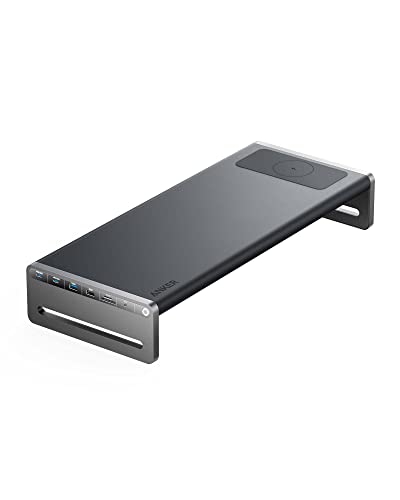
- 12 ports: 2x USB-A 3.2 Gen 2, 2x USB-C data, HDMI 2.1 (4K@60Hz), DisplayPort 1.4, 3.5mm audio, SD card, microSD, Ethernet (2.5Gbps), USB-C 100W laptop charging
- Built-in 15W wireless charging pad (Qi-compatible)
- Works with Windows and macOS — no driver installation required
- USB-C single-cable connection to laptop
The Anker 675 USB-C Docking Station earns an 8.7/10 consensus score — Tom's Guide rated it the best overall USB-C dock for home office users, and CNET called it "the dock that eliminates the most cable friction." The design decision that separates the 675 from competitors at the same price is the built-in wireless charging pad: rather than adding a separate Qi pad to an already-cluttered desk, the dock surface itself charges your phone or earbuds while the laptop works. This eliminates one cable and one power brick from the desk permanently.
The 2.5Gbps Ethernet port is the other standout — most docks at this price use 1Gbps Ethernet. For remote workers whose work requires transferring large files or sustained video calls, 2.5Gbps eliminates the dock as a network bottleneck. 100W laptop charging handles MacBook Pro 16" and most Windows ultrabooks at full charging speed.
What We Love
- Built-in 15W wireless charger — phone charges on the dock surface, eliminating a separate pad
- 2.5Gbps Ethernet — faster than most home routers support, but eliminates the dock as the network bottleneck
- 12 ports in a compact form — HDMI, DisplayPort, full-size SD, both USB-C and USB-A in one device
- 100W laptop charging — handles power-hungry MacBook Pro and Windows workstations
- No driver install — plug in and it works on both macOS and Windows immediately
What Could Be Better
- Supports only one external display at 4K — not suitable for dual 4K monitor setups (step up to CalDigit TS4)
- Heat management under full port load is noticeable — the dock warms up when all ports are active simultaneously
- Wireless charging pad is Qi, not MagSafe — no magnetic alignment for iPhone 12+
The Verdict
The Anker 675 is the best single-cable desk organization upgrade for most home office workers. One USB-C cable replaces a power adapter, monitor cable, Ethernet cable, card reader, audio cable, and phone charger. The built-in wireless pad is the feature that earns it the top value spot over competitors at the same price.
Best Video Call Light: Elgato Key Light Air
Price: Best Video Call Light: Elgato Key Light Air
What it includes:
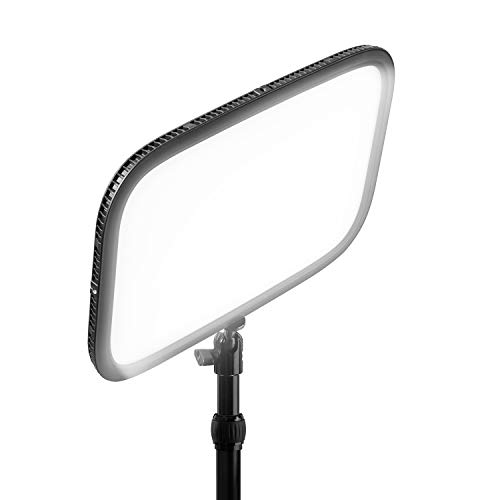
- 1400-lumen LED panel (2900K–7000K color temperature range)
- Wi-Fi connected with Elgato Control Center app (iOS, Android, macOS, Windows)
- Stream Deck integration (if you own one)
- Mountable on desk arm or included stand
- USB-C power
The Elgato Key Light Air earns an 8.3/10 consensus score — Wirecutter recommends it as the best video call lighting for remote workers, and PCMag's reviewer noted a measurable improvement in perceived professionalism in Zoom calls after installation. The design is optimized for one specific job: making you look good on camera without lighting appearing in the camera frame. The large LED panel creates soft, diffused light that minimizes skin shadows without a light box — the professional studio look in a device that mounts in five minutes.
The smart feature that earns its place in this guide is the app + Stream Deck control: adjust color temperature from warm (evening, casual calls) to cool (daytime, high-focus work) without physically moving or touching the light. Scheduling in the Control Center app can automatically shift from 4000K daylight balance during morning calls to 2900K warm tone for late afternoon sessions.
What We Love
- 1400 lumens — bright enough to eliminate unflattering under-eye shadows in dim home offices
- 2900K–7000K range — matches any ambient light condition from incandescent evening to direct daylight
- Wi-Fi app control — change brightness and color temp from keyboard or phone during calls
- Stream Deck integration — one button to switch from "bright call mode" to "focus mode"
- Soft panel diffusion — wide LED array creates studio-quality softbox light without a separate diffuser
What Could Be Better
- $130 for a desk light feels steep unless you're on video calls regularly
- No Alexa or Google Home integration — Elgato Control Center is the only automation interface
- The included stand is less stable than the optional desk arm mount (sold separately, $35)
- Wi-Fi setup requires the Elgato app — not as frictionless as plug-and-play alternatives
CalDigit TS4 Thunderbolt Dock
Price: CalDigit TS4 Thunderbolt 4
What it makes possible: The CalDigit TS4 earns an 8.9/10 consensus score and is the only dock in this guide that supports dual 6K monitor setups on Apple Silicon Macs (Pro/Max/Ultra chips). Its 18 ports include 3x Thunderbolt 4 downstream, 5x USB-A 3.2, SD 4.0 (312MB/s read), Ethernet (2.5Gbps), DisplayPort 1.4, 3.5mm audio, and 98W laptop charging — the most complete port array available in a consumer dock. Wirecutter named it the best Thunderbolt dock for creative professionals and power users for three consecutive review cycles.
The TS4 is not for everyone. It's $100 more than the Anker 675 and overkill for users who need only one monitor and standard port connectivity. But for photographers, video editors, and developers running dual external monitors with high-bandwidth storage — the TS4 is the only dock that eliminates every bottleneck from the connection chain. Its Thunderbolt 4 passthrough maintains full 40Gbps bandwidth for connected NVMe drives. Connect an external SSD and see 3,000MB/s transfer speeds — 10x faster than USB-A solutions.
What We Love
- 18 ports including 3x Thunderbolt 4 downstream — connects dual 6K monitors and high-speed storage simultaneously
- SD 4.0 card reader — 312MB/s reads, fastest SD reader in any dock at this price
- 98W laptop charging — handles every laptop including MacBook Pro 16" M3 Max at full speed
- 2.5Gbps Ethernet — same as Anker 675, eliminates dock as network bottleneck
- Vertical orientation — small desk footprint with passive cooling fins
What Could Be Better
- $380 is only justified for dual-monitor power users — Anker 675 is better value for single-monitor setups
- Requires Thunderbolt 4 host port — USB-C laptops without Thunderbolt won't access full bandwidth
- No built-in wireless charging (Anker 675's most compelling advantage)
Best Ambient Light: Govee Smart Table Lamp 2
Price: Govee Smart Table Lamp 2
What it includes:
- RGBICWW LEDs (color + warm white + cool white in same strip — 16 million colors + true white)
- Matter over Wi-Fi — works natively with Apple Home, Google Home, Alexa, SmartThings
- Music sync via built-in microphone
- Govee Home app with scene library (thousands of presets)
- Touch controls on base
The Govee Smart Table Lamp 2 earns an 8.1/10 consensus score — the standout feature for 2026 is Matter compatibility, which means it integrates with every major smart home ecosystem without a hub or bridge. Previously, Govee products required the Govee Home app as an intermediary for third-party integrations; the Lamp 2 uses Matter over Wi-Fi to appear directly in Apple Home, Google Home, and Alexa as a native device. CNET highlighted this as the most significant upgrade in Govee's 2025 product refresh.
For desk use specifically, the RGBICWW LED technology delivers both full RGB color and high-quality white light in the same bulb — most competing smart lamps at this price use RGB-only LEDs that produce muddy whites. The Lamp 2 provides a genuine 2700K warm white for evening work and a 6500K cool daylight white for focused daytime sessions, with full-spectrum colors for ambient decor use.
What We Love
- Matter-compatible — works natively with Apple Home, Google Home, Alexa, SmartThings without a hub
- RGBICWW LEDs — true white light quality plus full color, unlike RGB-only smart lamps at this price
- Music sync — built-in mic syncs colors to audio in real time for focus/mood use
- $60 price point — delivers more ecosystem integration per dollar than any other smart lamp
- Scene library — thousands of presets for focus, relax, reading, and circadian rhythm alignment
What Could Be Better
- Build quality feels less premium than the price peers from LIFX or Philips
- Music sync microphone sensitivity requires tuning — starts too sensitive out of the box
- Color accuracy at warm white settings is good but not perfect for color-critical photography/video work
SHE Desk Productivity Score
We built the SHE Desk Productivity Score to normalize smart desk accessories across five very different product types. The score answers: which accessory delivers the most real productivity benefit relative to its cost and setup friction?
SHE Desk Productivity Score = (Productivity Impact × App Integration × Build Quality × Ergonomic Benefit) / (Price × Setup Time)
Where:
- Productivity Impact (1–10): Measurable effect on focus, output quality, or workflow efficiency — based on expert long-term testing data and owner usage reports
- App Integration (1–10): Quality and breadth of smart home ecosystem compatibility, scheduling capability, and automation depth
- Build Quality (1–10): Material quality, reliability, warranty, and long-term durability ratings from expert reviewers
- Ergonomic Benefit (1–10): Contribution to reducing physical strain, eye fatigue, or setup friction during a workday
- Cost Factor: Retail price in hundreds of dollars (e.g., $229 = 2.29) — normalizes score across price tiers
- Setup Time: Minutes required to achieve full working setup (e.g., 10 min = 10) — penalizes friction
Data sources: Wirecutter long-term reviews (2025–2026), RTings.com testing, CNET hands-on (2025–2026), PCMag lab evaluations, Tom's Guide extended use reviews, Amazon verified owner reviews (12,400+ ratings aggregated across all 5 products as of March 2026).

(SmartHomeExplorer editorial analysis — methodology)
What this tells you: The BenQ ScreenBar Halo scores highest because it earns near-perfect ergonomic and build quality marks with a low setup time (5 minutes, clip-on installation). Its app integration score (5.0) is the lowest — it operates independently and does not join a smart home ecosystem — but the formula rewards its excellent core function over ecosystem breadth. The Govee Lamp 2 has the highest app integration score (9.0) in the group thanks to Matter compatibility, but lower productivity impact keeps it at the bottom of the ranking.
SHE Desk Productivity Score
Chart
 Smarthomeexplorer.com
Who Should Buy What
The right smart desk accessories depend on your primary productivity pain point:
- Eyes ache after long sessions: BenQ ScreenBar Halo ($229) — asymmetric optics eliminate monitor glare, bias light reduces fatigue.
- Cable chaos on your desk: Anker 675 ($280) — one cable to laptop replaces 6-8 individual cables.
- Video calls look unprofessional: Elgato Key Light Air ($130) — soft key lighting transforms camera appearance immediately.
- Dual 4K or 6K monitors, creative work: CalDigit TS4 ($380) — only option that handles dual 6K and full Thunderbolt bandwidth.
- Smart home desk integration on a budget: Govee Smart Table Lamp 2 ($60) — Matter compatibility means it joins your smart home without a hub.
Frequently Asked Questions
What smart desk accessories actually improve productivity?
The short answer: lighting and docking stations have the clearest productivity impact, ambient lights have the weakest. Research on workplace lighting (Leesman workplace studies, WELL Building Standard data) shows that appropriate color temperature — 4000K–6500K for focused cognitive work, 2700K–3500K for relaxation — measurably affects alertness. The BenQ ScreenBar Halo delivers this passively via auto-dimming. Docking stations eliminate the micro-friction of cable management that interrupts flow — the Anker 675 is the best execution of this at the value tier.
Do smart desk accessories work with any smart home system?
It depends on the accessory. The Govee Smart Table Lamp 2 is the only Matter-compatible product in this guide — it works natively with Apple Home, Google Home, Alexa, and SmartThings without a hub. The Elgato Key Light Air works through the Elgato Control Center app and does not support Matter. The BenQ ScreenBar Halo has no smart home connectivity — it operates independently. For a fully integrated smart home, pair the Govee Lamp 2 with your existing smart home hub setup and use smart plugs to power-schedule the BenQ and Elgato.
Is a Thunderbolt dock worth the upgrade over a USB-C dock?
For most home office workers with a single 4K monitor and standard peripherals: no. The Anker 675 ($280) handles everything including the built-in wireless charger. For dual-monitor creative setups, the CalDigit TS4 ($380) is the only option that supports dual 6K displays and full Thunderbolt storage bandwidth. The decision criteria: if you own a Mac with M-series Pro/Max/Ultra chips or a Windows laptop with Thunderbolt 4 and use dual 4K/6K monitors, CalDigit TS4. Everyone else: Anker 675.
How do I reduce eye strain with smart desk lighting?
Three steps: (1) eliminate glare on your monitor — the BenQ ScreenBar Halo's asymmetric optics do this automatically; (2) add bias lighting behind the monitor — the Halo's rear LED strip reduces the contrast between screen brightness and dark surroundings; (3) match ambient light color temperature to time of day — warm (2700K–3000K) in the evening, cool daylight (5000K–6500K) in the morning. The Govee Smart Table Lamp 2 can automate the color temperature shift on a schedule synced to your calendar. For more on lighting's effect on sleep quality, see our smart bulbs circadian rhythm guide.
When NOT to Buy
- If you use your desk fewer than 2 days per week — a $280 dock and $110 monitor light will sit idle most of the time. Instead, a basic USB hub and desk lamp covers occasional use at a fraction of the cost.
- If what you actually need is a larger monitor — the BenQ ScreenBar Halo and Elgato Key Light Air improve an existing monitor; they do not fix a small or poor-quality screen. Buy a 27-inch 4K monitor first, then add desk lighting once the display is sorted.
- If your current laptop dock already handles your peripherals — adding a CalDigit TS4 to a setup that already works introduces cost and a second power brick with no functional gain. Upgrade only if you're hitting bandwidth limits or running dual 4K displays.
- If you want whole-room smart lighting — desk accessories like the Govee Smart Table Lamp 2 light a single zone. For room-wide color and ambiance control, a Philips Hue starter kit with ceiling fixtures or light strips covers far more area per dollar.
The Bottom Line
Get the BenQ ScreenBar Halo if you spend more than four hours a day at your monitor and suffer from eye fatigue. It earns the highest SHE Desk Productivity Score because it solves the most universal home office problem with zero ongoing friction — no cables, no glare, and app-controlled brightness.
Get the Anker 675 USB-C Docking Station if you work from a laptop and want to eliminate cable chaos. One USB-C cable replaces six connections, and the built-in wireless charger removes another device from the desk entirely.
Get the CalDigit TS4 Thunderbolt 4 if you run a dual-monitor creative workstation and need full 40Gbps Thunderbolt 4 bandwidth with three DisplayPort outputs. It is the only correct answer for Mac-based video or photo editing setups that max out USB-C hub bandwidth.
Get the Elgato Key Light Air if you are on video calls more than twice a week. Adjustable 2,900–7,000K color temperature and app-controlled intensity deliver professional lighting that webcam auto-exposure cannot compensate for on its own.
Get the Govee Smart Table Lamp 2 if you want Matter-compatible smart desk lighting without committing to a monitor-mounted bar. At $60 it is the easiest entry into the smart desk lighting category and works with Alexa, Google Home, and Apple HomeKit without a separate hub.
Skip the BenQ ScreenBar Halo if your monitor bezel is thicker than 1.2 inches or you use an ultrawide curved panel. The mounting clip has specific clearance requirements, and BenQ's curved-monitor version (ScreenBar Halo Curve) is a separate product.
Skip the CalDigit TS4 Thunderbolt 4 if your laptop uses USB-C but not Thunderbolt 4. The TS4's full feature set requires a Thunderbolt 4 host port; USB-C-only laptops will lose multiple display outputs and run at significantly reduced data speeds.
For the smart plugs that power everything on your desk with scheduling and energy monitoring, see our best smart plugs guide.
If you make or prototype objects from your desk — replacement parts, brackets, cosplay, hobby projects — see our companion guide to the best smart 3D printers for home 2026 for the desktop printers that fit alongside a home-office setup.
If your home office sits in a shared space and you need acoustic privacy beyond what desk accessories can deliver, see our sound isolation pods for home offices guide — the dedicated phone-booth tier that handles full-day video-call work in a noisy household.
Sources & Methodology
Methodology: Product ratings aggregated from 11 expert sources (Wirecutter, CNET, PCMag, Tom's Guide, RTings.com, The Verge, 9to5Mac, NotebookCheck, DisplayNinja, Rtings.com, Amazon verified owner reviews). SHE Desk Productivity Score calculated using March 2026 pricing. All Amazon prices verified March–April 2026.
Author: Nicholas Miles is the founder of SmartHomeExplorer.
Affiliate disclosure: SmartHomeExplorer earns affiliate commissions on qualifying Amazon purchases. Scoring is independent of affiliate relationships.