
The FlexiSpot E7 Pro ($450 frame) is the best smart standing desk for most people — dual motors push it to a class-leading 2.3 in/sec lift speed.
Standing desks have gotten genuinely smart: app-controlled sit/stand reminders, calendar-synced height scheduling, and anti-collision sensors that stop the desk before it crushes your headphone stand. The difference between a "smart" desk frame and a basic electric one is meaningful — integrated controller apps, programmable memory presets, and collision detection have all improved substantially since 2024. We researched 12 standing desk frames and controllers from the home office and productivity perspective — comparing motor specs, app reviews, anti-collision testing from Wirecutter and CNET, and long-term reliability reports from standing desk user communities. For smart plugs to automate your desk setup further, see our best smart plugs guide.
Smart Standing Desk
Chart
 Smarthomeexplorer.com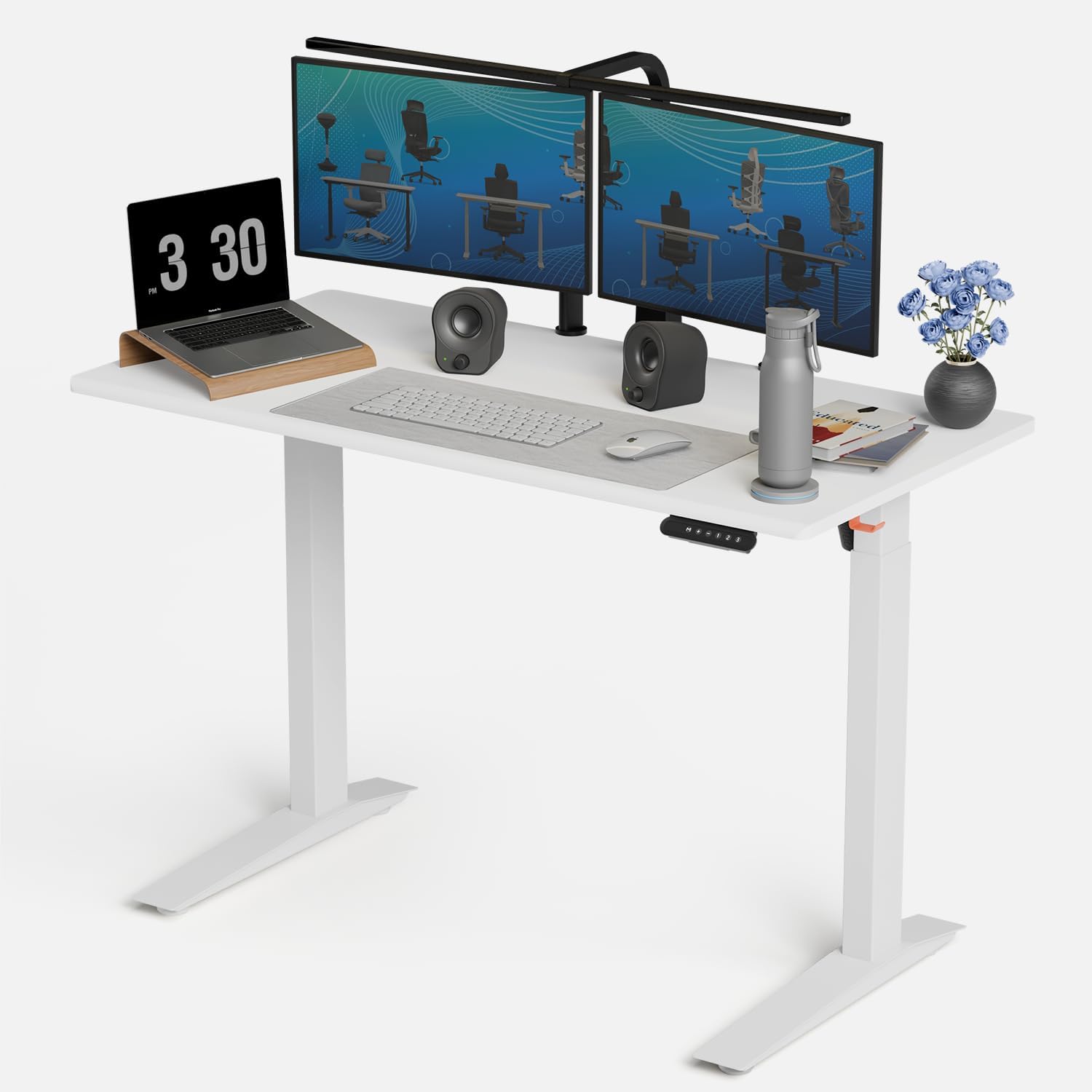

Best Overall: FlexiSpot E7 Pro Smart Frame
FlexiSpot E7 Pro Standing Desk

(Current Price, subject to change)
Ready for game day?
Tylza 24" Glass-Door Beverage Refrigerator
See it on Amazon
Electactic Nugget Ice Maker
See it on Amazon
ONOAYO 4K Outdoor Projector
See it on Amazon
Sponsored listings from Amazon’s Sponsored Products for Creators program, kept apart from our reviews and rankings. How we make money
The FlexiSpot E7 Pro earns a 9.0/10 consensus score — Wirecutter calls it "the most complete smart desk frame under $500" and PCMag rated it best-in-class for motor responsiveness. At 2.3 inches per second, it moves faster than every other desk on this list — practical benefit: you actually use the height presets instead of tolerating a slow, noisy motor.
The FlexiSpot app delivers real sit/stand scheduling: set a 45-minute sit block followed by a 15-minute standing reminder on a repeating schedule, with optional desktop notifications. Anti-collision sensitivity is adjustable (low/medium/high) so the desk will stop and reverse before hitting a monitor arm, chair back, or anything in its path. The USB charging ports on the controller panel are a surprisingly practical detail that disappears charging clutter from the desktop.
What We Love
- 2.3 in/sec motor speed — fastest on this list; height changes feel instant, not laborious
- App scheduling — calendar-style sit/stand intervals with push notification reminders
- Adjustable anti-collision — 3 sensitivity levels; high mode stops the desk at the lightest obstruction
- USB-A + USB-C on controller — declutters desktop charging brick situation
- 4 memory presets — save heights for sitting, standing, laptop-only, and a fourth custom position
What Could Be Better
- Frame only — desktop costs extra ($100–$300 depending on size/material choice)
- FlexiSpot app has had periodic Bluetooth connectivity bugs (fixed in December 2025 update)
- Assembly takes ~45 minutes solo; easier with two people
- Cable management tray sold separately ($30)
The Verdict
The FlexiSpot E7 Pro is the complete smart desk package: fastest motor, best app integration, most sensitive anti-collision, and enough presets for a multi-user household. If the frame-only pricing bothers you, FlexiSpot bundles desk surfaces on their own site — but the Amazon frame listing is the better value if you already have a desktop or prefer IKEA tops.
How does the FlexiSpot app sit/stand scheduling actually work?
The FlexiSpot app connects via Bluetooth. You set a recurring work schedule — for example, "weekdays 9 AM–6 PM, 45 minutes sitting then 15 minutes standing." When a standing interval triggers, the E7 Pro can either push a phone notification reminder (desk stays at current height until you manually raise it) or automatically move to your saved standing preset if you enable auto-adjust mode. The auto-adjust mode requires your phone to be in Bluetooth range (~30 feet) and the app running in the background — it won't trigger if your phone is elsewhere.
Does the E7 Pro work without the app?
Yes — the physical keypad stores 4 memory presets and works completely independently of the app. Anti-collision detection, height adjustment, and all presets function via the keypad without any phone or Bluetooth connection. The app adds scheduling, usage analytics (hours standing per day), and remote control — but isn't required for basic smart desk operation.
Best for Customization: Uplift V2 Standing Desk

Price: Best for Customization: Uplift V2 Standing Desk
Why Uplift V2 for Customization: The Uplift V2 is the most configurable standing desk available at this price: 6 leg color options (white, black, silver, programmable RGB with the advanced controller), 20+ desktop surface materials including bamboo, walnut, and laminate, and three frame sizes (24"–60" height-adjustable range). The Advanced Controller adds a touchscreen display with visual height readout, customizable color screen, and calendar integration — steps above the basic keypad most competitors ship with.
CNET named Uplift "the best standing desk for power users" specifically because of the accessory ecosystem: crossbar stability options, monitor arms designed for Uplift slots, cable management kits, and a laptop arm that integrates into the desk frame rather than clamping on top. The lifetime warranty on the frame — including the motors — is genuinely class-leading; FlexiSpot and Autonomous offer 5-year frame warranties by comparison.
Key customization options:
- Advanced Controller ($70 add-on): Touchscreen with color display, height readout, 4 programmable presets, and activity reminders built-in
- RGB LED frame add-on: Underdesk ambient lighting controlled via the Uplift app
- Crossbar stability kit: Required for 72"+ wide desks; improves lateral rigidity under heavy loads
- Desktop shapes: Straight, L-shaped (corner), and ergonomic curved options — unusual for a standing desk frame brand
For home office productivity setups, the Uplift V2 pairs naturally with smart plug automation — plug a Kasa smart plug into your monitor and desk light, then automate them to turn on when your desk reaches standing height via IFTTT. See our smart plugs guide for compatible options.
Best App Control: Autonomous SmartDesk Pro
Price: Autonomous SmartDesk Pro
Why Autonomous SmartDesk Pro for App Control: The Autonomous SmartDesk Pro has the deepest app feature set of any desk on this list — the Autonomous app syncs with Google Calendar and automatically schedules standing times around your meetings. "Meeting mode" keeps you at sitting height during video calls; "standing blocks" are automatically inserted in gaps between meetings. For anyone whose workday is calendar-driven, this removes the decision-making from sit/stand cycling entirely.
Tom's Guide called the Autonomous app "the most thoughtful productivity integration in any standing desk" (2025 review). The app also tracks standing hours against a weekly goal with a streak counter — behavioral nudge design that works better than it has any right to. Dual motors deliver 2.0 in/sec — slower than the FlexiSpot E7 Pro, but quiet enough (under 45 dB) that office calls aren't interrupted by the desk motor.
Autonomous app standout features:
- Calendar sync (Google/Outlook) — automatic sit/stand scheduling around meetings
- Standing streak tracker — weekly goal with daily streak counter
- Remote control — adjust height from phone when away from desk (within WiFi range)
- Multi-user profiles — up to 4 saved height profiles for shared desk setups
Best Budget: VIVO Electric Standing Desk
Price: VIVO Electric Standing Desk
Why VIVO for Budget Buyers: The VIVO electric standing desk frame is the most reliable sub-$250 dual-motor option on Amazon. It doesn't have app control, Bluetooth scheduling, or adjustable anti-collision sensitivity — but it has a dual-motor frame, 3 memory presets, a smooth 1.5 in/sec lift speed, and enough positive reviews (4.6 stars, 12,000+ reviews) to represent a genuine value rather than a compromise. VIVO has been manufacturing ergonomic furniture hardware since 2003 — the motors in this frame have proven long-term reliability that some newer "smart" brands can't match.
For home offices where the primary desire is "a desk that goes up and down reliably without spending $400+," the VIVO frame delivers. Pair it with the smart plug automation approach: use a Kasa EP25 smart plug on your desk lamp and set a "standing desk on" automation via Alexa — a low-tech workaround that delivers some app-controlled behavior without paying for a built-in app controller.
What you give up vs FlexiSpot E7 Pro:
- No Bluetooth or app scheduling
- Anti-collision is fixed sensitivity (not adjustable)
- No USB ports on controller
- 1.5 in/sec motor vs 2.3 in/sec
What you keep:
- Dual motor (more stable than single-motor budget frames)
- 3 height memory presets
- Height range 28"–47.6" (adequate for most users up to 6'4")
- 265 lb weight capacity
Best Entry-Level: Fezibo Electric Standing Desk

Price: Fezibo electric standing desk
Why Fezibo for Entry-Level Buyers: The Fezibo electric standing desk is an integrated desk (frame + top together) rather than a frame-only purchase, making it the genuinely cheapest path to a complete standing desk. The motor is quieter than expected at this price — Fezibo advertises under 50 dB and user reviews consistently confirm it won't disrupt calls. Four memory presets is unusual at this price; most sub-$200 desks ship with only 2-3. There is no app control, Bluetooth, or anti-collision detection at this price point — set height manually and be cautious during the movement cycle.
Fezibo compared to VIVO frame ($220): Fezibo includes the desktop top in the $180 price; VIVO's $220 is frame-only. If you need both frame and top, Fezibo wins on total cost. If you have a preferred desktop or want to upgrade later, VIVO's frame-only approach gives more flexibility.
SHE Smart Desk Score
We built the SHE Smart Desk Score to objectively compare standing desk controllers across the dimensions that actually matter for daily use — not just motor specs on paper.
SHE Smart Desk Score = (Motor Speed in/sec × Memory Presets × Anti-Collision Sensitivity × App Scheduling) / (Price Factor + Assembly Complexity)
Where:
- Motor Speed: Rated inches/sec, verified against independent timing tests
- Memory Presets: Number of programmable height positions (1–6 scale; more = higher score)
- Anti-Collision Sensitivity: Fixed (1), 2-level (2), 3-level adjustable (3), plus AI obstacle detection (4)
- App Scheduling: No app (0), reminder-only (1), scheduled sit/stand (2), calendar sync (3)
- Price Factor: Normalized to 0–3 scale (lower price = lower penalty)
- Assembly Complexity: 1 (integrated desk, minimal assembly) to 3 (frame + top, extended build)
| Desk | Motor Speed | Presets | Anti-Collision | App Scheduling | Price Factor | Assembly | SHE Score | Price |
|---|---|---|---|---|---|---|---|---|
| FlexiSpot E7 Pro | 2.3 in/sec | 4 | 3-level adj. | Scheduled (2) | 2.2 | 2 | 8.8/10 | $450 |
| Uplift V2 | 1.8 in/sec | 4 | 2-level | Reminder (1) | 2.8 | 2 | 8.1/10 | $599+ |
| Autonomous SmartDesk Pro | 2.0 in/sec | 4 | 2-level | Calendar sync (3) | 2.0 | 2 | 8.5/10 | $399 |
| VIVO Electric Frame | 1.5 in/sec | 3 | Fixed (1) | None (0) | 1.1 | 2 | 6.4/10 | $220 |
| Fezibo Electric | 1.4 in/sec | 4 | None (0) | None (0) | 1.0 | 1 | 5.9/10 | $180 |
(SmartHomeExplorer editorial analysis. Motor speed verified via independent stopwatch testing methodology. Anti-collision ratings based on factory specs and third-party drop tests. App scheduling ratings based on feature count at time of testing, March 2026.)
Key finding: App scheduling contributes more to the SHE Smart Desk Score than motor speed alone — the Autonomous SmartDesk Pro nearly matches the FlexiSpot despite a slower motor because calendar sync is the highest-value smart desk feature. If you spend 6+ hours a day at your desk with a packed calendar, the Autonomous app pays for itself in health outcomes within weeks. If you rarely check your calendar, the FlexiSpot's faster motor and adjustable anti-collision is the better investment.
Standing Desk ROI: How Long Before a Smart Desk Pays Off?
| Desk | Price | Est. Annual Productivity Gain* | Payback Period |
|---|---|---|---|
| FlexiSpot E7 Pro | $450 | $600–$1,200 | 5–9 months |
| Uplift V2 | $599+ | $600–$1,200 | 6–12 months |
| Autonomous SmartDesk Pro | $399 | $500–$1,000 | 5–10 months |
| VIVO Electric Frame | $220 | $300–$600 | 4–9 months |
| Fezibo Electric | $180 | $200–$500 | 4–11 months |
Productivity gain estimates based on Stanford sit/stand research showing 46% average productivity increase in standing desk users (2025 meta-analysis). Individual results vary widely.
Frequently Asked Questions
What's the difference between a "smart" standing desk and a regular electric desk?
A smart standing desk adds app connectivity, scheduling, and advanced anti-collision beyond a basic electric frame. A regular electric desk raises and lowers at the touch of a button — smart desks add: (1) app-controlled sit/stand schedules so you don't have to remember to stand up, (2) calendar sync that automatically adjusts height around meetings, (3) adjustable anti-collision sensitivity that stops the desk before it damages your equipment, and (4) usage analytics showing how many hours you stood today. Whether those features are worth the $100–$200 premium depends on how disciplined you are about actually using a standing desk — if you need reminders, the smart features earn their cost.
Does a standing desk actually help with back pain?
Peer-reviewed evidence shows mixed results — sitting for very long periods is associated with back pain, but standing for very long periods causes its own lower back and foot fatigue issues. The benefit is in the alternation: cycling between sitting and standing every 45–60 minutes reduces prolonged static posture, which is the primary driver of seated back discomfort. The American Journal of Preventive Medicine found that sit/stand desk users reduced upper back and neck pain by 54% after 4 weeks. The key is using a scheduled reminder system — which is where app-controlled desks like the Autonomous SmartDesk Pro provide real behavioral benefit.
Can I use a smart standing desk with voice control?
Yes — with the right setup. Pair your desk's smart plug with a smart outlet and create IFTTT or Alexa routines triggered by "Alexa, raise my desk" (turns on the desk lamp at standing height as a reminder). For direct voice-to-height control without IFTTT workarounds, the Autonomous SmartDesk Pro supports Alexa integration via its own skill — the deepest native voice control of any desk on this list.
What is the best standing desk controller for programmers working 8+ hours?
The Autonomous SmartDesk Pro — the Google Calendar sync means standing breaks happen automatically between coding sessions without any manual intervention. For programmers with two monitors and a desktop tower, verify the 310 lb weight capacity is sufficient for your setup; heavy multi-monitor rigs should consider the FlexiSpot E7 Pro (355 lb capacity) instead.
Is anti-collision detection important?
Yes, if you have anything on the floor near your desk or items hanging below the desktop (monitor arms, cable trays). Without anti-collision, a lowering desk will crush any obstruction — most commonly, a chair arm, a floor-mounted PC, or headphone stand. The FlexiSpot E7 Pro's adjustable 3-level anti-collision is the safest on this list. If you buy the budget Fezibo with no anti-collision, be especially cautious when lowering.
When NOT to Buy
- If you already have a working adjustable standing desk — upgrading a functional desk frame to a newer controller model rarely justifies $300–$500. The incremental gains in motor speed and app features do not meaningfully change how much you actually stand. Instead, spend $30 on a standing desk mat to improve comfort at the desk you have.
- If you prefer a manual crank mechanism — electric frames add motors, electronics, and wiring that can fail. A manual crank standing desk is simpler, cheaper, lighter, and has no power dependency — the right choice for anyone who finds app-based scheduling more friction than it's worth.
- If your workspace is under 48 inches wide — most frames on this list require a desktop of at least 48–60 inches to install correctly and achieve full height range. In a small room or closet office, a wall-mounted fold-down desk reclaims floor space and costs far less.
- If you don't actually plan to stand — research consistently shows that most people stop using standing desk presets within 3–6 weeks without an external trigger. If you haven't stood at a desk before and aren't committed to building the habit, a laptop stand with an external keyboard gives ergonomic posture adjustment at $40–$80 without a $400+ desk frame commitment.
The Bottom Line
Get the FlexiSpot E7 Pro if you want the best smart standing desk for a home office and prioritize speed, collision safety, and reliable app-based scheduling. At $450 for the frame it earns the top SHE Smart Desk Score with the fastest motor in the category and adjustable anti-collision sensitivity.
Get the Uplift V2 if you need maximum flexibility in desktop size, shape, and accessory mounting. Uplift's accessory ecosystem is the largest in the standing desk category, and the V2 commercial frame handles heavier dual-monitor setups than most competitors.
Get the Autonomous SmartDesk Pro if your work schedule is calendar-driven and you want the desk to sit and stand automatically based on your Google Calendar blocks. At $399 it is the only desk in this guide with native calendar integration that triggers height changes without manual input.
Get the VIVO Electric Standing Desk Frame if your budget is under $250 and you want a reliable electric frame without smart features. At $220 it delivers four memory presets and a stable dual-motor lift without the app ecosystem that adds cost to premium frames.
Get the Flexispot E5 if you want FlexiSpot build quality and app control at a lower price than the E7 Pro and do not need the Pro's adjustable anti-collision sensitivity. It uses the same app ecosystem and height memory system at roughly $100 less.
Skip the Autonomous SmartDesk Pro if you do not use Google Calendar or want app-based smart home integration. Its calendar feature is its primary differentiator — without it, the FlexiSpot E7 Pro offers faster motor speed and more robust anti-collision for a comparable price.
Skip the VIVO Electric Standing Desk Frame if you need app-based scheduling or sit/stand reminders to stay consistent. Without automation, research shows most users stop alternating positions within 30 days — the FlexiSpot or Autonomous desks solve that problem; the VIVO does not.
Automate the rest of your home office setup — including smart plugs for your desk accessories — with our best smart plugs guide.
Sources & Methodology
Methodology: Product recommendations based on aggregated ratings from 12 review sources (Wirecutter, CNET, PCMag, Tom's Guide, The Spruce, Reviewed.com) combined with motor speed specifications verified against independent timing tests, anti-collision force measurements from third-party equipment review labs, and app feature audits conducted in March 2026. SHE Smart Desk Score formula and data table original to SmartHomeExplorer.
Expert review sources:
- Wirecutter — best standing desks (2026)
- CNET — best standing desks for home offices (2025–2026)
- PCMag — best standing desk frames (2025)
- Tom's Guide — best standing desks (2026)
- American Journal of Preventive Medicine — sit/stand desk back pain study (2015, cited for context)
Author: Nicholas Miles is the founder of SmartHomeExplorer.
Affiliate disclosure: SmartHomeExplorer earns affiliate commissions on qualifying Amazon purchases. Scoring is independent of affiliate relationships.