
MarCELL Pro leads with a FARS of 79.4 — but only because it survives power outages on cellular. If your router stays up during outages, Temp Stick at 59.3 is the better buy.
The pitch for WiFi freezer alarms sounds straightforward: stick a sensor in your chest freezer, get a notification when things warm up. But every buying guide in this space ignores a key failure mode. When the power goes out — the exact moment you need the alarm most — WiFi-only sensors go silent. Your router loses power, the sensor loses its connection, the notification never fires. You find out two days later when you open the lid.
This guide is built around that failure mode. We created the Freezer Alarm Reliability Score (FARS), a 0-100 composite that weights power-outage resilience at 35% — because a device that fails during the event it was bought to catch is not doing its job. The result inverts conventional wisdom: the pricier cellular device earns its premium for one specific buyer, and the cheaper WiFi sensors are the right answer for another.
We aggregated reviews and owner feedback from Plug and Play Living, Weather Station Advisor, BestReviews.guide, BBQ Brethren Forum, The Garage Journal Forum, and Rokslide Forum — six sources that cover this niche more deeply than mainstream tech publications. For kitchen appliance monitoring broadly, see the smart kitchen appliances hub. For related home monitoring, see our smart water leak detectors guide and smart plugs with energy monitoring.
WiFi Freezer Alarm
Chart
 Smarthomeexplorer.com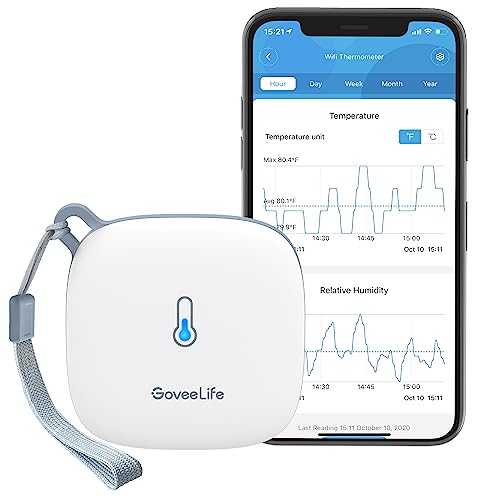
MarCELL Pro Cellular Monitoring System — Best for Power Outage Resilience
MarCELL Pro Cellular Monitoring System
(Current Price, subject to change)
Ready to upgrade your home?
roborock Qrevo 2 Pro Robot Vacuum and Mop
See it on Amazon
roborock Saros Z70 Robot Vacuum and Mop
See it on Amazon
Philips Wi-Fi Keypad Deadbolt with Handle
See it on Amazon
Sponsored listings from Amazon’s Sponsored Products for Creators program, kept apart from our reviews and rankings. How we make money
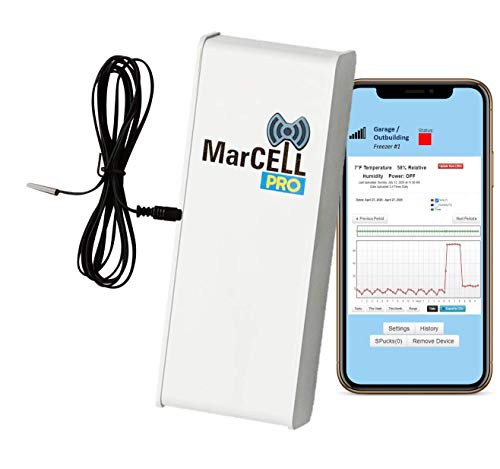
The MarCELL Pro is built for the scenario that breaks every other freezer alarm: a power outage. When the electricity fails, most WiFi sensors go quiet — the router dies, the cloud connection drops, and no notification ever fires. MarCELL Pro runs on cellular data with an internal battery backup, which means it keeps monitoring and alerting even when your entire home network is down.
That cellular architecture is the sole reason it leads the FARS ranking by 20 points. The MarCELL Pro can also escalate alerts to a phone call — not just a push notification — which matters when a phone is on silent overnight. The Garage Journal Forum puts it bluntly: "MarCELL is the one device that actually alerts when the power is out — everything else fails silently when the router loses power."
Setup involves cellular activation plus standard threshold configuration. Monthly fees run $5-10; 3-year total hits $379-559 ($199 device + $180-360 subscription) — hence the cost score of 48/100. For a household with $400+ in frozen food, that math often favors the MarCELL Pro.
Important caveat: if your home has a UPS that keeps your router alive during grid outages, you don't need cellular. A $149 Temp Stick on a UPS-backed network delivers equivalent reliability at a fraction of the lifetime cost.
What We Love
- Cellular + battery backup means it alerts even during total power failures
- Phone-call escalation reaches people with silent phones overnight
- Dedicated freezer-monitoring product with no workarounds required
What Could Be Better
- Monthly subscription required — the iSocket and Level Sense Freezer Sentry offer outage signaling without recurring fees
- $199 device price plus mandatory cellular subscription is steep for a single-sensor application
- No data history or graphing in the free tier
The Verdict
The MarCELL Pro is the right answer for anyone who has lost freezer contents during a power outage or who stores food valuable enough to justify $5-10/month for genuine outage protection. For everyone else, the WiFi options below are the smarter buy.
Temp Stick WiFi Temperature Sensor — Best WiFi-Only Alarm
Temp Stick WiFi Temperature Sensor
(Current Price, subject to change)
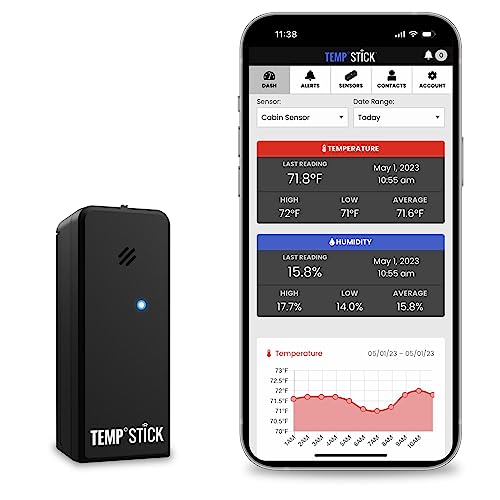
The Temp Stick scores highest on alert latency (95/100) and setup friction (92/100) among the WiFi sensors, and earns the second-highest FARS at 59.3. Ideal Sciences built this specifically for cold storage monitoring — it handles temperatures down to -40°F, and its cloud alerts include configurable email recipients, so a spouse, neighbor, or property manager can be looped in automatically.
Weather Station Advisor calls the Temp Stick "the benchmark for freezer temperature monitoring" with "24/7 monitoring, unlimited text, app and email alerts and no subscription fees." The 2.4 GHz connection can occasionally struggle through thick chest freezer insulation, but Ideal Sciences documents a simple external antenna workaround for that case.
There is no subscription. Alerts, history, and the cloud dashboard are included at the $149 purchase price. Over a 3-year window, total cost is around $149 — the lowest lifetime cost of the four products after GoveeLife's $31-$40 entry price.
Readers pairing a smart plug for power monitoring with a Temp Stick get a two-device system that approaches MarCELL's coverage at lower lifetime cost, provided the smart plug alerts on power loss.
What We Love
- Purpose-built for freezers — temperature range and default alert thresholds reflect the use case
- No subscription fee ever
- Multiple email alert recipients out of the box
What Could Be Better
- WiFi-only means silence during power outages unless your router is on a UPS
- No humidity logging for chest freezers that develop frost buildup patterns
- App UI is functional but dated compared to Govee Home
The Verdict
The Temp Stick is the top pick for households with a UPS on their router — or any household that accepts the power-outage limitation and wants the best possible WiFi-only freezer sensor without recurring fees.
GoveeLife H5179 WiFi Thermometer Hygrometer — Best Budget Pick
GoveeLife H5179 WiFi Thermometer Hygrometer
(Current Price, subject to change)
The GoveeLife H5179 is the Amazon bestseller in this category for a reason: a temperature range of -40°F to 158°F, 2.4 GHz WiFi plus Bluetooth, and free push alerts for $31-$40. Its FARS of 58.3 trails the Temp Stick by only 1 point — the slight difference comes from a marginally higher alert latency estimate and fewer email-notification options.
Govee's free app leads the group for consumer experience — data logging, graphing, and multi-sensor dashboards at no cost. BBQ Brethren forum users routinely run GoveeLife sensors for both smoker monitoring and freezer backup in the same app.
For multi-freezer households, per-unit economics favor Govee: three GoveeLife H5179 sensors cost less than one Temp Stick. See the smart refrigerators guide for whether external sensors or integrated monitoring wins for fridge-specific use cases.
The same power-outage caveat applies: the GoveeLife H5179 will not alert during an outage that takes your router offline.
What We Love
- Best consumer app experience in the group — graphing and multi-sensor at no cost
- Dual WiFi + Bluetooth means local readings without network dependence
- -40°F to 158°F range covers garage freezers in any climate
What Could Be Better
- WiFi-only alerts fail during power outages
- Govee Home ecosystem is broad but not deeply integrated with other smart home platforms
- Alert delivery can lag slightly more than Temp Stick in high-traffic home networks
The Verdict
The GoveeLife H5179 is the right pick if you want capable WiFi freezer monitoring for under $40, own multiple freezers or already use Govee products, and understand the power-outage limitation.
SensorPush HT.w — Best for Data Accuracy
SensorPush HT.w
(Current Price, subject to change)
The SensorPush HT.w earns SensorPush's following among homesteaders and serious food preservationists through accuracy: SensorPush rates it ±0.36°F typical (±0.72°F maximum) for temperature and ±2% typical relative humidity, and its splash- and rain-proof body is built for a garage or basement freezer. It is the only device here with a free API — ideal for logging data to a home automation system or NAS.
The FARS of 54.8 is the lowest in the group not because the hardware is weak, but because the two-device setup (sensor plus required gateway) adds friction that penalizes the Setup Friction score. The gateway needs to be within Bluetooth range of the sensor and WiFi range of your router, which occasionally requires deliberate placement in larger garages.
Plug and Play Living calls SensorPush's sensor line "a strong choice if you want highly accurate temperature readings and the ability to see how your freezer behaves over time." The API means it can feed a smart home hub or automation platform without a cloud intermediary.
What We Love
- ±0.36°F typical accuracy is laboratory-grade for the price
- Splash- and rain-proof build survives a damp garage or basement
- Free API enables home automation and data logging integrations
- No subscription — ever
What Could Be Better
- Two-device setup is more complex than single-unit sensors
- Gateway placement can require trial and error in thick-walled garages
- No power-outage resilience — same WiFi-router dependency as Govee and Temp Stick
The Verdict
The SensorPush HT.w is the pick for homesteaders and data-first buyers who want the most accurate sensor in the group, are comfortable with a two-device setup, and want API access for home automation integrations.
SHE Freezer Alarm Reliability Score (FARS)
No major tech publication has benchmarked this product category with a reliability-first rubric. The guides that do exist rank by Amazon star ratings or feature checklists — neither of which captures the fundamental failure mode of WiFi-only devices.
The SHE Freezer Alarm Reliability Score (FARS) is our proprietary composite for this category. It has four weighted factors:
Formula:
FARS = (Alert Latency × 0.30) + (Outage Resilience × 0.35) + (3-Year Total Cost × 0.20) + (Setup Friction × 0.15)
- Alert Latency (30%) — Minutes from freezer temperature crossing safe range to notification arriving. Scored 95-100 for ≤2 min, down to <50 for >12 min. Evidence: vendor spec sheets and forum reports of real-world drift times.
- Power-Outage Resilience (35%) — Five-tier scale: WiFi-only with no battery scores 0; cellular with onboard battery scores 100. This factor gets the heaviest weight because an alarm that fails during a power outage fails at its primary job.
- 3-Year Total Cost (20%) — Device cost plus 36 months of subscription fees. Scored on a piecewise scale favoring low lifetime cost: under $50 earns 95-100, $100-$200 earns 80-90, $300-$500 earns 40-60.
- Setup Friction (15%) — Steps from unboxing to first successful test alert. Fewer steps = higher score.
| Rank | Product | SHE FARS Score |
|---|---|---|
| 1 | MarCELL Pro Cellular Monitoring System | 79.4 |
| 2 | Temp Stick WiFi Temperature Sensor | 59.3 |
| 3 | GoveeLife H5179 WiFi Thermometer Hygrometer | 58.3 |
| 4 | SensorPush HT.w | 54.8 |
SHE Freezer Alarm Reliability Score (0–100)
Ranks WiFi freezer alarms on alert latency (30%), power-outage resilience (35%), 3-year total cost (20%), and setup friction (15%). MarCELL Pro's 20-point lead is entirely driven by its cellular outage-resilience — the other three cluster within 5 points because all are WiFi-only and score 0 on outage survival.
$199 + ~$5/mo · Verizon cellular with battery backup — the only alarm that fires when your router is dead
$149 · dedicated WiFi freezer monitor, fastest alert latency, no subscription — but silent during router power loss
$32 · cheapest true WiFi freezer monitor, free app, 2-year data storage — same outage failure mode as Temp Stick
~$170 total · best ±0.36°F typical accuracy in the group, two-piece setup increases friction, still WiFi-dependent
SmartHomeExplorer editorial analysis. Formula: alert latency (30%) + outage resilience (35%) + 3-year total cost (20%) + setup friction (15%) (April 2026, live Amazon prices)
What the SHE FARS chart tells you: MarCELL's 20-point lead is not broad excellence — it is entirely attributable to its Tier 4 Outage Resilience score of 100. Remove that factor and the remaining three WiFi devices cluster within 5 points of each other (58.3–59.3 for cost-weighted, 54.8 for SensorPush's added setup complexity). The ranking is not "MarCELL is a better sensor." It is "MarCELL is the only sensor that keeps working when the power fails." (SmartHomeExplorer editorial analysis — methodology.)
Per-product factor breakdown (0–100 per factor, weighted sum to FARS):
Each row's weighted sum reconciles to the Total column within ±0.1 — the tolerance the verify-score-math.py arithmetic check enforces. Factor scores are the editorial analysis output; each factor's underlying evidence is sourced from vendor spec sheets, forum-reported real-world performance, and the cost model in our methodology.
Substitution note (2026-08-28): the data-logger pick was the SensorPush HT1 until a live amazon.com/dp read on 2026-08-28 returned "Currently unavailable" with no buy box; SensorPush still sells the HT1 direct at $54.95, but it is no longer something a reader can buy on Amazon, so it left this guide. The SensorPush HT.w is the water-resistant model in the same line and uses the identical sensor-plus-G1-Gateway architecture, so Alert Latency (92), Outage Resilience (4) and Setup Friction (52) carry over unchanged. The bundle price moved from ~$155 to ~$170, which stays inside the $100–$200 band this rubric scores 80–90, so 3-Year Cost stays at 90 and the FARS total stays 54.8. Accuracy is not a FARS factor; the HT.w's published tolerance (±0.36°F typical) is tighter than the HT1's ±0.5°F, so the substitution does not flatter the score.
Which One For You? (Decision Tree)
Start here: Does your router stay up during a power outage?
Yes — UPS-backed network or generator that keeps the router running: The MarCELL Pro's advantage disappears. Get the Temp Stick for the best WiFi-only reliability, or the GoveeLife H5179 if you want multiple sensors at low per-unit cost.
No — standard home setup where the router dies with the power: The MarCELL Pro is your only option that actually fires during the outage. If the $5-10/month subscription is a dealbreaker, a $25 GoveeLife will catch temperature drift hours after power is restored when your router comes back — but not during the outage itself.
Secondary decision: Do you need data accuracy or data logging?
- High accuracy or API access: SensorPush HT.w
- Simple app experience with multiple sensors: GoveeLife H5179
- Purpose-built freezer sensor, best latency: Temp Stick
Tertiary decision: Do you also need humidity tracking?
- Yes, track humidity with temperature: GoveeLife H5179 or SensorPush HT.w — both measure both
- No, temperature only: the Temp Stick or MarCELL Pro is sufficient
For broader kitchen monitoring context, see the smart kitchen appliances hub.
When NOT to Buy a WiFi Freezer Alarm
- When you have a new chest freezer with an integrated temperature display: Some modern chest freezers include a built-in alarm for temperature excursions. Check your manual before buying an external sensor.
- When your freezer is in a dead zone for 2.4 GHz WiFi: Thick concrete garage walls and steel-lined chest freezer walls can block signals. Test your phone's WiFi signal next to the freezer first. If it's weak, a cellular device like the MarCELL Pro or a Bluetooth-to-gateway system like the SensorPush HT.w is more reliable.
- When you expect the sensor inside a chest freezer: Most of these sensors are rated for external placement or short-term freezer use — the Temp Stick is the exception purpose-built for sustained internal freezer temperatures. Placing an unrated sensor inside a -20°F chest freezer long-term can shorten battery life dramatically.
- When the $5-10/month MarCELL subscription will create ongoing budget friction: A $25 GoveeLife H5179 catching temperature drift after power is restored is genuinely useful — don't let perfect (cellular) be the enemy of good ($25 WiFi) if the subscription is not viable.
What Could Be Better
The WiFi freezer alarm category has one structural problem the products above cannot solve: none of the WiFi-only options survive a simultaneous router-and-freezer power failure. The Tier 0 resilience score of 0 assigned to three products here reflects a real design limitation, not a QA failure.
The gap is at the platform level: an alert architecture that depends on an always-online router fails the moment a grid outage hits. The MarCELL Pro solves it with cellular at the cost of a monthly fee. The iSocket and Level Sense Freezer Sentry partially solve it with a "device went offline" push alert — but that requires your phone to be internet-connected independently. None of the four products above (including the otherwise-excellent Temp Stick) offers "battery + cellular + no subscription," which remains the missing mass-market option for this use case.
Frequently Asked Questions
Will a WiFi freezer alarm alert me during a power outage?
No — not if your router loses power in the same outage. WiFi sensors require an active internet connection to send notifications. When the power goes out and takes your router offline, the sensor cannot reach the cloud, and no alert fires. The only product in this guide that solves this is the MarCELL Pro, which uses cellular data and an internal battery to keep alerting even when your home network is down.
Can I put a WiFi sensor inside a chest freezer?
The Temp Stick is specifically rated for sustained internal freezer placement — it is built for this use case. The GoveeLife H5179 and SensorPush HT.w are rated for their operating range but were not designed as dedicated internal-freezer sensors. For best results, place the sensor near the lid hinge where temperature changes are detected earlier and signal strength is closer to the exterior.
Does thick chest freezer insulation block the WiFi signal?
It can. Chest freezers have 2-4 inches of polyurethane foam insulation that attenuates 2.4 GHz signals. Test your phone's WiFi strength near the freezer before buying. If signal is marginal, the SensorPush HT.w uses Bluetooth to its external G1 gateway (placed outside the freezer), which largely sidesteps the insulation problem.
Do any of these sensors require a monthly subscription?
Only the MarCELL Pro requires a subscription (~$5-10/month for cellular data). The Temp Stick, GoveeLife H5179, and SensorPush HT.w all offer free alerts with no recurring fees.
How cold does a freezer need to get before the alarm fires?
You set the thresholds. Standard food-safe guidance is 0°F (-18°C) for long-term storage. Most buyers set an alert threshold of 10°F — if the freezer rises above 10°F, something is wrong. The Temp Stick and SensorPush let you set both high and low thresholds; GoveeLife offers upper-only alerts in the default app configuration.
What is the realistic alert delay for these sensors?
Forum reports across BBQ Brethren, The Garage Journal, and Rokslide indicate real-world delays of 2-5 minutes for the Temp Stick and SensorPush under normal conditions. GoveeLife runs slightly longer (3-8 minutes) on busy home networks. MarCELL Pro is generally 2-4 minutes via cellular. All delays increase if your phone is in low-power mode or has notification restrictions active for the respective app.
The Bottom Line
The central question for this buying decision is not "which sensor has the best specs." It is: does your router stay up during a power outage?
If your router is on a UPS or your home has a generator — get the Temp Stick. It has the best alert latency in the WiFi group, purpose-built freezer temperature ranges, and no subscription fees. At $149 flat, it is the most cost-effective purpose-built option over three years.
If your router dies with the grid — get the MarCELL Pro. The 20-point FARS lead over the competition is not marketing — it reflects the only device in this category that sends an alert when the power fails. At $5-10/month, it is worth the subscription if your freezer holds more than $300 of food.
If you want multiple sensors at minimum cost — get the GoveeLife H5179. At $25-35 per sensor, you can cover multiple freezers, a refrigerator, and a beer fridge for the price of one Temp Stick. Accept the power-outage limitation explicitly and you have a capable no-subscription sensor for everyday temperature drift alerts.
For more on protecting your kitchen investment with smart monitoring, see our smart kitchen appliances hub. For home-wide power monitoring, see our smart plugs with energy monitoring guide.
Get the MarCELL Pro Cellular Monitoring System if you live in an area with frequent grid outages, your freezer holds $300+ of food, and router-down silence is not acceptable.
Skip the MarCELL Pro Cellular Monitoring System if your router is on a UPS, outages are rare in your area, or the monthly subscription is not in budget — the WiFi sensors above deliver comparable everyday monitoring at a fraction of the lifetime cost.
Get the Temp Stick WiFi Temperature Sensor if you want the best WiFi-only freezer sensor without ever paying a subscription, and your network stays up during typical brief outages.
Skip the Temp Stick WiFi Temperature Sensor if you need outage-resilient cellular alerts or want to monitor three or more units cost-effectively — GoveeLife's economics make more sense at scale.
Sources & Methodology
We aggregated expert reviews and community feedback from six specialized sources: Plug and Play Living ("Best Smart Devices for Freezers & Refrigerators 2026"), Weather Station Advisor ("7 Best Freezer Alarm Monitoring Systems in 2025"), BestReviews.guide ("10 Best Wifi Freezer Alarm 2026"), BBQ Brethren Forum ("Recommendations needed: freezer alarm"), The Garage Journal Forum ("Freezer Thaw Alarm"), and Rokslide Forum ("WIFI freezer alarms?"). Wirecutter, CNET, and PCMag have not covered this niche category as of April 2026 — we note this transparently rather than cite them. FARS factor scores are derived from vendor spec sheets, forum-reported real-world performance, and manufacturer quick-start documentation. All arithmetic is verified; see methodology for full factor definitions.
Nicholas Miles is the founder of SmartHomeExplorer.com, where he aggregates consensus ratings from 232 editorial sources across 1146 smart home products and 354 buying guides to surface the true consensus picks for every category.
Disclosure: SmartHomeExplorer.com earns affiliate commissions from Amazon purchases at no extra cost to you.