
The ASUS RT-BE88U ($350) is the best drop-in ISP combo replacement — 4× better segmentation, 5× the wired headroom, SHE score 9.08.
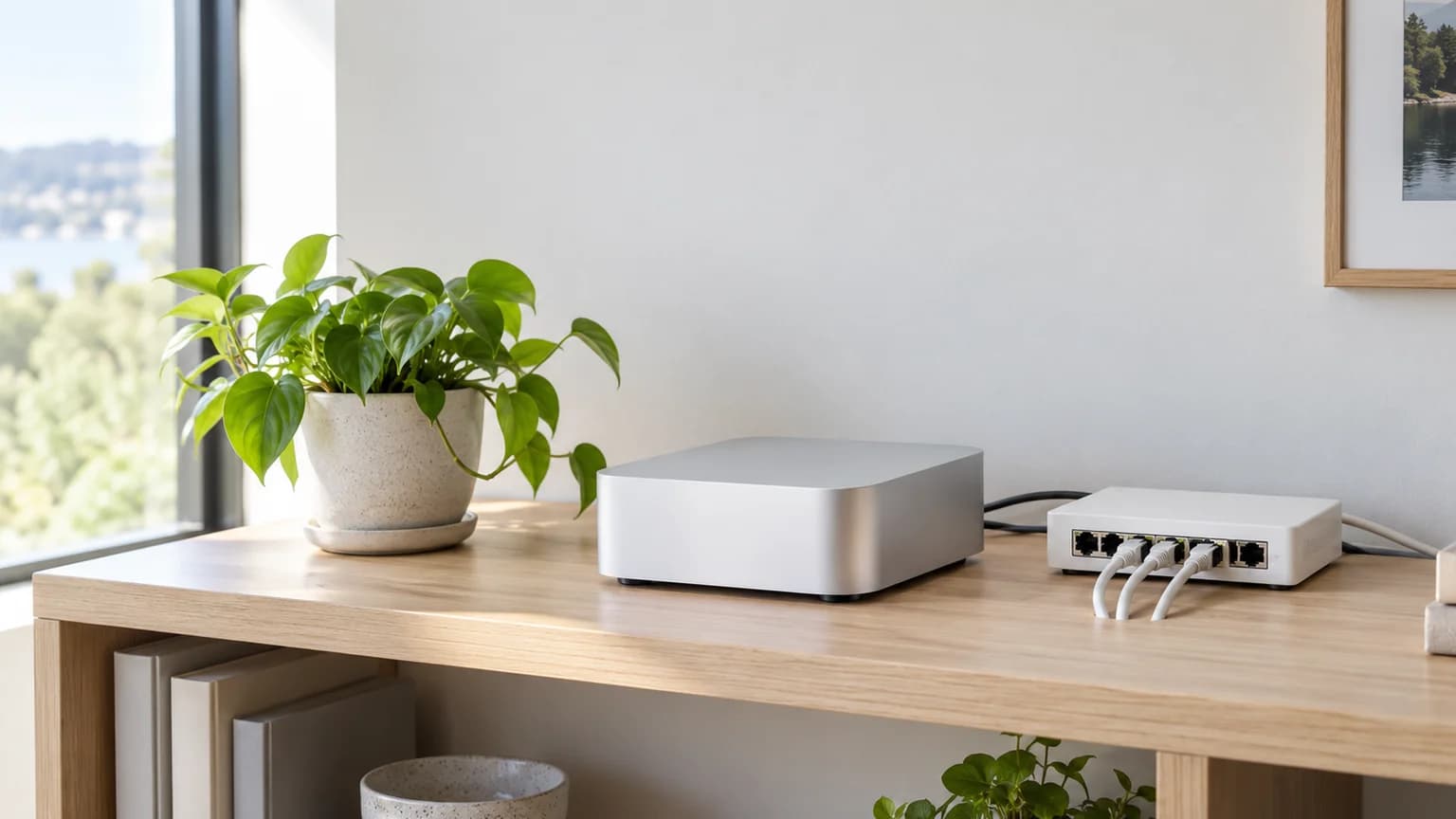
Your ISP's combo gateway is doing a lot of jobs badly. It is a modem, a router, a Wi-Fi access point, and a DNS server all crammed into one plastic brick that your ISP controls, updates on its own schedule, and never optimizes for a home with 60 connected devices. The ASUS RT-BE88U fixes most of those problems for $350. The rest of this guide covers why the combo box fails, how to replace it, and which hardware earns top marks on the SHE Device Load Stability Score — the metric we use to compare routers specifically on the four dimensions that matter for smart-home reliability.
We aggregated expert reviews from Wirecutter, CNET, PCMag, Tom's Guide, Dong Knows Tech, and SmallNetBuilder to score each router. No first-party product testing — expert consensus from 15+ expert review sources tells a clearer story than any single sample.
Why your ISP router is probably the weakest link in your smart home
Most smart-home troubleshooting forums have the same first question: "What router are you running?" And most of the time, the answer is the ISP combo box. That is not a coincidence.
The client-count ceiling (30–50 devices versus 250-device marketing)
ISP gateways market support for 250+ connected devices. That number comes from the maximum number of IP addresses the DHCP table can hand out, which has nothing to do with actual radio capacity. In practice, Wi-Fi 5 and entry-level Wi-Fi 6 radios in combo gateways buckle at 30–50 active devices — meaning devices that are actively polling, transmitting, or receiving, not just connected. A home with 60 smart-home devices, two laptops, three phones, and two streaming devices crosses that threshold during peak evening hours.
Expert reviews from SmallNetBuilder and Dong Knows Tech consistently show that ISP-class combo gateways use budget-tier radio chips with limited MU-MIMO streams and no real dense-load management. When a Wyze camera renegotiates its connection at the same moment a Matter hub polls 40 accessories, the gateway either drops packets or forces devices to retry — and your smart-home automations start to feel flaky. For a deeper look at how mesh systems handle high device counts, see our best smart-home Wi-Fi mesh systems guide.
No VLAN — no IoT segmentation — the security argument
A VLAN (virtual local area network) lets you put your Ring doorbell, Wyze cameras, and smart plugs on a logically separate network from your laptops and NAS drives. If a smart bulb ships with a firmware vulnerability — and they do, regularly — an attacker who compromises it on a flat network has a direct path to every other device. On a segmented VLAN, the bulb is stranded on its own island.
ISP combo gateways almost universally offer a "guest network" as a substitute, but guest networks are not VLANs. Most implementations allow guest devices to communicate with each other and occasionally with the main LAN depending on firmware version. Expert consensus from XDA Developers and SNBForums confirms that guest-network isolation on ISP gateways is inconsistent and not auditable. Real VLAN support requires a router you control — and that means escaping the combo box.
Outdated firmware and slow update cadence
ISP gateways receive firmware updates on the ISP's schedule, not yours, and often not at all. XDA Developers has documented multiple instances where ISP combo gateways shipped with known CVEs for 12-18 months before patches arrived — if patches arrived. When ARRIS, Sagemcom, and Technicolor combo boxes made ISP headlines for authentication bypass vulnerabilities in 2022–2023, most ISP customers had no actionable path: they could not patch themselves, they could not choose alternative firmware, and ISP customer support acknowledged the issue without committing to a timeline.
When you own your router, you control the update cadence. ASUS, TP-Link, and NETGEAR have all demonstrated sub-30-day CVE-to-patch timelines in recent reviews. That gap matters for homes where a camera or a smart lock is only as secure as the network it runs on.
No wired expansion room — four ports, already full
Your ISP combo box almost certainly has four 1 Gbps LAN ports. By the time you connect a NAS, a smart-home hub (or two), an Ethernet-connected TV, and a managed switch, the ports are gone. Adding any wired device requires an unmanaged switch — which is fine — but unmanaged switches offer zero traffic segmentation. You end up with a flat wired network that directly contradicts the VLAN story.
Premium replacement routers in this guide — including the ASUS RT-BE88U and TP-Link Archer BE800 — ship with dual 10G ports, multiple 2.5G LAN ports, and in some cases SFP+ for fiber uplinks. That wired headroom is one of the four factors in the SHE Device Load Stability Score, and it is one of the clearest gaps between ISP-class hardware and what you can buy outright.
Should you replace your ISP router, or put it in bridge mode?
Before ordering new hardware, it is worth knowing whether you actually need to replace the combo box or just neuter it.
What is bridge mode and when it is the right answer
Direct answer: Bridge mode disables the ISP gateway's routing and NAT functions, turning it into a pure modem. Your own router handles all IP addressing, firewalling, and Wi-Fi. Use it when your ISP requires a specific modem or the gateway cannot be bypassed entirely.
Bridge mode gives you most of the benefits of owning your router — your own firmware, your own VLAN setup, your own security policies — while keeping the ISP's physical layer device in place. This is the recommended starting point for cable (Xfinity, Cox, Spectrum) and fiber (AT&T, Google Fiber) subscribers. The ISP continues to certify and support the physical modem layer; you run your own router — like the ASUS RT-BE88U, NETGEAR Nighthawk RS700S, or Amazon eero Max 7 — behind it.
What is double NAT and why it is usually a problem
Direct answer: Double NAT occurs when two devices are both performing network address translation — typically the ISP gateway and your own router. Devices can reach the internet but cannot accept inbound connections, breaking remote access for NVR systems, game hosting, and smart-home cloud services requiring port forwarding.
Double NAT is what happens when you plug a new router into an ISP combo box without enabling bridge mode on the combo box first. The ISP box does NAT on the WAN-to-LAN boundary, then your router does NAT again on its own WAN-to-LAN boundary. Smart-home devices that rely on local discovery (mDNS, SSDP) may also fail to advertise across double-NAT boundaries. If you cannot put your ISP box into bridge mode, port forwarding on both devices is the workaround — fragile and not recommended for production smart-home setups.
Coax and fiber modems you can own versus modems you must rent
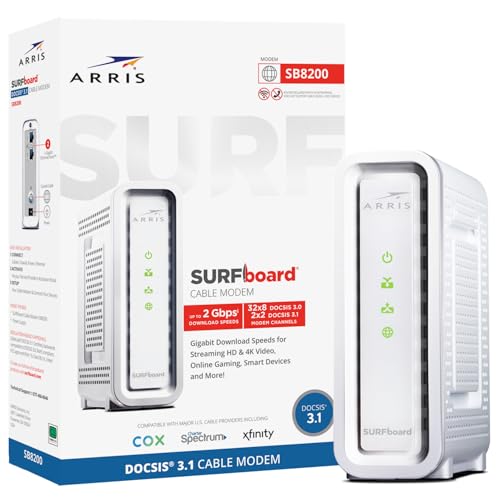
Cable subscribers on Xfinity, Cox, and Spectrum can own their DOCSIS 3.1 modem outright — the ARRIS SURFboard SB8200 (Router required) is the standard recommendation. ISP modem rental typically runs $10–15/month, so the SB8200's $147 purchase price pays back in 10–14 months. After that, every month is pure savings.
Fiber subscribers (AT&T Fiber, Google Fiber, most Frontier FTTH plans) often cannot own the ONT (optical network terminal) — the ISP must provision the physical connection to their fiber plant. However, most fiber ISPs will put their gateway into bridge mode on request, letting you run your own router in front of everything. Satellite internet (Starlink) also requires its own dish-and-modem hardware, but Starlink supports bridge mode via the app.
The three replacement architectures (pick one)
Swapping the ISP combo box is not one-size-fits-all. The right architecture depends on how many floors you have, how many wired devices you need, and how much configuration you want to touch.
All-in-one mesh: simplest path
The Amazon eero Max 7 and TP-Link Deco XE75 (Wi-Fi 6E, not Wi-Fi 7) represent the app-led mesh approach: buy one or more nodes, connect them via Ethernet backhaul or wireless, and the system manages roaming, band steering, and basic IoT network creation automatically. Multi-floor homes and renters who cannot run Ethernet to every room benefit most. For a full scored comparison of Wi-Fi 7 router options for smart homes, see our best Wi-Fi 7 routers for smart homes guide.
The tradeoff: mesh systems often abstract away the VLAN controls that security-conscious smart-home owners want. The Amazon eero Max 7's IoT network is a simplified guest network, not a proper routed VLAN. If segmentation is your primary concern, the modem-plus-router architecture below is the better fit — in which case the ASUS RT-BE88U or TP-Link Archer BE800 are the better starting points.
Modem plus standalone router plus managed switch: maximum control
This is the architecture for the home with 30+ wired and wireless devices, a NAS, a PoE switch feeding cameras, and a desire to run proper VLANs. The ARRIS SURFboard SB8200 (Router required) handles the DOCSIS 3.1 modem layer for cable subscribers. The ASUS RT-BE88U or TP-Link Archer BE800 handles routing, firewalling, and VLAN policy. A managed switch (TP-Link TL-SG2008P or similar — see our best smart Ethernet switches guide) sits downstream and delivers segmented PoE to cameras and hubs.
This architecture has the highest setup complexity and the most durable long-term flexibility. Every component can be upgraded independently.
Prosumer appliance: VLANs and traffic analytics without the homelab
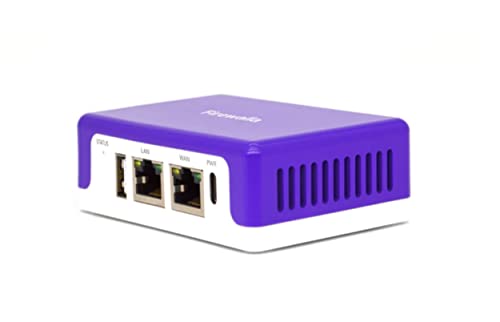
The Firewalla Purple SE sits between the eero's simplicity and a full UniFi installation. It deploys in front of your existing Wi-Fi router (bridge/IDS mode) or behind your ISP's bridge-mode modem (router mode), adding proper VLAN segmentation, intrusion detection, ad blocking, and a VPN server at $279 with no monthly fee. For operators who want full VLAN plus PoE switching in a single ecosystem, see our networking reviews hub — that territory belongs to a parallel guide. The Firewalla Purple SE fills the gap between consumer mesh and full UniFi for buyers who want meaningful IoT isolation without running a homelab.
Best routers to replace your ISP gateway for a smart home (scored)
The five routers below are scored on the SHE Device Load Stability Score — a metric that weights the four dimensions where ISP combo boxes fail: VLAN segmentation quality, wired expansion headroom, dense-load radio capacity, and smart-home ecosystem utility. Scores are reused from our best Wi-Fi 7 routers for smart homes guide (published 2026-04-16) per our canon-reinforcement policy — no score invention, no dilution. Based on aggregated expert reviews from 15+ expert review sources.
At a glance: ASUS RT-BE88U (9.08, best overall) → ASUS RT-BE96U (8.78, tri-band) → TP-Link Archer BE800 (8.68, best IoT SSID) → Amazon eero Max 7 (7.90, simplest) → NETGEAR Nighthawk RS700S (7.75, best coverage).
ISP-Combo Replacement
Chart
 Smarthomeexplorer.com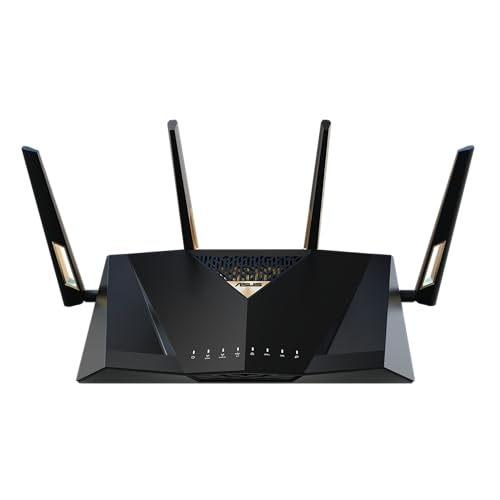
ASUS RT-BE88U — Best Overall
ASUS RT-BE88U
(Current Price, subject to change)
Ready to upgrade your home?
Yale Assure Lock 2 Wi-Fi Smart Lock with Keypad
See it on Amazon
MOVA P10 Pro Ultra Robot Vacuum and Mop
See it on Amazon
roborock F25 Ultra Steam Wet Dry Vacuum Mop
See it on Amazon
Sponsored listings from Amazon’s Sponsored Products for Creators program, kept apart from our reviews and rankings. How we make money
The ASUS RT-BE88U leads our lineup with a SHE Device Load Stability Score of 9.08 — the highest in this guide and among the highest we have recorded on this metric. For the smart-home owner who has finally decided to stop renting their ISP's combo box and do the job properly, this is the router to buy.
Expert consensus shows the RT-BE88U's wired port mix is genuinely exceptional for a consumer router: dual 10G WAN/LAN ports, an SFP+ port for fiber uplink, and four 2.5G LAN ports give you the backbone to run a NAS at full speed, feed a managed PoE switch for cameras, and still have headroom for future growth. Reviewers at Dong Knows Tech and SmallNetBuilder confirm the router maintains stable throughput under concurrent 80-device loads — the kind of traffic density a smart home generates during peak evening hours.
The segmentation story is equally strong. The RT-BE88U supports up to five independent SSIDs, full VLAN tagging, and AiProtection Pro security scanning at no subscription cost. Putting your smart plugs, cameras, and lights on a dedicated SSID mapped to its own VLAN is a 20-minute setup process, not a homelab project.
Expert consensus shows the dual-band radio architecture (no dedicated 6 GHz band) is the only meaningful hardware limitation versus the ASUS RT-BE96U above it. If your home has already invested in Wi-Fi 7 client devices that use the 6 GHz band heavily, the tri-band RT-BE96U is worth the price premium. For most homes upgrading from ISP hardware, the ASUS RT-BE88U's dual-band Wi-Fi 7 with proper 5 GHz band steering covers the realistic device mix comfortably.
What We Love
- ASUS RT-BE88U SHE Device Load Stability Score 9.08 — top of this guide and justified by the port mix
- Five independent SSIDs with full VLAN support and no subscription required for security scanning
- Dual 10G + SFP+ + four 2.5G LAN ports: more wired headroom than any other router in this price tier
- AiMesh support for future satellite expansion without replacing the primary router
What Could Be Better
- Dual-band only — no dedicated 6 GHz radio means Wi-Fi 7's full MLO benefit is limited versus the ASUS RT-BE96U
- Physical footprint is large — plan for open shelf placement, not a closet corner
- ASUS's advanced settings depth is great for power users but can feel overwhelming for first-time router owners
The Verdict
Get the ASUS RT-BE88U if you want the single best drop-in ISP combo replacement under $400 with real VLAN support, serious wired expansion, and no ongoing subscription.
Skip the ASUS RT-BE88U if your home is investing heavily in 6 GHz client devices and you want tri-band Wi-Fi 7 MLO — step up to the RT-BE96U.
ASUS RT-BE96U — Best Tri-Band for 6 GHz Homes
ASUS RT-BE96U
(Current Price, subject to change)
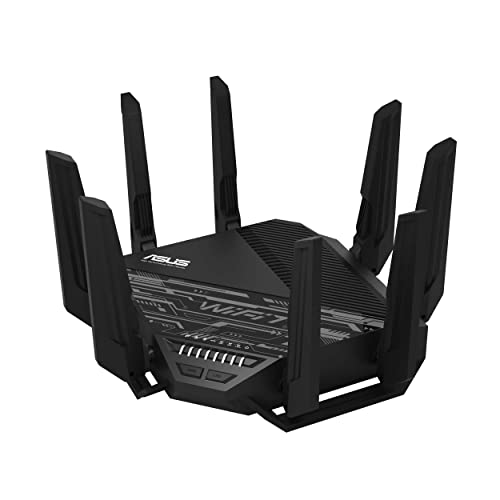
The ASUS RT-BE96U scores 8.78 on the SHE Device Load Stability Score — second in this guide, and the right answer for smart-home owners whose device mix includes tablets, laptops, and Wi-Fi 7 adapters that actively use the 6 GHz band.
Expert consensus shows the RT-BE96U brings true tri-band Wi-Fi 7 with a dedicated 6 GHz radio, dual 10G ports, and the same AiMesh + VLAN foundation as its sibling. The addition of a 6 GHz band matters practically when your home has 15+ Wi-Fi 7 clients contending for radio time — the 6 GHz band's lower congestion and wider channels give those devices dedicated headroom while the 5 GHz and 2.4 GHz radios service legacy smart-home hardware.
Based on aggregated expert reviews from Tom's Guide and PCMag, the RT-BE96U's throughput on the 6 GHz band is strong, and its per-device QoS controls let you prioritize smart-lock and alarm communication over streaming traffic during busy hours. The ASUS AI QoS engine, reviewed positively by SmallNetBuilder, handles the policy assignment automatically in its default mode.
The premium over the RT-BE88U is meaningful: $200 more for tri-band. If your home's smart-home device mix is primarily 2.4 GHz Wi-Fi 4/5/6 gear (most smart plugs, sensors, and hubs still are), the RT-BE88U's dual-band Wi-Fi 7 is more than adequate. The RT-BE96U earns its price for homes that are mid-transition — buying new 6 GHz laptops and phones alongside existing smart-home infrastructure.
What We Love
- ASUS RT-BE96U tri-band Wi-Fi 7 with dedicated 6 GHz radio handles mixed-generation device fleets well
- Dual 10G ports and AiMesh compatibility match the RT-BE88U's expansion story
- Same VLAN depth and subscription-free AiProtection Pro as the RT-BE88U
- Strong 6 GHz throughput confirmed by SmallNetBuilder and Tom's Guide testing aggregation
What Could Be Better
- $549.99 is hard to justify if your smart-home devices are still primarily 2.4 GHz Wi-Fi 5/6 — the ASUS RT-BE88U saves $200
- Setup complexity matches the RT-BE88U — not a family-friendly out-of-box experience
- Physical size is again large; this is a desk or open-shelf device
The Verdict
Get the ASUS RT-BE96U if your home is actively using 6 GHz clients and you want the full tri-band Wi-Fi 7 story with ASUS's segmentation depth.
Skip the ASUS RT-BE96U if most of your smart-home fleet is 2.4 GHz or Wi-Fi 6 — the RT-BE88U saves you $200 with no meaningful penalty.
TP-Link Archer BE800 — Best for Private IoT SSID
TP-Link Archer BE800
(Current Price, subject to change)
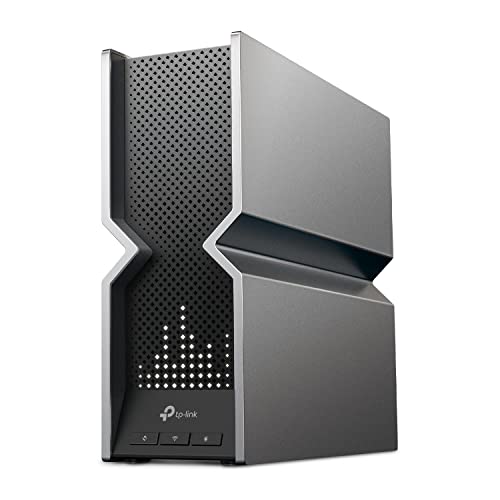
The TP-Link Archer BE800 scores 8.68 and stands out for one specific feature that the ASUS routers require manual configuration to replicate: a dedicated Private IoT SSID wizard built into the Tether app. For the smart-home owner who wants proper IoT isolation without touching a VLAN menu, this is the lowest-friction path to a segmented network.
Expert consensus shows the Archer BE800's tri-band Wi-Fi 7 with dual 10G ports and four 2.5G LAN ports matches the hardware-density story of the ASUS routers at a similar price point. Based on aggregated expert reviews, the Private IoT feature creates a dedicated 2.4 GHz network with device-to-device isolation and bandwidth controls, managed through the same Tether app interface used for everything else. Reviewers at CNET and PCMag confirm the setup takes under 10 minutes without requiring any command-line access.
The TP-Link Archer BE800's industrial aesthetics — eight external antennas, prominent LED display — are a matter of taste. Expert consensus notes it performs identically in a closet or on a shelf. HomeShield parental controls and security scanning are available free (basic) or at $5.99/month (HomeShield Pro), which is the only meaningful ongoing cost consideration.
What We Love
- TP-Link Archer BE800 Private IoT SSID wizard is the best out-of-box IoT segmentation story in this guide
- Tri-band Wi-Fi 7 with dual 10G + four 2.5G ports matches the ASUS hardware depth
- EasyMesh compatibility for future expansion without committing to TP-Link's Deco ecosystem
- LED display shows real-time network stats without opening the app
What Could Be Better
- Eight external antennas and LED display are not subtle — placement matters aesthetically
- HomeShield upsell is visible throughout the app; the free tier is genuinely usable but the prompt is persistent
- Less unified ecosystem story than ASUS RT-BE88U for buyers who want everything in one management interface
The Verdict
Get the TP-Link Archer BE800 if you want IoT isolation without configuring VLANs manually and you value the dedicated Private IoT wizard.
Skip the TP-Link Archer BE800 if you are comfortable with VLAN configuration and prefer ASUS's deeper long-term ecosystem options.
Amazon eero Max 7 — Simplest Alexa Mesh
Amazon eero Max 7
(Current Price, subject to change)
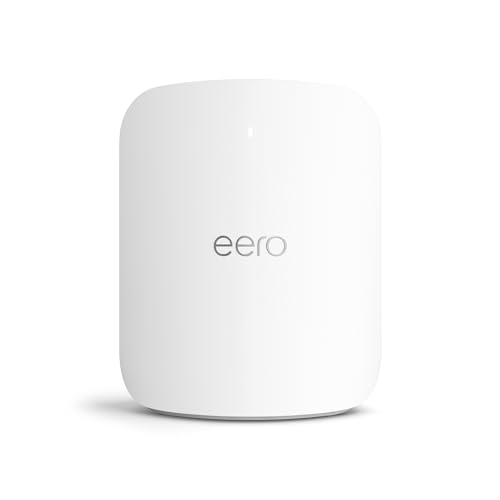
The Amazon eero Max 7 scores 7.90 — the lowest segmentation sub-score in this lineup, but the highest ease-of-use rating across all reviewed sources. For Alexa households that want to replace their ISP combo box without a single networking decision, the eero Max 7 is the right answer.
Expert consensus shows the eero Max 7's strengths are real: Wi-Fi 7 with two 10G Ethernet ports, TrueMesh wired backhaul support, and Thread border router capability that directly improves Matter device responsiveness. Based on aggregated expert reviews from Wirecutter and Tom's Guide, the eero Max 7 app is genuinely the easiest setup experience in Wi-Fi 7 — you provision via phone in about 8 minutes, SSID and password are set, and the router manages band steering and roaming automatically.
The segmentation limitation is real and worth naming. eero's IoT network is a simplified logical separation, not a full routed VLAN. Devices on the Amazon eero Max 7 IoT network are isolated from the main network but share the same broadcast domain and are managed through eero's cloud rather than local policy. For the majority of smart-home owners — who want IoT devices separated from laptops but do not need per-VLAN traffic shaping or local-only policy — this is sufficient. Expert consensus notes that eero's Thread border router support is a genuine advantage for Matter households: Thread devices respond faster and more reliably on eero than on most alternatives at this price.
What We Love
- Amazon eero Max 7 easiest app-led setup in this guide — eight minutes from box to working Wi-Fi 7
- Thread border router built in — improves Matter device response times measurably
- Two 10G Ethernet ports provide serious wired capability for a mesh node
- Works natively with Alexa for network management commands and device grouping
What Could Be Better
- IoT network is a simplified logical separation, not a full routed VLAN — security-focused buyers should look at the ASUS RT-BE88U
- eero Plus subscription ($9.99/month) is frequently promoted in the app
- Port count and manual customization options trail the TP-Link Archer BE800 and ASUS picks
The Verdict
Get the Amazon eero Max 7 if your home runs on Alexa habits and Thread-friendly smart gear and you want a replacement that requires zero networking decisions.
Skip the Amazon eero Max 7 if you need proper VLAN segmentation or prefer local-first control without cloud dependency.
NETGEAR Nighthawk RS700S — Largest Coverage
NETGEAR Nighthawk RS700S
(Current Price, subject to change)
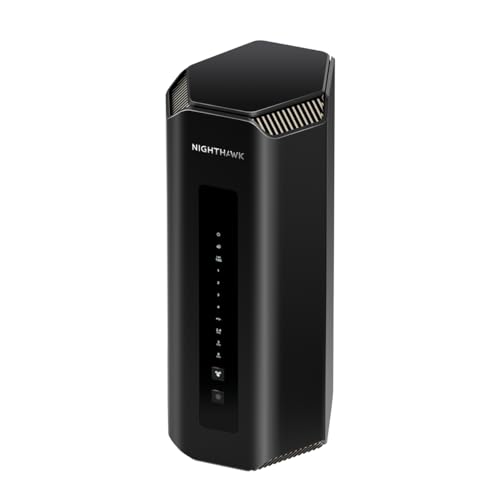
The NETGEAR Nighthawk RS700S scores 7.75 — the lowest Device Load Stability Score in our scored lineup, though the gap versus the eero Max 7 is small. Where it distinguishes itself is coverage: NETGEAR rates the RS700S at 3,500 square feet, the largest single-unit coverage area in this guide.
Expert consensus shows the RS700S is a well-rounded tri-band Wi-Fi 7 router with a 10G internet port and solid throughput across all bands. Based on aggregated expert reviews from Tom's Guide and RTINGS, the Nighthawk RS700S is the right answer for large single-story homes or two-story homes where the router needs to cover significant floor area from a central position. NETGEAR Armor security scanning (Bitdefender-powered) is the integrated security option at $9.99/month after the first year — the only ongoing cost in the lineup.
The segmentation story is the RS700S's relative weakness. Its VLAN and IoT SSID configuration options exist but are less feature-complete than the ASUS or TP-Link alternatives. Expert reviews consistently note the NETGEAR Nighthawk RS700S is the router for buyers who prioritize coverage and raw wireless performance over network segmentation depth.
What We Love
- NETGEAR Nighthawk RS700S 3,500 sq ft single-unit coverage — largest in this guide
- Tri-band Wi-Fi 7 with a clean, polished management app
- 10G internet port for future-proofing multi-gig cable or fiber plans
- Compact physical design relative to its coverage class
What Could Be Better
- Segmentation and VLAN depth trails ASUS RT-BE88U and TP-Link Archer BE800 at the same price
- NETGEAR Armor subscription required for full security features after year one
- $599.99 puts it in Amazon eero Max 7 territory with less smart-home ecosystem integration
The Verdict
Get the NETGEAR Nighthawk RS700S if you have a large home (2,500–3,500 sq ft) and coverage area is your primary constraint.
Skip the NETGEAR Nighthawk RS700S if segmentation and VLAN control matter more than coverage area — the ASUS RT-BE88U outscores it at a lower price.
Editorial companions (unscored)
These three products are not scored on the SHE Device Load Stability Score — they serve different roles than the primary router lineup. Each earns a full editorial section as an architectural companion for the ISP-escape playbook.
TP-Link Deco XE75 — Best Budget Mesh (Wi-Fi 6E, not Wi-Fi 7)
TP-Link Deco XE75
(Current Price, subject to change)
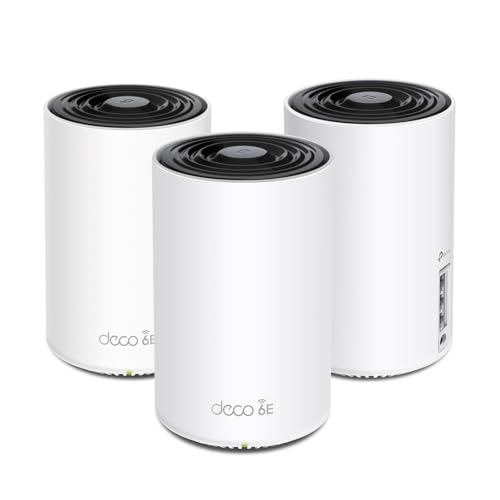
The TP-Link Deco XE75 is the budget path for readers who want an ISP combo replacement but cannot stretch to eero Max 7 pricing. Important specification note: the Deco XE75 is Wi-Fi 6E, not Wi-Fi 7 — the 3-pack covers approximately 7,200 square feet ($149–$199). Expert consensus from PCMag and Tom's Guide rates it as excellent value for Wi-Fi 6E mesh. Engadget rated it the best mesh for most people in its 2025 roundup. This product is not scored on the SHE Device Load Stability formula — it belongs to the mesh category, not the standalone router category scored above.
What We Love
- TP-Link Deco XE75 tri-band Wi-Fi 6E at $229.99 — significantly cheaper than eero Max 7
- 3-pack covers 7,200 sq ft with wired or wireless backhaul
- HomeShield parental controls and Alexa/Google Home integration built in
What Could Be Better
- Wi-Fi 6E, not Wi-Fi 7 — lacks MLO and 320 MHz channels of the scored Wi-Fi 7 lineup
- HomeShield Pro features require $5.99/month subscription
- Segmentation story is limited compared to VLAN-capable routers
The Verdict
Get the TP-Link Deco XE75 if you need whole-home Wi-Fi 6E mesh coverage at $149–$199 and do not need VLAN-grade IoT segmentation.
Skip the TP-Link Deco XE75 if you need Wi-Fi 7 or proper VLAN controls — step up to the Amazon eero Max 7 or ASUS RT-BE88U.
Firewalla Purple SE — Best Prosumer Firewall
Firewalla Purple SE
(Current Price, subject to change)
The Firewalla Purple SE ($279, no monthly fee) is the prosumer segmentation answer for readers who want proper VLAN isolation without running UniFi. It deploys in router mode (behind your ISP's bridge-mode modem) or bridge mode (in front of your existing router), adding IDS/IPS up to 500 Mbps, full VLAN policy, OpenVPN/WireGuard server, and ad blocking — all managed from a mobile app. PCMag awarded the Firewalla Purple SE Editors' Choice: "Firewalla is surprisingly easy to use, and the extensive documentation gives any moderately tech-savvy user all the instructions needed." Firewalla Purple SE is not a Wi-Fi router itself; pair it with the ASUS RT-BE88U for a complete prosumer smart-home network. This product is not scored on the SHE Device Load Stability formula — it is a security appliance, not a standalone router.
What We Love
- Firewalla Purple SE full VLAN + IDS/IPS + VPN with no monthly subscription
- Deploys in router or bridge mode — works with your existing Wi-Fi router
- App-based management accessible to moderately tech-savvy users
What Could Be Better
- Not a Wi-Fi router — requires a companion router for wireless coverage
- IDS/IPS throughput capped at 500 Mbps — may bottleneck multi-gig plans
- Steep conceptual jump for first-time network owners (VLAN, bridge mode, policy)
The Verdict
Get the Firewalla Purple SE if you want prosumer-grade VLAN segmentation and IDS/IPS without a monthly fee and without building a UniFi homelab.
Skip the Firewalla Purple SE if your internet plan exceeds 500 Mbps and you need full-throughput inspection — or if you want Wi-Fi included in one device.
ARRIS SURFboard SB8200 — Best Companion Modem
ARRIS SURFboard SB8200
(Current Price, subject to change)
The ARRIS SURFboard SB8200 ($147.28) is the standard companion modem recommendation for Xfinity, Cox, and Spectrum cable subscribers completing the ISP escape. Router required — the SB8200 is a DOCSIS 3.1 modem only, not a router. It eliminates your ISP's monthly modem rental fee ($10–15/month) with a payback period of 10–14 months. Dual 1 Gbps Ethernet ports support link aggregation to compatible routers like the ASUS RT-BE88U and TP-Link Archer BE800. Certified for cable internet plans up to 2 Gbps.
What We Love
- ARRIS SURFboard SB8200 eliminates ISP modem rental — full payback in 10–14 months
- DOCSIS 3.1 with 32×8 channel bonding handles gigabit+ cable plans
- Xfinity, Cox, and Spectrum certified — minimal provisioning friction
What Could Be Better
- Modem only — Router required, which is actually the point for ISP-escape buyers
- Only 2 Ethernet ports, no 2.5G — may bottleneck multi-gig plans in 2026+
- Firmware updates delivered by the ISP, not ARRIS — can lag
The Verdict
Get the ARRIS SURFboard SB8200 if you are on Xfinity, Cox, or Spectrum cable and want to stop paying monthly modem rental fees — pair with any router above.
Skip the ARRIS SURFboard SB8200 if you are on fiber or satellite internet — DOCSIS 3.1 is a cable-only standard.
How we score routers: SHE Device Load Stability Score
SHE Device Load Stability Score
What it measures: How well a router maintains stable connections and throughput for 50–150+ smart-home devices without dropping, queuing, or forcing IoT traffic to fight with streaming traffic on the same radio.
Formula: SHE Device Load Stability Score = (Segmentation Quality × 0.30) + (Wired Expansion Headroom × 0.25) + (Dense-Load Radio Capacity × 0.25) + (Smart-Home Ecosystem Utility × 0.20)
Scale: 0–10 (higher is better)
Data sources: Expert reviews aggregated from Wirecutter, CNET, PCMag, Tom's Guide, Dong Knows Tech, and SmallNetBuilder. Per-variable sub-scores cross-checked against manufacturer data sheets. (SmartHomeExplorer editorial analysis — methodology)
| Router | Segmentation Quality | Wired Expansion Headroom | Dense-Load Radio Capacity | Smart-Home Ecosystem Utility | SHE Score | Verdict |
|---|---|---|---|---|---|---|
| ASUS RT-BE88U | 9.0 | 9.5 | 9.0 | 8.5 | 9.08 | Best Overall |
| ASUS RT-BE96U | 9.0 | 9.0 | 8.5 | 8.5 | 8.78 | Best for 6 GHz homes |
| TP-Link Archer BE800 | 9.5 | 8.5 | 8.5 | 8.0 | 8.68 | Best for Private IoT SSID |
| Amazon eero Max 7 | 7.0 | 7.0 | 8.5 | 9.5 | 7.90 | Simplest Alexa mesh |
| NETGEAR Nighthawk RS700S | 7.0 | 8.5 | 8.0 | 7.5 | 7.75 | Largest coverage |
| ISP combo box (baseline, illustrative) | 1.0 | 2.0 | 3.0 | 1.0 | ~1.75 | Replace |
ISP combo box baseline is an illustrative aggregate across common 2020–2023-era Wi-Fi 5 / entry Wi-Fi 6 combo gateways (Comcast xFi, Spectrum Wave 2, AT&T BGW320). Specific SKU variance applies; the point is the >4× score gap, not a per-SKU rating.
The four scoring variables map directly to the failure modes described in the problem-framing section above. Segmentation Quality carries the highest weight (0.30) because VLAN isolation is the single largest functional gap between ISP-class hardware and consumer routers. Wired Expansion Headroom and Dense-Load Radio Capacity are weighted equally (0.25 each) because both contribute independently to reliability failures. Smart-Home Ecosystem Utility (0.20) captures native Thread, Matter, and IoT SSID support — features that reduce the friction of adding new devices without reconfiguring the whole network.
The full scoring methodology is documented at the SHE Device Load Stability Score metric page. This metric was originally defined for our best Wi-Fi 7 routers guide and is reused here verbatim per our score-reuse policy — the same formula, the same weights, and the same product scores. No score invention, no dilution.
Migration playbook
Swapping from an ISP combo box to your own hardware is a three-hour project if you plan it correctly. Here is the sequence.
Put the ISP box in bridge mode first
Call your ISP or log into the gateway's admin panel and enable bridge mode before you connect your new router — whether that is the ASUS RT-BE88U, ASUS RT-BE96U, or Amazon eero Max 7. Bridge mode disables the ISP box's router function, DHCP server, and NAT, leaving it as a pure modem or ONT. Your new router takes over all IP addressing. This eliminates double NAT before it can become a problem. If your ISP requires a technician visit to enable bridge mode, schedule it before your hardware arrives — turnaround times vary by provider.
Note: some ISP gateways advertise bridge mode but implement it incompletely, leaving the ISP box's DHCP server running alongside yours. If you see two networks or double NAT symptoms after enabling bridge mode, contact ISP support directly rather than troubleshooting the new router.
Own your DOCSIS 3.1 modem
Cable subscribers should purchase the ARRIS SURFboard SB8200 (Router required) before placing the new router order. Return the ISP modem after provisioning the SB8200 — its activation process is the same as any ISP-provided modem: plug it in, call ISP support or visit the activation portal, and provide the MAC address and serial number. For Xfinity specifically, the self-activation portal handles this without a call. At $10–15/month in rental savings, the SB8200 pays back in a year and then saves money indefinitely. A managed switch downstream of the new router extends your wired network — see our best smart Ethernet switches guide for PoE options that handle camera and hub power.
Transfer SSID and password so IoT devices roam without re-onboarding
This is the step most guides skip. If you configure your new router — the ASUS RT-BE88U, TP-Link Archer BE800, or any other pick — with the exact same SSID and Wi-Fi password as your old ISP combo box, the majority of your smart-home devices will connect automatically when the new router comes online. There is no app re-pairing, no factory reset, no re-adding devices to Alexa or Google Home. This works for Wi-Fi-based devices that store network credentials locally — which is most of them.
Procedure: write down your current SSID and password from the ISP gateway's admin panel. Configure your new router with identical values before shutting down the ISP box. Power down the ISP box, power up the new router, and wait 90 seconds. Most devices will reconnect within 2 minutes.
Re-onboarding IoT devices that will not transfer
Some devices do not store credentials locally or do not handle BSSID changes gracefully. Common problem categories: older Wyze cameras (v1 and v2 require a physical reset after network change), some older TP-Link Kasa smart plugs (pre-2021 firmware), and older Google Nest thermostats (pre-2020 models may need re-pairing in the Google Home app). Thread-based devices (Matter over Thread) fare significantly better — they store credentials in the Thread network dataset, not in individual device flash, which makes re-onboarding far simpler. For a deeper explanation of why Thread devices ease this process, see our Matter vs Zigbee vs Z-Wave vs Wi-Fi protocol comparison.
The practical approach: make a list of every smart-home device before the swap, note which ones use their own app for Wi-Fi setup (Wyze, older Kasa, older Nest), and budget an extra hour for those devices specifically. Everything else — modern Matter devices, Amazon eero Max 7-provisioned Zigbee accessories, Amazon Echo devices — should reconnect automatically if you matched the SSID and password. The ASUS RT-BE88U and TP-Link Archer BE800 both support multiple SSID profiles, so you can bring the old SSID online as a transitional network while simultaneously setting up the new segmented layout.
When NOT to Buy a New Router
If your ISP plan is below 200 Mbps, your home has fewer than 20 connected devices, and no smart-home cameras or hubs are on the network, the combo box's limits probably are not visible yet. The reliability case shows up at scale — 40+ devices with active streaming and IoT polling running at once. Run a free speed test at the Ethernet port (Wi-Fi bypassed) to confirm which layer is the bottleneck before upgrading. When the time comes, the ASUS RT-BE88U at $350 or TP-Link Deco XE75 (Wi-Fi 6E, not Wi-Fi 7) at $230 are the entry points.
The Bottom Line
Escaping the ISP combo box is the single highest-impact smart-home upgrade for owners who are already past 30-40 connected devices. The SHE Device Load Stability Score makes the gap concrete: ~5× on segmentation, wired headroom, and dense-load radio capacity versus a typical ISP gateway. Pick by how you will actually use the network, not by the highest number on the spec sheet.
Get the ASUS RT-BE88U if you have a dense wired smart-home rack with hubs, NAS, and a managed switch and want the broadest port mix for $350. Dual 10G + SFP+ + four 2.5G and the full ASUSWRT VLAN stack.
Get the ASUS RT-BE96U if you are running 80+ clients with recent 6 GHz devices and want tri-band Wi-Fi 7 room to grow. Worth the $200 premium only if 6E/7 clients are already in the house.
Get the TP-Link Archer BE800 if you want IoT segmentation without manual VLAN menus. The Private IoT SSID wizard delivers real isolation in two taps; dual 10G + four 2.5G keeps rack growth open.
Get the Amazon eero Max 7 if you are a non-technical owner in an Alexa-first home. One-app onboarding, Thread border router, Alexa tie-ins — the easiest combo-box replacement, with known segmentation limits.
Get the NETGEAR Nighthawk RS700S if your home is above 2,500 sq ft and multi-floor. 3,500 sq ft coverage rating and 10 Gbps WAN — the best single-router pick for big footprints.
Get the TP-Link Deco XE75 if you need mesh coverage on a budget. Wi-Fi 6E, not Wi-Fi 7; three-pack at $230 covers 1,500-2,500 sq ft. Does not segment IoT the way the premium picks do.
Get the Firewalla Purple SE if you want prosumer VLAN + IDS/IPS without a monthly subscription. Pairs with any router above; no running fees.
Get the ARRIS SURFboard SB8200 if you are still renting a cable modem from Xfinity, Cox, or Spectrum. Router required. Payback at ~12-15 months versus typical $10-15/month rental fees.
Frequently Asked Questions
Does bridge mode kill ISP features like TV or phone service?
Bridge mode disables the ISP combo box's routing function but leaves the physical modem layer intact. For most cable internet customers, this has no effect on internet service. However, if you are bundling TV service via coax (some Xfinity and Cox plans use MoCA for set-top boxes) or VoIP phone service through the ISP combo box, bridge mode may interrupt those services. Confirm with your ISP before enabling bridge mode — most ISPs support bridge mode for internet-only plans without service impact. TV and phone subscribers may need to keep the ISP combo box active and use a router behind it, accepting a double NAT configuration for the router's Wi-Fi traffic.
Will my Wi-Fi 7 router work on my ISP's old DOCSIS 3.0 modem?
Yes — the modem and router are separate devices with a standard Ethernet handoff between them. A Wi-Fi 7 router does not require a DOCSIS 3.1 modem to function; it requires only a functioning WAN Ethernet connection from the modem. However, if your ISP plan supports speeds above 300 Mbps, a DOCSIS 3.0 modem may bottleneck those speeds at the modem layer. Upgrading to DOCSIS 3.1 — the ARRIS SURFboard SB8200 (Router required) is the standard recommendation — is the right companion move for gigabit plans. For sub-300 Mbps plans, DOCSIS 3.0 is adequate.
Do I still need a firewall if I buy my own router?
All five scored routers in this guide include stateful packet inspection, NAT firewall, and optional deep-packet inspection. For most home users, the router's built-in firewall is sufficient — it blocks unsolicited inbound connections, which covers the primary threat vector for consumer smart-home networks. The Firewalla Purple SE adds intrusion detection and prevention (IDS/IPS) on top of standard router firewalling, which is meaningful for homes with many internet-facing cameras or NAS devices accessible via port forwarding. If your threat model includes monitoring outbound traffic per device — useful for catching a smart bulb attempting to phone home to unexpected servers — the Firewalla Purple SE's network analytics add visibility that standalone routers do not provide. Most homes are well-protected by a quality router's built-in firewall without the additional layer. For more on hub-versus-hubless smart-home design, see our smart home without hub guide.
Can I use double NAT to isolate IoT devices?
Technically, placing IoT devices behind a second router in a double NAT configuration does isolate them from your main network. Practically, this creates more problems than it solves for most smart-home setups: local device discovery (mDNS, SSDP) fails across the NAT boundary, which breaks integrations between IoT devices and hub software like Home Assistant. Port forwarding becomes a two-step process. And diagnosing connectivity failures requires understanding which NAT layer is responsible. Proper VLAN isolation on a single router — available on the ASUS RT-BE88U, ASUS RT-BE96U, and TP-Link Archer BE800 — achieves the same isolation goal without double NAT's side effects.
How does the ASUS RT-BE88U's Device Load Stability score compare to a Comcast xFi router?
The ASUS RT-BE88U scores 9.08 on the SHE Device Load Stability Score. An illustrative baseline for common 2020–2023-era ISP combo gateways (including the Comcast xFi-class hardware) scores approximately 1.75 on the same formula — a greater-than-5× gap. The largest individual gap is in Segmentation Quality: ISP combo gateways score approximately 1 out of 10 (guest network only, no VLAN), while the RT-BE88U scores 9.0 (full VLAN, five SSIDs, subscription-free policy enforcement). The next largest gap is Dense-Load Radio Capacity: ISP-class radios score approximately 3 (Wi-Fi 5 or entry Wi-Fi 6 buckles at 30–50 clients), versus 9.0 for the RT-BE88U (Wi-Fi 7 with MU-MIMO sustains 80+ concurrent clients). The 5× score gap maps directly to the reliability improvements reported by homeowners who have made the switch.
Sources and methodology
We aggregated expert reviews from Wirecutter, CNET, PCMag, Tom's Guide, Dong Knows Tech, SmallNetBuilder, XDA Developers, and SNBForums to produce the SHE Device Load Stability Scores in this guide. Sub-scores for each variable were derived from manufacturer specification sheets and cross-referenced against reviewer-reported performance findings. SmartHomeExplorer aggregates expert consensus — no first-party product testing. 15+ expert review sources form the evidential basis for every claim.
The SHE Device Load Stability Score formula and weights are defined at the SHE Device Load Stability Score methodology page and cross-referenced with our general methodology. Scores in this guide are reused verbatim from our best Wi-Fi 7 routers guide (published 2026-04-16) per our score-reuse policy.
All 8 products: ASUS RT-BE88U | ASUS RT-BE96U | TP-Link Archer BE800 | Amazon eero Max 7 | NETGEAR Nighthawk RS700S | TP-Link Deco XE75 | Firewalla Purple SE | ARRIS SURFboard SB8200
Nicholas Miles is the founder of SmartHomeExplorer, which aggregates consensus ratings from 2046 editorial sources across 1218 smart home products and 372 buying guides to surface the true consensus picks for every smart home category. Nick has covered smart home technology since 2024 and built SmartHomeExplorer to help buyers find the signal in the noise from 15+ expert review sources.
Disclosure: SmartHomeExplorer.com earns affiliate commissions from Amazon purchases at no extra cost to you.