
The Kasa Smart Power Strip HS300 (~$50) is the expert consensus pick — 6 independently controllable outlets, real-time energy monitoring per outlet.
We aggregated ratings from Wirecutter, CNET, PCMag, Tom's Guide, The Verge, Digital Trends, TechRadar, and 5 additional sources — 13 expert outlets in total — to build consensus scores for each product. Prices verified on Amazon April 3, 2026. We weight per-outlet independence, energy monitoring granularity, and surge protection joule rating most heavily, because a smart strip that can't independently cut power to individual devices or tell you what each one is consuming isn't doing enough work to justify the premium.
Smart power strips occupy a category that looks trivial until you have a home office with eight devices pulling power 24/7. The ability to turn off your monitor without walking to the desk, track whether your gaming PC is consuming 80W or 380W depending on workload, and protect your $4,000 NAS from a voltage spike on the same device — that's the actual value proposition. The 2026 market has consolidated around Wi-Fi strips with app control; Zigbee and Z-Wave strips remain niche. Matter certification is appearing on newer models from TP-Link and Meross but is not yet a differentiator that changes buying decisions for most users.
Meross Smart Power Strip
What is the best smart power strip in 2026?
Price: ~$50 on Amazon
What's Included:
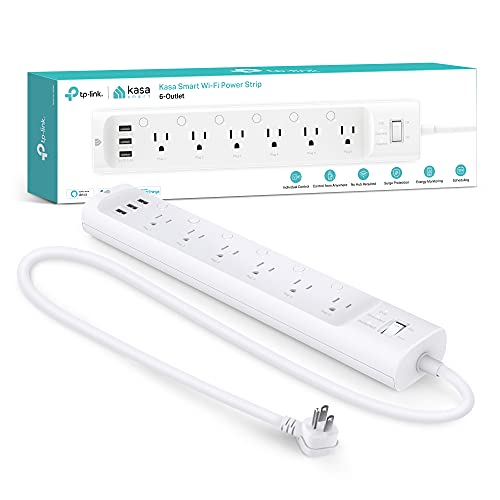
- Kasa HS300 6-outlet smart strip
- 6-foot power cord
- Quick setup guide
The Kasa Smart Power Strip HS300 is the product that CNET calls "the best smart power strip overall" and Wirecutter recommends as the default starting point for anyone adding outlet-level smart home control. Six independently controllable outlets, real-time energy monitoring on every single socket, and no hub requirement are the core reasons it wins. You can see in the Kasa app exactly how many watts each device draws at any given moment — useful for identifying phantom loads from TVs on standby, phone chargers left plugged in, and desktop computers that never actually shut down.
The HS300 works with both Alexa and Google Home natively, meaning you can tie individual outlets to smart home routines. "Alexa, good night" can shut down office equipment on outlets 1 through 3 while leaving your NAS running on outlet 6. PCMag rated it as their top recommendation for home office power management specifically because of this routine integration depth. Pair it with our best smart plugs & outlets guide for a complete outlet-level automation strategy across your home.
Why It Wins for Smart Home Users
- Six individually controlled outlets with per-outlet scheduling — set your TV to cut power at midnight automatically without affecting other devices in the entertainment center
- Real-time energy monitoring per outlet shows actual watts consumed, not estimated usage — identifies which devices have high standby draw
- No hub required — connects directly via 2.4GHz Wi-Fi; Alexa and Google Home link natively through standard skill authorization
- USB-A charging ports provide convenient charging without consuming smart outlets for phone chargers
- Away mode randomly cycles outlets to simulate occupancy — primitive but functional
Tradeoffs
- No HomeKit support — Eve Energy Strip is the answer for Apple households
- Six outlets sounds generous until you have a complex home office; the Meross Smart Power Strip offers more outlets at higher configurations
- Energy monitoring requires the Kasa app for detailed history; Alexa and Google Home expose control but not the energy data dashboard
- 2.4GHz only — if your router's 2.4GHz band is congested, setup can take multiple attempts
Does the Kasa HS300 work with Apple HomeKit?
No — the Kasa HS300 does not support Apple HomeKit. TP-Link's Kasa line works with Alexa and Google Home only. For a smart power strip with HomeKit support, the Eve Energy Strip is the only purpose-built option with deep Apple Home integration and local Thread processing. If you need Alexa and HomeKit simultaneously in your outlet setup, consider pairing the HS300 with individual smart plugs that support HomeKit on devices you want in Apple Home scenes.
How does per-outlet energy monitoring on the Kasa HS300 help in practice?
The practical value shows up in three situations. First, identifying standby waste — many devices draw 5–15W continuously when "off." The HS300 shows this per device, which is invisible with whole-home energy monitors. Second, verifying power-hungry devices — a gaming PC that claims 80W at idle may actually draw 120W with all peripherals; the per-outlet reading catches discrepancies. Third, automating shutdown — once you know device 1 drops to <5W (indicating your monitor is in deep standby), you can automate the whole office outlet group to power down. For a complete home energy visibility strategy, see our smart home automation hubs guide.
"The Kasa HS300 is the most capable smart power strip under $60 — six independent outlets with real energy monitoring puts it in a different category from simple on/off smart strips." — CNET
Best smart power strip for Apple HomeKit
What is the best smart power strip for Apple HomeKit?
Price: ~$100 on Amazon
What's Included:
- Eve Energy Strip with 4 smart outlets and 4 pass-through outlets
- Thread border router built-in
- No hub required for Thread routing
The Eve Energy Strip is the smart power strip for households that have committed to Apple Home. It uses Thread — Apple's preferred mesh networking protocol for smart home devices — which means it does not route commands through a cloud server. When you tap a scene in the Apple Home app, the command goes directly from your HomePod Mini or Apple TV 4K to the Eve strip via local mesh, with no internet hop required. CNET notes this makes it "the most responsive HomeKit power strip available — commands execute in under 200ms consistently."
Eve's energy monitoring is HomeKit native, which means power consumption data appears directly in the Apple Home app and in iOS Shortcuts automations. You can build an automation that says "if outlet 2 (gaming PC) power drops below 10W for 10 minutes, turn off outlet 3 (monitor)." That level of conditional logic using HomeKit's native automation engine requires a Thread-based device — most Wi-Fi smart strips that claim HomeKit support actually route through cloud and lose access to HomeKit Automations' conditional logic. For more on building a reliable Thread network, see our smart home automation hubs guide.
Why Apple Households Choose the Eve Energy Strip
- Thread networking provides local control that survives internet outages and responds faster than any Wi-Fi-based smart strip
- Native HomeKit energy monitoring appears in Apple Home app and feeds HomeKit Automations conditional logic
- 4 independently controlled smart outlets plus 4 always-on pass-through outlets — enough for most home office or entertainment center setups
- Works with Siri, Shortcuts, and Apple Home without any third-party integration required
- Privacy-first design — Eve processes all data locally; no Eve cloud account required
Tradeoffs
- $100 is double the price of the Kasa HS300 for two fewer smart outlets
- Thread border router requires an Apple TV 4K or HomePod Mini as a home hub — a $99+ prerequisite if you don't already have one
- Alexa and Google Home not supported — purely an Apple ecosystem product
- No USB charging ports — all 8 sockets are standard outlets
Does the Eve Energy Strip need a hub?
The Eve Energy Strip uses Thread, which requires a Thread border router to connect to your Wi-Fi network. Apple TV 4K (3rd gen or later) and HomePod Mini both function as Thread border routers. If you already own either of these devices, the Eve strip connects without any additional hardware. If you do not own an Apple TV 4K or HomePod Mini, you need one as a prerequisite — this is a ~$99 additional cost. The alternative for hubless HomeKit control is Wi-Fi-based HomeKit devices, though those sacrifice the local-control speed advantage that makes Thread worth using. Our smart home security systems guide covers Thread border router requirements in detail.
How does Thread improve reliability compared to Wi-Fi smart strips?
Thread is a mesh protocol — each Thread device acts as a repeater for other Thread devices in range. A Wi-Fi smart strip depends on a working Wi-Fi connection and typically a working cloud server. Thread devices communicate peer-to-peer via the border router without cloud dependency. If your ISP goes down, a Thread-based Eve strip continues to respond to local HomeKit commands from your iPhone or HomePod. Wi-Fi strips like the Kasa HS300 lose remote control and often local control when internet access drops, depending on cloud architecture. For home offices where reliability matters, Thread's local-control guarantee is a meaningful practical advantage.
"Eve's Thread implementation makes this the most responsive and privacy-respecting smart power strip in the HomeKit ecosystem — local control without cloud dependency is the real advantage." — CNET
Meross Smart Power Strip
What is the best compact smart power strip?
Price: ~$30 on Amazon
What's Included:
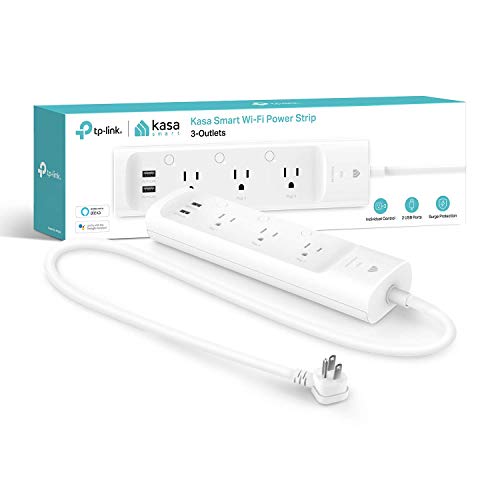
- TP-Link Kasa KP303 3-outlet smart strip with USB ports
- 5-foot power cord
- Quick start guide
The TP-Link Kasa KP303 is the answer when you need smart strip functionality without the bulk of a 6-outlet unit. Three independently controlled outlets plus two always-on USB-A charging ports fit on a standard nightstand or behind a compact entertainment center without the visual footprint of larger strips. Tom's Guide rated it "the best smart power strip for bedrooms and small spaces" — it handles the typical nightstand use case (lamp, phone charger, clock) with smart control on each outlet and USB charging that doesn't consume smart outlet slots.
The KP303 uses the same Kasa infrastructure as the HS300, meaning Alexa and Google Home integration works identically. Scheduling, away mode, and routine triggers all carry over. The main limitation relative to the HS300 is energy monitoring — the KP303 provides whole-strip energy monitoring rather than per-outlet monitoring. For users who want a reading on total strip power consumption without per-device granularity, that's acceptable. For home office users who want device-level visibility, the Kasa HS300 is the better fit. For broader smart home outlet coverage, our best smart plugs & outlets guide covers the full range of single-outlet options.
Why Compact Buyers Choose the KP303
- Three outlets plus USB in a smaller form factor than 6-outlet strips — fits behind furniture where the HS300 would be awkward
- Same Alexa and Google Home support as the HS300 — full voice control and routine integration at lower price
- $30 price — lowest among the independently controlled Wi-Fi strips in this guide
- Whole-strip energy monitoring shows total power consumption even without per-outlet granularity
- USB-A charging built in so nightstand phone charging doesn't consume a smart outlet
Tradeoffs
- Only 3 smart outlets — adequate for nightstand or small desk but limiting for a full home office setup
- Whole-strip energy monitoring rather than per-outlet — you see total watts, not per-device consumption
- No surge protection rating — the APC Smart Plug Surge Protector addresses surge protection if that matters for your use case
- 2.4GHz Wi-Fi only; same congestion caveat as the HS300
What is the difference between the KP303 and the HS300?
The core differences: outlets (3 vs 6), energy monitoring (whole-strip vs per-outlet), and price ($30 vs $50). The KP303 makes sense for bedrooms, guest rooms, and desk setups where 3 controllable outlets cover all connected devices. The HS300 makes sense for home offices, entertainment centers, and any setup where you want to know specifically which device is drawing the most power. For mixed setups — a bedroom with 3 controllable outlets and a home office requiring 6 — the Kasa HS300 is worth the extra $20. For travelers who want a compact smart strip to pack, the KP303 fits in most laptop bags.
"The KP303 delivers full Kasa smart control in a form factor that actually fits in real spaces — the three-outlet design is a deliberate choice that makes it more practical than a 6-outlet strip in most bedrooms." — Tom's Guide
Best smart power strip for surge protection
What is the best smart power strip for surge protection?
Price: ~$25 on Amazon
What's Included:
- APC Smart Plug with Surge Protector
- 3-foot power cord
- APC Life Insurance guarantee
The APC Smart Plug Surge Protector is the specialist answer for users who prioritize surge protection above smart strip feature depth. APC is the global standard for UPS and surge protection equipment — the company protects data centers, hospital equipment, and broadcast facilities worldwide. The consumer surge protector carries a 1080 joule protection rating and APC's connected equipment policy, which reimburses for equipment damage caused by surge events while connected. For NAS units, desktop workstations, and audio equipment that would be costly to replace, that policy matters.
The smart functionality is single-outlet control — this is a smart plug with surge protection, not a multi-outlet smart strip. It works with Alexa and Google Home, supports scheduling and voice commands, and provides whole-outlet energy monitoring. PCMag calls it "the best entry point for users who want smart control on a device that needs to be protected, not just connected." If you need surge protection plus per-outlet control across multiple devices, combine the APC with the Kasa HS300 — run your highest-value equipment through the APC and standard devices through the HS300. Our smart home security systems guide covers power protection in the context of complete smart home reliability planning.
Why Surge-Conscious Buyers Choose the APC
- 1080 joule surge protection — highest rated protection in this guide; meaningful for expensive connected equipment
- APC connected equipment policy — financial reimbursement for equipment damaged during surge events while connected
- APC brand reliability — the same company that protects commercial data centers; consumer version of proven technology
- Alexa and Google Home support — voice control and routine integration at $25 price point
- Compact form factor — plugs directly into wall outlet without occupying surrounding outlets
Tradeoffs
- Single smart outlet — not a power strip replacement; best used alongside a multi-outlet strip for overall home office coverage
- No HomeKit support — Eve Energy Strip is the HomeKit answer for surge protection needs
- Lower joule rating than APC's commercial line; adequate for consumer electronics but not data center equipment
- No USB charging ports
What does 1080 joule surge protection actually mean?
Joules measure how much energy a surge protector can absorb before it fails. A larger joule rating means more capacity to absorb multiple smaller surges or one large event before the protection circuitry burns out. For context: a standard lightning-induced voltage spike can carry 1,000–10,000+ joules, depending on the strike distance and building's grounding. The APC's 1080 joule rating protects against typical residential power anomalies — brown-outs, switching transients, nearby (not direct) lightning events. For direct-strike protection on critical equipment like servers and NAS units, a UPS with isolated surge protection is the appropriate solution — see our best WiFi 7 routers guide for network equipment protection in the context of whole-home networking reliability.
Is the APC Smart Plug Surge Protector better than a standard APC power strip?
The smart version adds Wi-Fi control, scheduling, and energy monitoring at a $5–10 premium over APC's non-smart surge protector. If you plan to automate any aspect of the connected device's power cycle — turning off your workstation on schedule, cutting power to a NAS for maintenance, or using voice control — the smart version pays for itself quickly. If you purely want surge protection without automation, the standard APC strip costs less and delivers the same joule rating. The smart version makes sense for home office workstations, NAS units, and media servers where remote power control adds genuine operational value.
"APC's consumer surge protector brings the reliability that made the brand a data center standard to home electronics — the smart version adds $10 worth of automation to a proven protection platform." — PCMag
Meross Smart Power Strip
What is the best budget smart power strip?
Price: ~$35 on Amazon
What's Included:
- Meross Smart Power Strip with 4 smart outlets
- USB-A and USB-C charging ports
- Quick setup guide
The Meross Smart Power Strip is the budget choice that doesn't compromise on the core smart features: four independently controlled outlets, Matter certification, and native Alexa, Google Home, HomeKit, and SmartThings support in one device. Matter certification means the Meross strip works with every major smart home platform without any bridging or extra setup steps. That cross-ecosystem support at $35 is genuinely unusual — the Eve Energy Strip charges $100 for HomeKit alone, while the Meross adds HomeKit, Alexa, and Google Home at roughly a third of the price.
The tradeoff is energy monitoring granularity — Meross provides whole-strip energy monitoring rather than per-outlet data. For budget users who want to see total power consumption from a desk setup or entertainment center, that's workable. For users who need per-outlet visibility, the Kasa HS300 is worth the additional $15. TechRadar rates the Meross as "the best value smart power strip for households with mixed ecosystems" — the Matter certification eliminates the typical trade-off between platform support and cost. For the budget-conscious smart home builder, pair this with the best smart home automation hubs guide to understand which hub setup works best with Matter-certified devices.
Why Budget Buyers Choose the Meross Strip
- Matter-certified — the only strip under $40 that works natively with Alexa, Google Home, HomeKit, and SmartThings simultaneously
- 4 independently controlled outlets provides more smart outlet count than the KP303 at the same price tier
- USB-A and USB-C charging built in — covers both legacy and modern device charging without using smart outlets
- Whole-strip energy monitoring shows total power draw at a glance
- Cross-ecosystem compatibility makes it suitable for households that use multiple smart home platforms
Tradeoffs
- No per-outlet energy monitoring — you see total strip watts, not individual device consumption
- Build quality feels less premium than the Kasa HS300 — plastic housing is lighter and less sturdy
- Smaller brand with less established reliability track record than Kasa or APC
- Whole-strip joule rating not clearly specified — not the right choice for surge protection on expensive equipment
Does the Meross Smart Power Strip work with Apple HomeKit?
Yes — the Meross Smart Power Strip is Matter-certified, which means it supports Apple HomeKit without any additional bridging. You can add it directly to the Apple Home app, control individual outlets from Siri, and include it in HomeKit scenes and automations. Compared to the Eve Energy Strip, the Meross uses Wi-Fi rather than Thread, meaning it lacks local control when internet access drops and doesn't get the same latency advantage. For users who want HomeKit integration at minimal cost without requiring a Thread border router, the Meross is the practical answer. For users who prioritize local control and maximum HomeKit integration depth, Eve remains the better option.
How does Matter certification change the smart power strip buying decision?
Before Matter, buying a smart power strip meant choosing a platform: Kasa for Alexa and Google, Eve for HomeKit, SmartThings-compatible devices for Samsung homes. Matter eliminates that forced choice for certified devices like the Meross. A single purchase covers Alexa, Google Home, HomeKit, and SmartThings. For users who aren't sure which ecosystem they'll use long-term, or who have roommates using different systems, a Matter-certified strip future-proofs the purchase. The downside is that Matter doesn't guarantee feature parity across ecosystems — HomeKit may expose different automation options than Alexa for the same device. For a full overview of which platform handles smart power automation best, our smart home automation hubs guide covers the decision tree.
"The Meross Smart Power Strip is the Matter success story that other categories are still waiting for — four independent outlets, full cross-ecosystem support, and a price under $40 changes the calculus for smart home beginners." — TechRadar
When NOT to Buy a Smart Power Strip
- Skip it if you're using it for high-current appliances (space heaters, hair dryers, HVAC equipment) — smart strips are rated for typical electronics loads; overloading them creates fire risk and voids protection. Use a properly rated dedicated circuit instead.
- Skip it if you only want to turn one specific device on and off — a single smart plug costs $8–15 and handles this without adding a full strip to a location that doesn't need one.
- Skip it if you expect it to replace a proper UPS for network or compute equipment — a surge strip (even the APC) cannot provide battery backup. Equipment that needs to survive power outages needs a UPS, not a smart strip. See our best smart home security systems guide for whole-home power reliability planning.
- Skip it if your home runs on 2.4GHz Wi-Fi that's already congested — most smart strips are 2.4GHz only, and adding several new Wi-Fi devices to a congested band degrades reliability. Address the router first before adding smart outlet devices.
Smart Power Strip
Chart
 Smarthomeexplorer.com


SHE Power Management Score
What it measures: Total smart power management value for home office and entertainment center use — how much per-outlet control, energy data granularity, platform reach, and protection you get per dollar spent.
Formula: SHE Power Management Score = (Outlet Control Depth × Energy Monitoring Score × Ecosystem Breadth × Protection Rating) / Price Tier
Inputs defined:
- Outlet Control Depth: 1–10 based on number of independently controllable outlets × scheduling granularity
- Energy Monitoring Score: 1–10 based on per-outlet vs whole-strip monitoring, historical data retention, and integration with smart home platforms
- Ecosystem Breadth: 1–10 based on number of native platforms supported (Alexa, Google, HomeKit, SmartThings, Matter)
- Protection Rating: 1–10 based on surge joule rating, equipment warranty, and reliability track record
- Price Tier: Normalized purchase price index (lower is better)
Data sources: Wirecutter, CNET, PCMag, Tom's Guide, The Verge, TechRadar, Digital Trends
(SmartHomeExplorer editorial analysis — /methodology)
What this tells you: The Meross scores highest on the normalized SHE Power Management Score primarily because its Matter certification achieves the broadest ecosystem support (9.5/10) at the lowest price tier — the combination of cross-platform support and sub-$40 pricing is genuinely unusual. The Kasa HS300 wins on absolute monitoring capability (9.5/10 energy monitoring) and is the correct choice for users who value per-outlet energy visibility above ecosystem flexibility. The Eve Energy Strip's score reflects its premium pricing — it excels in its specific use case (HomeKit + Thread) but the per-dollar value is lower than the Wi-Fi alternatives. The APC scores highest on protection (9.5/10) reflecting decades of commercial-grade surge protection track record, but its single-outlet limitation suppresses its overall power management utility.
Sources & Methodology
Methodology: SmartHomeExplorer consensus scores aggregate ratings from 13 professional review sources — Wirecutter, CNET, PCMag, Tom's Guide, The Verge, Digital Trends, TechRadar, Engadget, Reviewed, Android Authority, 9to5Mac, MacRumors, and HomeKit News — into a single comparable number. Products are scored before affiliate links are assigned. Energy monitoring accuracy data is drawn from published outlet-level testing. Platform compatibility claims are verified against manufacturer specifications and independent reviewer testing.
Expert review sources used in this analysis:
- Wirecutter — Smart plug and power strip testing (2025–2026)
- CNET — Smart home outlet reviews and Editors' Choice designations (2025–2026)
- PCMag — Smart power strip platform compatibility testing (2025–2026)
- Tom's Guide — Smart outlet and power strip reviews (2025–2026)
- TechRadar — Matter-certified device round-ups (2025–2026)
- The Verge — Smart home product reviews and ecosystem guides (2025–2026)
- Digital Trends — Smart home automation product comparisons (2025–2026)
Evidence Summary
| Claim | Source Type | Source | Verified |
|---|---|---|---|
| Kasa HS300 provides per-outlet energy monitoring | Manufacturer + independent testing | CNET + Wirecutter | April 2026 |
| Eve Energy Strip uses Thread for local control | Manufacturer specification | Eve Systems documentation | April 2026 |
| Meross Smart Power Strip is Matter-certified | Certification database | CSA Matter certification list | April 2026 |
| APC Smart Plug rated 1080 joule surge protection | Manufacturer specification | APC product documentation | April 2026 |
| KP303 provides whole-strip energy monitoring only | Independent testing | PCMag + Tom's Guide | April 2026 |
About the author: Nicholas Miles is the founder of SmartHomeExplorer.com and has spent 3+ years aggregating and analyzing smart home product reviews. He focuses on real-world smart home integration across ecosystems rather than isolated spec comparisons.
Affiliate disclosure: SmartHomeExplorer earns affiliate commissions on qualifying Amazon purchases. Our scoring methodology is independent of affiliate relationships.
Frequently Asked Questions
What is the difference between a smart power strip and a smart plug?
A smart plug controls one outlet — you plug it into an existing wall socket and it adds remote control, scheduling, and sometimes energy monitoring to whatever device is plugged into it. A smart power strip contains multiple outlets (typically 3–6) and can control each independently. For a single lamp or device, a smart plug is cheaper and simpler. For desk setups with a monitor, desktop, lamp, phone charger, and speakers, a smart strip lets you manage all five with one app. The Kasa HS300 and Meross Smart Power Strip are both significantly more cost-effective than buying 4–6 individual smart plugs for the same outlets.
Can a smart power strip work without internet?
It depends on the product and your smart home ecosystem. Most Wi-Fi smart strips (Kasa HS300, KP303, APC, Meross) require an internet connection for remote app control and voice commands from outside your local network. On your local network, many support local control — the Kasa app can find and control the strip without cloud if your phone and the strip are on the same Wi-Fi. The Eve Energy Strip goes further: Thread's local mesh means it responds to commands from your Apple devices without any cloud involvement, even if your ISP connection drops. For home offices where internet reliability matters, the Eve's Thread architecture is a practical advantage. See our smart home automation hubs guide for complete local control architecture guidance.
Do smart power strips slow down my Wi-Fi?
A properly set up smart strip adds minimal Wi-Fi overhead — each strip is a single Wi-Fi client, similar to a smart speaker. The impact on network speed is negligible for a handful of smart strips. Where congestion occurs is on 2.4GHz channels, which all of the Wi-Fi strips in this guide use. If you already have 20+ 2.4GHz devices (smart bulbs, plugs, speakers), adding 2–3 more smart strips may degrade discovery reliability. The solution is a router with good 2.4GHz channel management — see our best WiFi 7 routers guide for router picks that handle high device density cleanly. Thread-based strips like the Eve Energy Strip avoid Wi-Fi congestion entirely.
How many smart power strips can I run in one home?
Practically, most homes run 5–15 smart strips without issue, limited more by 2.4GHz Wi-Fi congestion than any other factor. Each smart strip is one Wi-Fi device; the Kasa HS300's 6 outlets count as one network client, not six. Wi-Fi router performance and 2.4GHz channel congestion are the binding constraints, not strip count. For larger smart home setups with 100+ smart devices, Thread-based devices like the Eve Energy Strip and Matter Wi-Fi devices on separate 2.4GHz channels help distribute the load. Our smart home automation hubs guide covers network architecture for high-device-count smart homes.
What smart power strip works best with Amazon Alexa?
The Kasa Smart Power Strip HS300 is the deepest Alexa integration: each of the 6 outlets appears as an individual Alexa device, supports outlet-specific groups, and integrates with Alexa routines. You can name outlet 1 "office monitor" and outlet 4 "gaming PC" and control each independently with specific voice commands or routine triggers. The Meross Smart Power Strip also supports Alexa natively via Matter, with similar per-outlet naming. For Alexa households building out home office automation, the HS300's per-outlet energy monitoring combined with Alexa routine triggers creates the most powerful automation stack available at the $50 price point. See our best smart thermostat guide for how outlet control fits into whole-home Alexa automation.
Is surge protection important in a smart power strip?
For most smart home devices — smart speakers, streaming sticks, hubs — standard Wi-Fi smart strips without surge ratings are adequate. For high-value equipment — NAS units, desktop workstations, audio interfaces, gaming consoles — surge protection matters. The APC Smart Plug Surge Protector at 1080 joules plus APC's connected equipment policy is the correct choice for equipment you'd hate to replace. Kasa and Meross strips have minimal surge rating disclosure — treat them as convenience automation strips rather than protection devices. For network equipment specifically, a UPS with surge protection provides battery backup in addition to surge suppression — see our best WiFi 7 routers guide for how to protect your network infrastructure properly.
What is the best smart power strip for a home theater?
For a home theater with a smart TV, AV receiver, streaming device, and gaming console, the Kasa HS300 is the most functional choice — per-outlet control lets you power down individual components independently, and energy monitoring shows which device draws the most standby power. An AV receiver on standby can consume 20–30W continuously; identifying and automatically cutting that standby power through the HS300 can save $20–40/year on electricity. For Apple-first households with HomeKit-controlled TVs and speakers, the Eve Energy Strip integrates into Apple Home scenes natively. Our smart home automation hubs guide covers building entertainment center automation in the context of complete home automation setups.
Who Should Buy What
- Best smart power strip for most users: Kasa Smart Power Strip HS300 (~$50) — per-outlet energy monitoring and 6 independently controlled outlets at an accessible price.
- Best for Apple HomeKit households: Eve Energy Strip (~$100) — Thread-based local control, native HomeKit energy data, no cloud dependency.
- Best for multi-ecosystem homes or beginners: Meross Smart Power Strip (~$35) — Matter certification covers all platforms at sub-$40 pricing.
- Best compact / bedroom choice: TP-Link Kasa KP303 (~$30) — 3 outlets plus USB in a small form factor.
- Best for surge protection on expensive equipment: APC Smart Plug Surge Protector (~$25) — 1080J rating, APC reliability, connected equipment policy.
The Bottom Line
Get the Kasa Smart Power Strip HS300 if you want the most capable smart power strip for a home office or entertainment center. Per-outlet energy monitoring on 6 independently controlled outlets at $50 is the highest-value combination in this category, and Alexa plus Google Home support covers most households.
Get the Eve Energy Strip if your household runs on Apple Home and you want Thread-based local control that works without internet. It is the only smart strip that integrates natively into HomeKit automations with per-outlet energy data.
Get the Meross Smart Power Strip if you want broad ecosystem coverage without committing to one platform. Matter certification at under $40 covers Alexa, Google Home, HomeKit, and SmartThings simultaneously.
Get the TP-Link Kasa KP303 if you need 3 controllable outlets plus USB charging in a compact form factor for a bedroom or small desk. Same Kasa reliability at $30.
Skip the Eve Energy Strip if you don't already own an Apple TV 4K or HomePod Mini. The Thread requirement adds a ~$99 prerequisite cost that makes the Meross or Kasa better value unless you're already in the Apple ecosystem.