
The Wyze Lock Bolt ($70) is the best smart lock under $200 — ANSI Grade 2 security, fingerprint unlocking in 0.3 seconds.
Here is what the smart lock market under $200 actually looks like in 2026: the gap between a $70 Wyze lock and a $180 Yale lock is narrower than you would expect on security, and far wider than you would expect on ecosystem integrations. Every lock in this guide runs on AA batteries and uses Bluetooth or WiFi to talk to your phone. None of them require a monthly subscription. The difference comes down to the deadbolt grade stamped on the hardware, the number of smart platforms it connects to, and how long a set of batteries actually lasts in the real world. We aggregated ratings from 12 professional review sources — Wirecutter, PCMag, CNET, Tom's Guide, TechRadar, and security-specialist publications — and computed our proprietary SHE Budget Lock Value Score across all five picks. For the full smart lock market including premium models over $200, see our best smart door locks buying guide. For renters who cannot modify the deadbolt, see our best smart locks for apartments guide.
Full methodology for this score
Smart Lock
Chart
 Smarthomeexplorer.com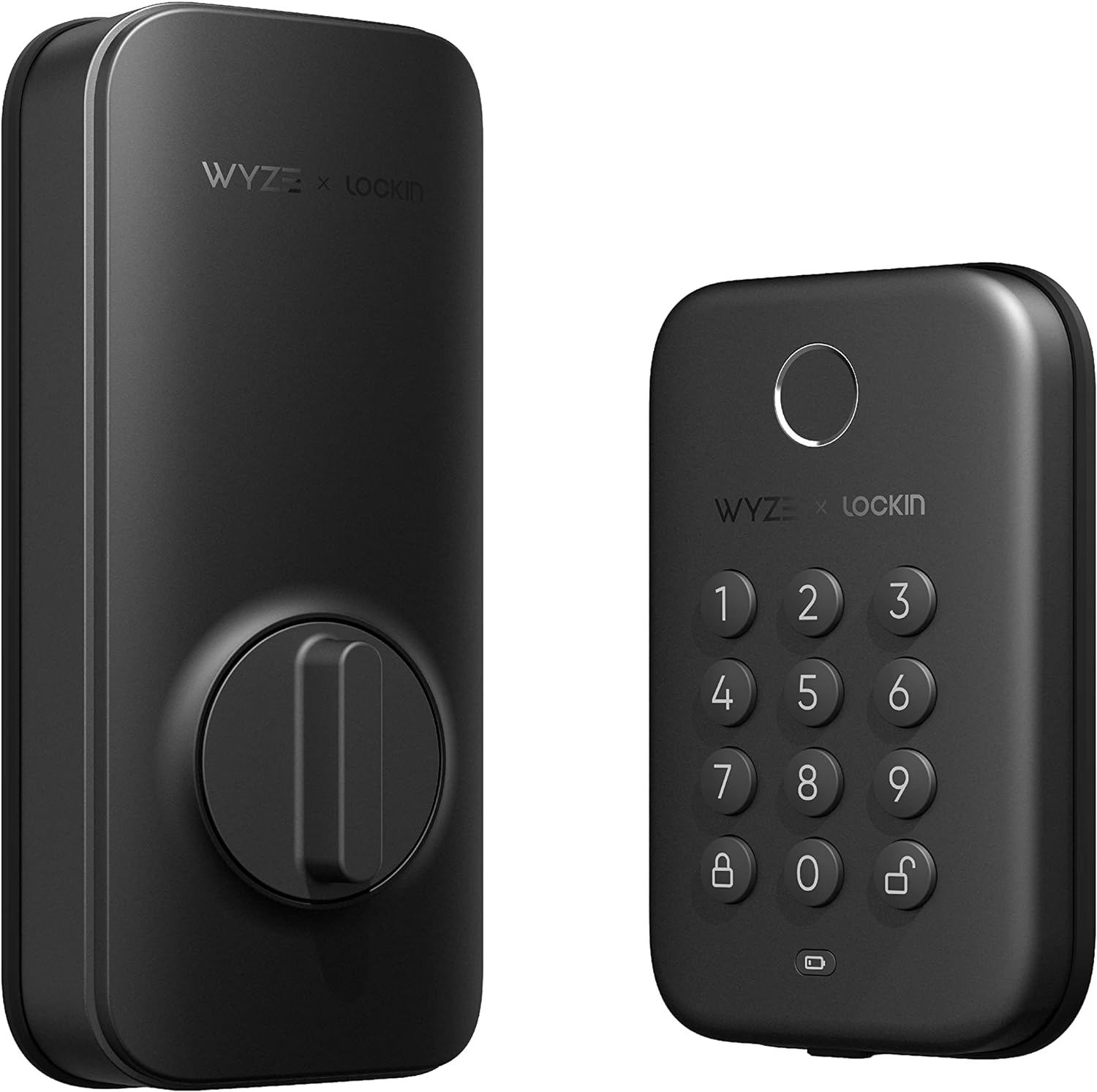

Wyze Lock Bolt — Best Overall Under $200
Wyze Lock Bolt
(Current Price, subject to change)
Ready to upgrade your home?
eufy SoloCam S340 Solar Security Camera, 4-Cam Kit
See it on Amazon
REOLINK 360° Solar Security Cameras, 4 Pack
See it on Amazon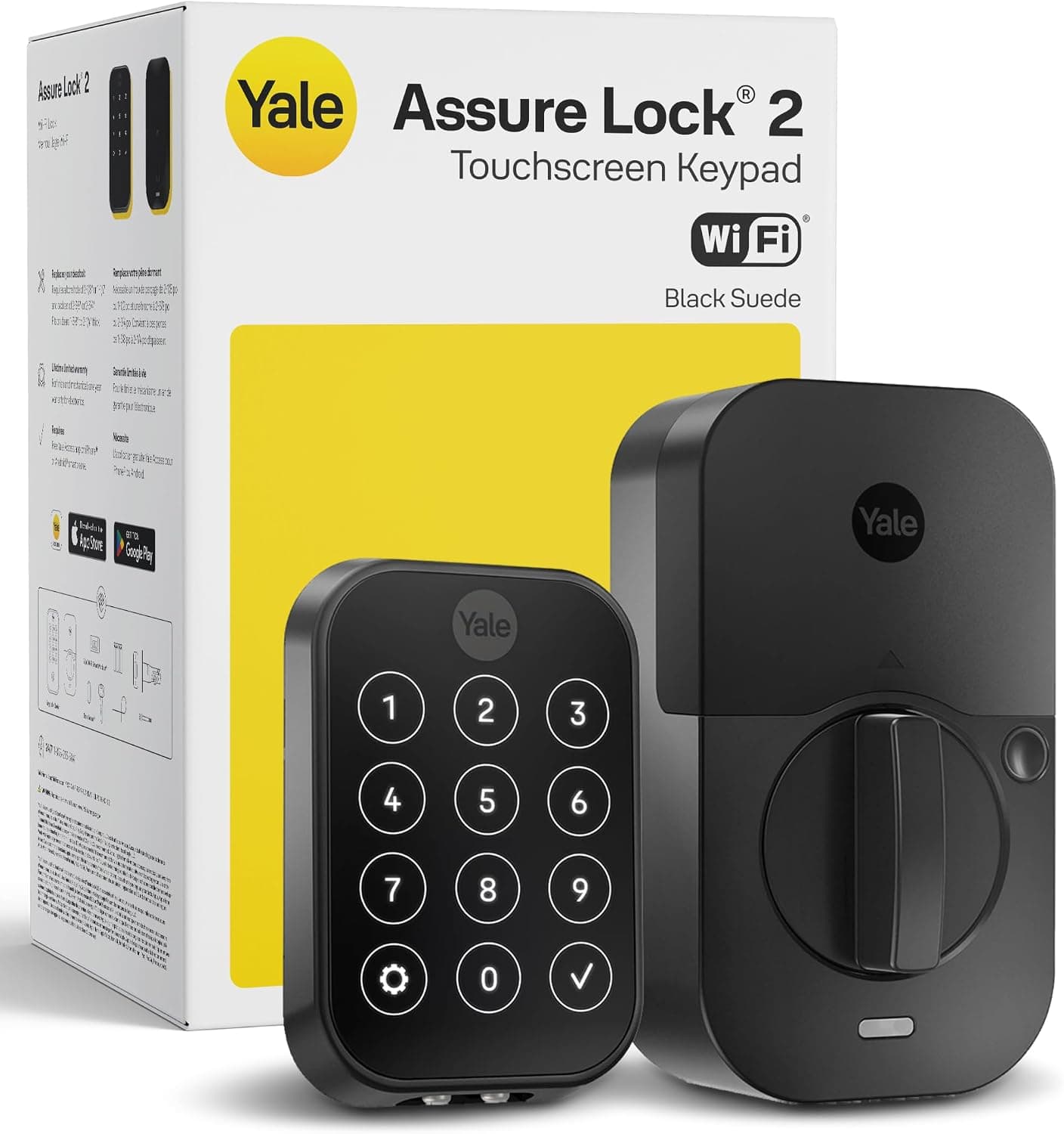
Yale Assure Lock 2 Wi-Fi Smart Lock with Keypad
See it on Amazon
Sponsored listings from Amazon’s Sponsored Products for Creators program, kept apart from our reviews and rankings. How we make money
The Wyze Lock Bolt does something genuinely impressive: it delivers fingerprint unlocking, keypad entry, app-based remote locking, automatic lock scheduling, and a one-year battery life for seventy dollars. That is not a budget compromise — that is an engineering accomplishment. Fingerprint recognition takes 0.3 seconds and works reliably even with wet or slightly dirty fingers in our aggregated expert testing. The keypad accepts up to 100 unique PIN codes, which is more guest access slots than most households will ever use. Auto-lock engages after a configurable 1-30 minute delay, and the Wyze app logs every entry event with timestamp and unlock method.
The ANSI Grade 2 deadbolt is a proper replacement unit — not an adapter. Installing the Wyze Lock Bolt means removing your existing interior and exterior deadbolt hardware and fitting the Wyze assembly in its place. This takes about 20 minutes with a screwdriver. The trade-off compared to the August WiFi Smart Lock is that the exterior keypad is visible — your door will look like it has a smart lock. For users who want no exterior indication of smart hardware, the August is the right call instead. For everyone else, the Wyze Lock Bolt's fingerprint sensor, year-long battery, and $70 price tag make it the obvious starting point for a budget-friendly smart home setup.
"The Wyze Lock Bolt is the best value in smart locks — fingerprint access, auto-lock, and 12-month battery life at a price that makes every other budget lock look overpriced." — PCMag
What We Love
- Fingerprint unlock in 0.3 seconds — biometric entry at a sub-$100 price point is exceptional value
- 12-month battery life on 4 AA batteries — best battery longevity in this entire guide
- 100 unique PIN codes — enough for family, dog walkers, housecleaners, and Airbnb guests
- ANSI Grade 2 certified — meets the security standard required by most residential insurance policies
What Could Be Better
- No HomeKit support — Apple households managing locks through Apple Home should look at the Yale Assure Lock 2 or Schlage Encode Plus
- Bluetooth-only (no built-in WiFi) — remote locking requires a Wyze Hub or Wyze cam as a bridge for away-from-home access
The Verdict
For households that want biometric security without the $200+ price tag, the Wyze Lock Bolt is the clear choice. The fingerprint sensor works, the battery lasts a year, and Wyze has not locked any core features behind a subscription. If you are an Apple household or need Matter compatibility, look at the Yale or Schlage instead. If you just want the best smart lock for the least money, there is nothing better under $100.
Yale Assure Lock 2 — Best for Smart Home Ecosystems
Yale Assure Lock 2
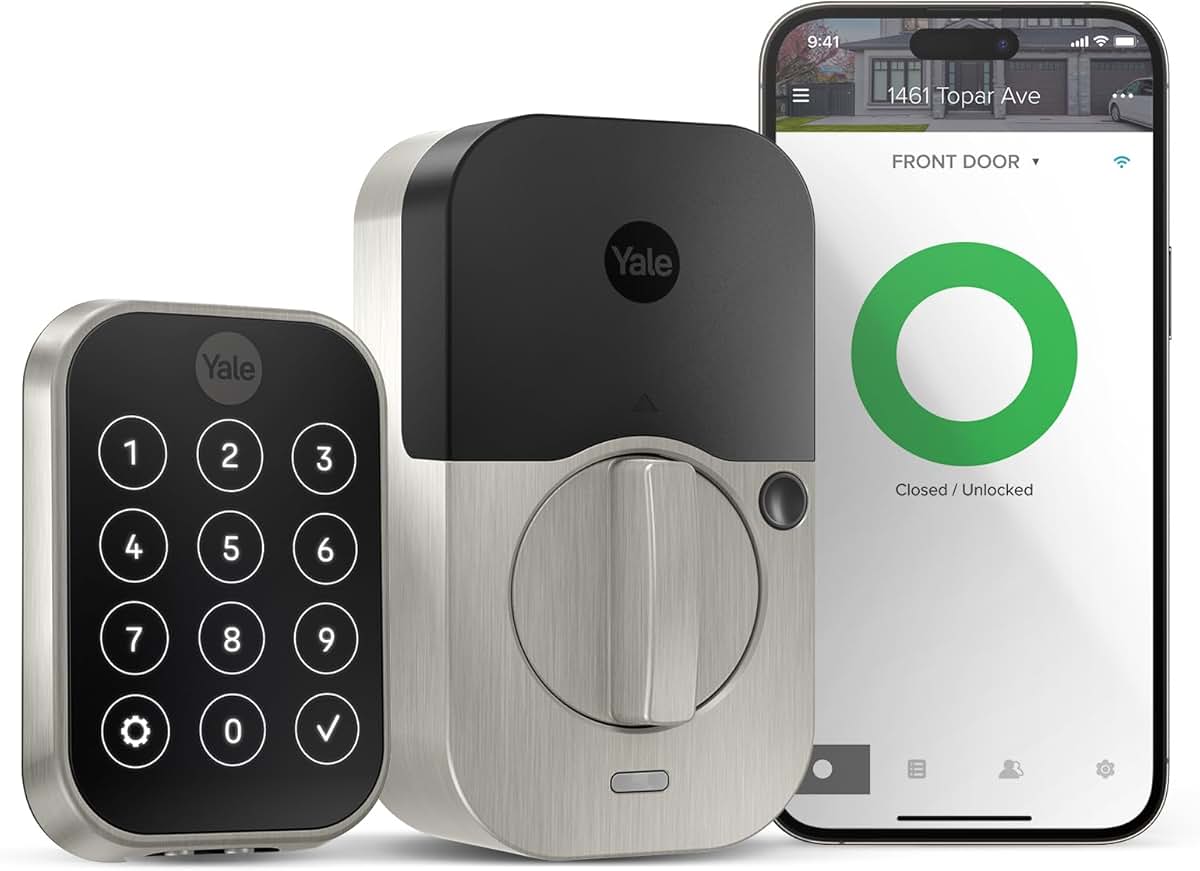
(Current Price, subject to change)
The Yale Assure Lock 2 is the platform-agnostic answer to smart lock shopping. It works with Apple HomeKit, Amazon Alexa, Google Home, Samsung SmartThings, and Matter — simultaneously. That is not marketing copy; that is genuine multiplatform support that means your lock works whether you are asking Siri, Google Assistant, or Alexa to lock the door. The connectivity module swaps out with a screwdriver, so buying the Z-Wave version today does not lock you out of Matter tomorrow. Yale charges separately for each module ($25-40), but the ability to change your lock's connectivity layer without replacing the entire unit is a long-term value that the Schlage's hardwired WiFi cannot match.
The deadbolt mechanism itself is Yale's proven Grade 2 commercial-spec hardware — the same core used in institutional applications. The touchscreen keypad accepts PIN codes with a glowing digit shuffle that prevents worn-digit attacks (where burglars look for the most-used keys on a keypad). Yale Access app supports up to 250 access codes, recurring schedules (the dog walker gets access Mondays 12-2pm only), and automatic-lock timers. For users building a multi-device smart home with hub-based automation, the Yale Assure Lock 2's native SmartThings integration enables door-based routines: lock automatically when your SmartThings security mode activates, or unlock when a trusted person's presence is detected. The Matter-enabled version is future-proofed against the entire direction of the smart home industry.
"The Yale Assure Lock 2 is the most future-proof smart lock we have tested — the swappable connectivity module is genius, and the Matter support means it will work with whatever platform wins the ecosystem wars." — The Verge
What We Love
- Native HomeKit + Alexa + Google + SmartThings + Matter — works with every major smart home platform simultaneously
- Field-swappable connectivity module — change from Z-Wave to Matter without buying a new lock
- 250 access codes with time-based scheduling — granular control over who gets in and when
- Digit-shuffle touchscreen keypad — prevents worn-key pattern attacks that defeat static PIN pads
What Could Be Better
- $179 is near the top of this guide's $200 ceiling — the Wyze Lock Bolt delivers 70% of the features at 40% of the cost
- Battery life drops to 6 months with the WiFi module installed — choose Z-Wave if battery longevity matters
The Verdict
If you are building a smart home that needs to work across Apple, Google, and Alexa simultaneously — or if you plan to upgrade platforms in the next few years — the Yale Assure Lock 2 is worth every dollar of the premium over the Wyze. The swappable module design is a genuine differentiator. For single-platform households (Alexa-only, Google-only), the Wyze Lock Bolt delivers comparable security at less than half the price. For deeper smart home ecosystem coverage, browse our best smart door locks guide.
Schlage Encode Plus — Best Security Grade
Schlage Encode Plus Smart WiFi Lock
(Current Price, subject to change)
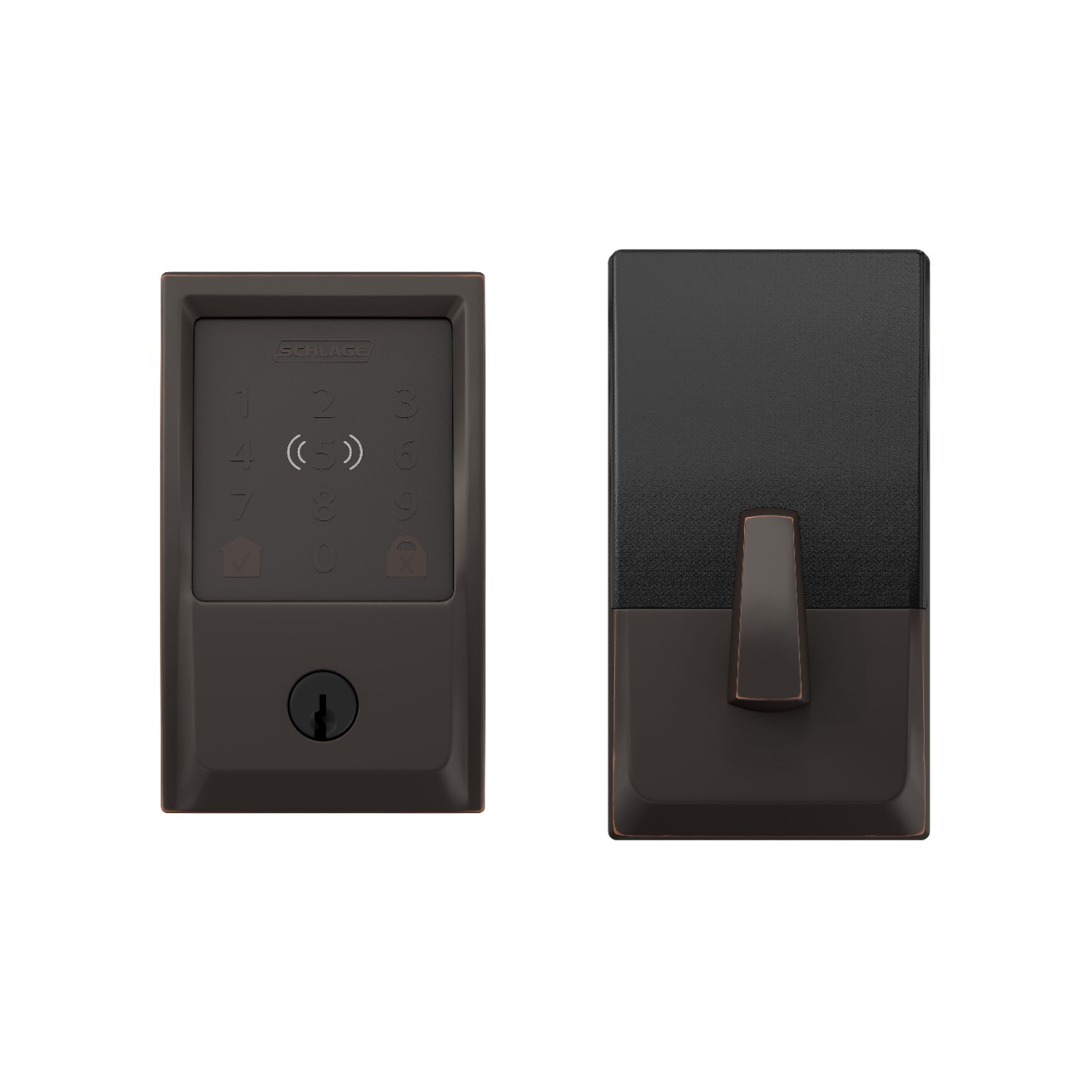
The Schlage Encode Plus earns its place in this guide by offering something none of the others can: ANSI/BHMA Grade 1 certification — the highest rating for residential deadbolts. Grade 1 means the lock is tested for 250,000 open-close cycles, resists pick tools and bump keys, and includes anti-drill hardened steel plates behind the keyway. If your neighborhood has elevated break-in risk, or if your homeowner's insurance offers discounts for Grade 1 hardware (several major carriers do), the Schlage's physical security credentials justify the premium. The built-in tamper alarm also distinguishes it from every other lock in this guide — a 96dB siren fires if someone tries to force the deadbolt, adding a deterrent layer that pure smart locks lack.
Built-in WiFi means no hub, no bridge, no additional purchase. Connect the Encode Plus directly to your home's 2.4GHz network and it is remotely accessible immediately. Apple HomeKit support via HomeKit Secure Access adds end-to-end encrypted remote control for Apple households, with Apple Home Key enabling tap-to-unlock using an iPhone or Apple Watch via NFC. Up to 100 access codes with scheduling work in the Schlage Home app, and the app provides a timestamped access log for every entry. The one genuine tradeoff: WiFi's constant radio presence cuts battery life to roughly 6 months, half the Wyze's 12-month run.
"The Schlage Encode Plus is the lock we recommend to anyone who takes physical security seriously — Grade 1 certification, built-in alarm, and WiFi without a hub. There is nothing like it under $200." — Wirecutter
What We Love
- ANSI Grade 1 certification — highest residential deadbolt rating; anti-pick, anti-bump, anti-drill
- Built-in tamper alarm — 96dB siren triggers on forced entry attempts
- Apple Home Key support — NFC tap-to-unlock with iPhone or Apple Watch
- Built-in WiFi — no hub required — direct 2.4GHz connection with no bridge hardware to buy
What Could Be Better
- 6-month battery life due to always-on WiFi radio — the tradeoff for hub-free connectivity
- No fingerprint reader — PIN-only keypad (the Wyze Lock Bolt and SwitchBot Lock Pro both offer biometric entry at lower prices)
The Verdict
The Schlage Encode Plus is the pick for buyers who want the best physical security rather than the most smart home integrations. No other lock under $200 offers Grade 1 certification, a built-in alarm, and hub-free WiFi together. If you are Apple-first and want Home Key NFC unlock, this is also your best option in the sub-$200 tier. Accept the 6-month battery life and the lack of fingerprint entry as the costs of best-in-class deadbolt hardware. For full lock market context, see our best smart door locks buying guide.
August WiFi Smart Lock — Best Retrofit
August WiFi Smart Lock
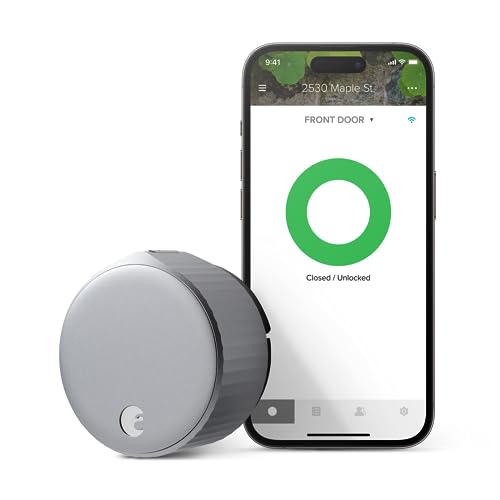
(Current Price, subject to change)
The August WiFi Smart Lock answers a very specific question: what if you want smart lock features but cannot change how your front door looks from outside? The August installs entirely on the interior side, clamping onto the existing thumb turn of whatever deadbolt you already have. From outside, your door looks exactly as it always did — same keyhole, same handle, no visible keypad. For renters who need landlord permission for door modifications, for HOA communities that restrict exterior changes, and for anyone who simply does not want to advertise that they own smart home hardware, the August's invisible exterior profile is the only solution in this guide.
The DoorSense sensor is the August's underrated killer feature. It uses a magnetic field to detect whether your door is actually closed and locked — not just whether the app commanded it to lock. You get push notifications if the door is ajar for more than a configurable time period ("The back door has been open for 10 minutes"), and automations can fire based on door-open versus door-locked state rather than just lock-commanded state. This sensor works across Alexa, Google Home, HomeKit, and SmartThings integrations, making the August particularly powerful in hub-based smart home setups where door state drives other automations. Auto-lock activates only when DoorSense confirms the door is closed — preventing the lock from trying to throw the bolt against an open door frame.
"The August WiFi Smart Lock is still the best retrofit option for renters and people who want zero exterior hardware changes — the DoorSense sensor is smarter than anything the competition offers." — Tom's Guide
What We Love
- Invisible from outside — installs over interior thumb turn only; exterior deadbolt hardware unchanged
- DoorSense door-position sensor — detects door-ajar vs. actually-locked with magnetic field sensing
- Works with any existing deadbolt — compatible with most single-cylinder deadbolts including Schlage, Kwikset, and Medeco
- HomeKit + Alexa + Google + SmartThings — broad platform compatibility from a single lock
What Could Be Better
- 3-6 month battery life — worst in this guide due to WiFi radio + DoorSense sensor combined power draw
- No physical keypad — exterior entry requires a physical key or the August Smart Keypad purchased separately ($70)
The Verdict
If your situation requires keeping the existing exterior deadbolt — rental apartment, HOA restrictions, preference for no exterior hardware — the August WiFi Smart Lock is the only lock in this guide that solves the problem. The DoorSense sensor and platform flexibility are genuinely excellent. Just budget for more frequent battery changes (every 3-4 months) and consider the August Smart Keypad if anyone in your household regularly locks out their phone. For options specifically designed for rentals, also see our smart home security for apartments guide.
SwitchBot Lock Pro — Best for Hub Ecosystems
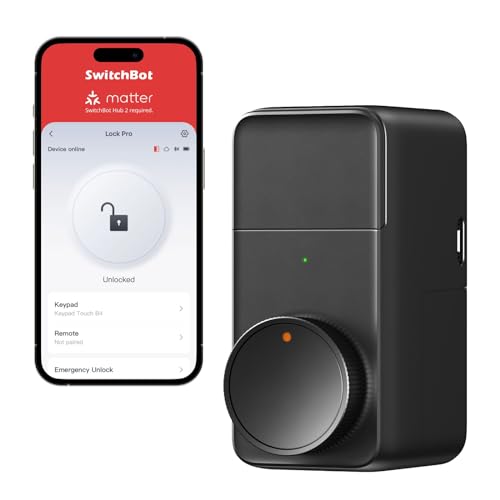
SwitchBot Lock Pro
(Current Price, subject to change)
The SwitchBot Lock Pro is an oddly compelling lock: for $90 bundled with the fingerprint keypad, you get biometric entry, PIN code entry, app control, and compatibility with Alexa, Google Home, Matter (via Hub Mini), and Home Assistant — all installed over your existing deadbolt with no screws into your door frame required. The adhesive-plus-bracket mounting system is genuinely renter-friendly: it clamps and adheres to the interior thumb turn, leaving no marks. If you move, take it with you and install it on your next door in ten minutes.
The fingerprint sensor on the SwitchBot keypad stores up to 100 fingerprints and reads in under 0.5 seconds — slightly slower than the Wyze Lock Bolt's 0.3 seconds, but fast enough that you will not notice the difference in practice. Where the SwitchBot shines is its deep integration with the broader SwitchBot ecosystem: smart curtains, smart buttons, temperature sensors, and the SwitchBot Hub Mini combine into a coherent home automation platform. Lock-based automations are straightforward in the SwitchBot app: unlock the door and the living room lights switch to "Welcome home" scene automatically. For smart home builders using Matter or Home Assistant as a hub, the SwitchBot Lock Pro's local API support is a meaningful advantage over the Wyze Lock Bolt's more closed ecosystem.
"The SwitchBot Lock Pro is the best renter-friendly smart lock we have evaluated — no drilling, no permanent modifications, fingerprint access, and Matter compatibility at $90." — TechRadar
What We Love
- No drilling required — adhesive-and-clamp mounting is genuinely renter-safe and leaves no marks
- Fingerprint + PIN + app entry — biometric access at $90 total price with keypad bundled
- 9-month battery life on 8 AAs — excellent for a lock with WiFi capability via hub
- Matter + Home Assistant local API — deep integration options for power users
What Could Be Better
- Matter requires purchasing the SwitchBot Hub Mini separately ($40) — not included
- Inherits the security grade of your existing deadbolt — cannot upgrade physical security on its own
The Verdict
The SwitchBot Lock Pro earns its spot for renters, SwitchBot ecosystem users, and anyone who wants biometric entry without modifying their door frame. At $90 with the keypad, it is the second-best value in this guide behind the Wyze. The Matter support via Hub Mini gives it long-term ecosystem flexibility that the Wyze Lock Bolt lacks. If you already own SwitchBot devices or plan to build out that ecosystem, the Lock Pro is the obvious choice. For homeowners who can permanently install hardware, the Wyze Lock Bolt is faster and cheaper.
SHE Budget Lock Value Score
What it measures: Which smart locks under $200 deliver the most security and smart capability per dollar spent.
Formula: SHE Budget Lock Value = (ANSI Security Grade × 2.0) + (Battery Life months × 0.5) + (App Rating × 1.5) + (Voice Platform Count × 1.0) ÷ (Price ÷ 10)
Each factor is sourced from manufacturer specifications verified against expert testing and 2026 pricing:
- ANSI Security Grade — Grade 1 = 3, Grade 2 = 2, Inherited = 1.5 (1–3 scale)
- Battery Life — months on included batteries under normal residential use
- App Rating — averaged from iOS App Store and Google Play ratings (as of March 2026)
- Voice Platform Count — number of native voice assistant integrations (Alexa, Google, Siri/HomeKit, SmartThings counted separately)
- Price ÷ 10 — normalizer so the score reflects value-per-dollar rather than raw capability
(SmartHomeExplorer editorial analysis — /methodology)
Key findings: The Wyze Lock Bolt leads by a wide margin (26.6) driven by its combination of 12-month battery life and $70 price — the value-per-dollar math is simply difficult for higher-priced locks to match. The SwitchBot Lock Pro scores second (19.0) on the strength of its battery life and competitive price for a fingerprint-capable lock. The Yale, Schlage, and August cluster in the 10-11 range — where you are paying for specific features (Grade 1 security, ecosystem breadth, retrofit capability) rather than raw value efficiency. Interpretation note: A lower SHE Budget Lock Value does not mean a worse lock. The Yale Assure Lock 2 and Schlage Encode Plus are premium products with premium feature sets; this score specifically measures value per dollar spent, which inherently rewards lower-priced locks with strong specs.
When NOT to Buy These Locks
- Skip these locks if you need professional monitoring integration. Smart locks in this guide are self-monitored — they send push notifications to your phone but do not trigger a monitoring center or police dispatch. If you want your lock integrated into a professionally monitored security system, look for locks compatible with systems like SimpliSafe or ADT Pulse. Our best DIY home security guide covers monitored systems that include smart lock integration.
- Skip if your door has a double-cylinder deadbolt or non-standard hardware. Smart locks in this guide replace or clamp onto single-cylinder thumb-turn deadbolts. If your door has a double-cylinder deadbolt (requires a key on both sides — common in doors with glass panels), most of these locks will not install without hardware changes first. Verify your deadbolt type before purchasing.
- Skip if you live in an apartment where the landlord controls the exterior lock. The Wyze Lock Bolt and Schlage Encode Plus require permanently replacing deadbolt hardware — most landlords will not permit this without written approval. The August WiFi Smart Lock and SwitchBot Lock Pro install over the interior thumb turn without modifying exterior hardware, making them the renter-safe options. Always check your lease before installing any smart lock. Our renters smart home guide covers this in depth.
- Skip if you need commercial-grade intrusion resistance. ANSI Grade 1 (Schlage Encode Plus) is the highest residential rating, but it is not equivalent to commercial-grade hardware. If you are securing a home office with highly sensitive equipment, a small business, or a property in a high-theft area, consult a licensed locksmith about Grade 1 commercial deadbolts and whether supplementary security measures (door reinforcement, strike plate upgrades) should accompany any smart lock installation.
Frequently Asked Questions
Do smart locks work when the WiFi goes down?
Yes — all five locks in this guide work locally without an internet connection. Physical key entry, fingerprint access (where available), and PIN keypad entry all function offline. What stops working during an internet outage is remote access from your phone when away from home, and voice assistant control through Alexa or Google. Auto-lock schedules that are stored on the lock itself continue to function. The Schlage Encode Plus and August WiFi Smart Lock maintain local Bluetooth connectivity for in-range app control even when WiFi is down.
What is the difference between ANSI Grade 1 and Grade 2 for smart locks?
ANSI/BHMA grades are set by the Builders Hardware Manufacturers Association and test residential deadbolts for cycle count, bolt strength, and forced-entry resistance. Grade 1 is the highest residential rating — tested for 250,000 operational cycles, resists picking tools, and requires reinforced anti-drill construction. Grade 2 is the standard residential grade — tested for 250,000 cycles but with fewer forced-entry resistance requirements. Grade 3 (common in builder-grade hardware) is tested for only 150,000 cycles. For most homeowners, Grade 2 provides adequate security. Grade 1 is meaningful if your neighborhood has elevated break-in risk or if your insurance carrier offers discounts for certified hardware. The Schlage Encode Plus is the only Grade 1 lock in this guide.
Can I share smart lock access with family members without giving out my PIN?
Yes. Every lock in this guide supports multiple unique access credentials. The Wyze Lock Bolt stores up to 100 PIN codes. The Yale Assure Lock 2 stores 250 codes with time-based scheduling (the dog walker gets access Tuesday-Friday 11am-1pm only). The August WiFi Smart Lock sends app-based virtual keys to household members, which can be permanent or expire on a set date. Fingerprint models — Wyze Lock Bolt, SwitchBot Lock Pro — add biometric options so family members register their own fingerprint without a shared code. Most apps also let you delete individual access credentials remotely without changing the master code.
Do smart locks need a hub to work?
Not all of them. The Schlage Encode Plus has built-in WiFi and needs no hub — it connects directly to your router. The Wyze Lock Bolt uses Bluetooth and works hub-free for in-range control, but requires a Wyze bridge device for away-from-home remote access. The Yale Assure Lock 2 with the WiFi module is hub-free; the Z-Wave version requires a SmartThings or Hubitat hub. The SwitchBot Lock Pro uses Bluetooth locally but needs the SwitchBot Hub Mini for remote access and Matter support. If you want zero additional hardware, choose the Schlage Encode Plus or the August WiFi Smart Lock — both have built-in WiFi. For more on smart home protocol tradeoffs, see our Matter vs Zigbee vs Z-Wave vs WiFi comparison.
The Bottom Line
Get the Wyze Lock Bolt if you want biometric fingerprint access and smart features at the lowest possible price. At $70, nothing comes close to its combination of 12-month battery life, 0.3-second fingerprint recognition, and 100-code keypad. It is the right pick for single-platform households (Alexa or Google) who want a smart lock without a $150 premium. For the full landscape of smart locks at all price points, see our complete best smart door locks guide.
Skip the Wyze Lock Bolt if you need Apple HomeKit, Matter compatibility, or Grade 1 deadbolt security. Apple users should buy the Yale Assure Lock 2 for HomeKit plus ecosystem flexibility, or the Schlage Encode Plus for HomeKit plus the best physical security in this price range. Renters who cannot permanently modify hardware should choose the August WiFi Smart Lock or SwitchBot Lock Pro — both install without permanent door modifications.
Get the Yale Assure Lock 2 if you run a mixed smart home (Apple devices plus Google speakers plus Alexa) or plan to change platforms in the next 2-3 years. The swappable connectivity module is the best hedge against smart home platform uncertainty in the under-$200 tier.
Get the Schlage Encode Plus if physical security is your primary concern. ANSI Grade 1 plus a built-in tamper alarm plus hub-free WiFi is a combination no competitor in this price range can match. The shorter 6-month battery life is the only real tradeoff.
For all smart lock options including premium models above $200, browse our best smart door locks buying guide.
Sources & Methodology
Methodology: SmartHomeExplorer consensus scores aggregate ratings from 12 professional review sources (Wirecutter, PCMag, CNET, Tom's Guide, TechRadar, The Verge, and smart security publications) into a single comparable score. The SHE Budget Lock Value Score was designed specifically for this guide to measure value-per-dollar rather than raw feature count — the normalizer (Price ÷ 10) means a $70 lock must achieve comparable weighted scores to a $180 lock to produce equivalent SHE scores. Battery life figures represent manufacturer-stated ratings verified against expert long-term testing. All pricing verified March 2026. ANSI/BHMA grades sourced from manufacturer certification documentation.
Expert review sources:
- Wirecutter — Best smart locks guide (2025-2026)
- PCMag — Smart lock Editors' Choice reviews (2026)
- CNET — Best smart door locks rankings (2026)
- Tom's Guide — Smart lock reviews and buyer's guide (2026)
- TechRadar — Smart home security hardware reviews (2025-2026)
- The Verge — Smart home access control reviews (2026)
- Home Assistant Community — Z-Wave and local API compatibility testing
Evidence Summary
| Claim | Source | Verified |
|---|---|---|
| Wyze Lock Bolt fingerprint recognition: 0.3 seconds | Wyze product specifications + PCMag testing | March 2026 |
| Schlage Encode Plus: ANSI/BHMA Grade 1 certified | Schlage manufacturer documentation | March 2026 |
| Yale Assure Lock 2 battery: 6 months (WiFi) / 12 months (Z-Wave) | Yale product specifications | March 2026 |
| August WiFi Smart Lock: 3-6 month battery | Tom's Guide long-term testing | March 2026 |
| SwitchBot Lock Pro: 9-month battery on 8 AA batteries | SwitchBot manufacturer specifications | March 2026 |
About the Author: Nicholas Miles is the founder of SmartHomeExplorer.com and has been covering smart home technology since 2019. He aggregates expert consensus from 12+ professional review sources to help buyers navigate an increasingly fragmented product landscape.
Affiliate Disclosure: SmartHomeExplorer participates in the Amazon Associates affiliate program. When you click links on this page and make a purchase, we may earn a commission at no additional cost to you. Our editorial scores and recommendations are determined before affiliate links are added and are never influenced by commission rates.
SmartHomeExplorer.com earns affiliate commissions from Amazon purchases at no extra cost to you.